wireless signals of this access point.)
Sideband for Control Channel (40Mhz only): There are “Lower” and “Upper” can be selected
if Bandwidth 40Mhz is Enabled.
Control Channel: There are 13 channels that you can choose. Choose the one that is suitable for
this device.
Current Channel: The channel that you choose will be displayed in this field.
Restore Wireless defaults: To recover to the default settings, press this button to retrieve the
settings and click Apply.
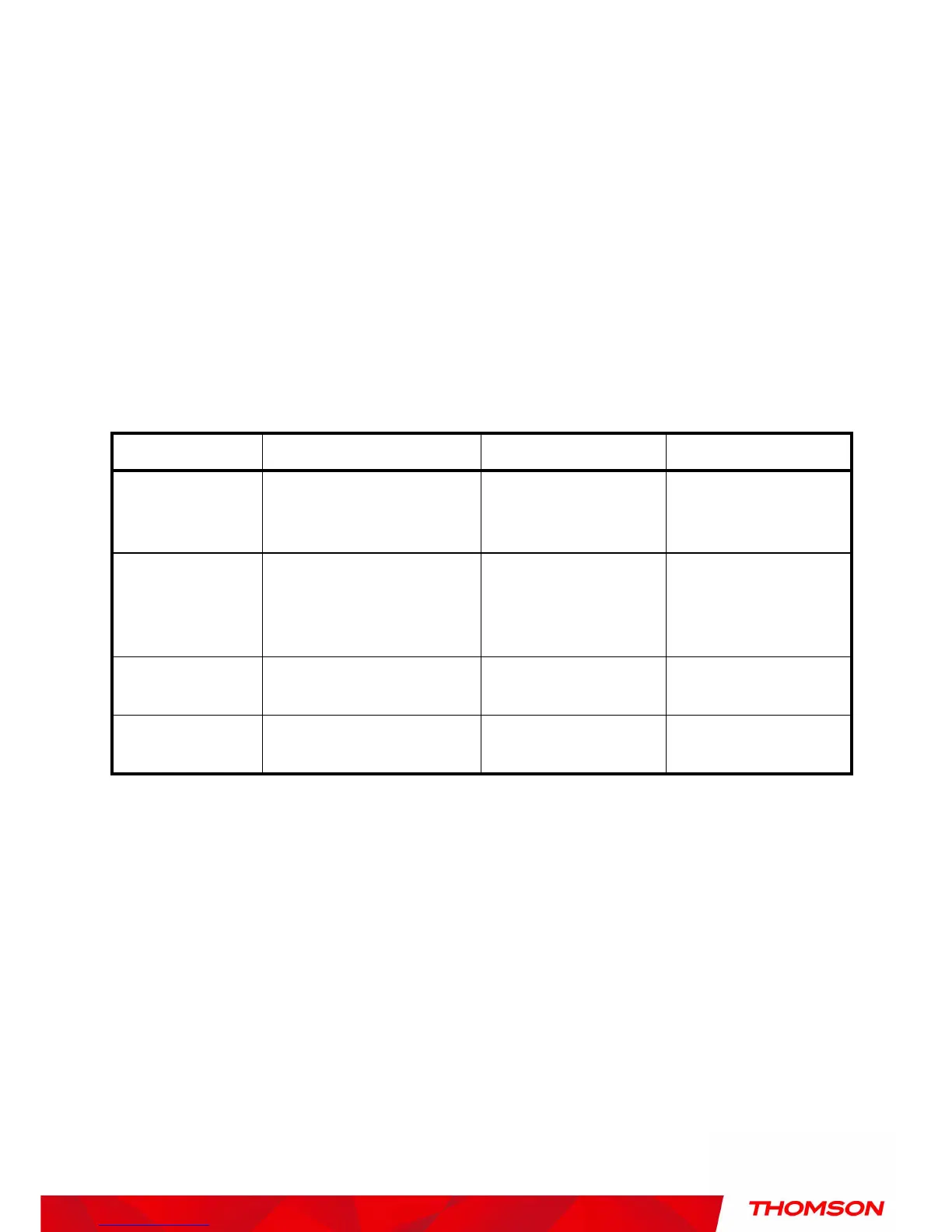
Setting Description Value List or Range Default
Network Name
(SSID)
Set the Network Name (also
known as SSID) of this
network.
Up to 32-character string
containing ASCII
characters only
THOM_Dxxxxxxx
Network Type
Select Closed to hide the
network from active scans.
Select Open to reveal the
network to active scans.
Open, Closed Open
New Channel
Select a particular channel on
which to operate.
1-13 1, 6 or 11
Interface
Enable or disable the wireless
interface.
Enabled, Disabled Enabled
Table1. Basic Settings Definitions


 To Next Page