EasyManua.ls Logo

THORENS TD125 - Anti-Skating Adjustment

THORENS TD125
22 pages
Print Icon
To Next Page IconTo Next Page
To Previous Page IconTo Previous Page
Loading...
Red
——
Right
channel
positive
(hot)
Green
Right
channel
negative
(shield)
These
two
leads
constitute
also
the
mono
channel.
White
Left
channel
positive
(not)
Blue
Left
channel
negative
(shield)
4.
Assembling
the
counterweight
As
a
precaution
against
damage
in
transit,
the
counter-
weight
is
packed
separately,
already
threaded
on
the
removable
back
tubular
part
of
the
arm
with
the
set
screw.
Slide
the
back
tubular
part
with
the
counterweight
‘onto
the
pick-up
arm
extension
and
lock
it
in
position
with
set
screw.
For
balancing
the
arm
move
the
stylus
force
adjustment
lever
back
as
far
as
possible
to
the
abutment
of
the
lower
end
of
the
scale.
Move
the
lowering
device
slide
bar
to
the
“play”
position.
Position
the
arm
80
that
the
stylus
tip
is
between
the
arm
rest
and
the
turntable
platter.
Turn
the
counterweight
with
the
right
hand,
while
main-
taining
the
lateral
position
of
the
arm
with
the
left
hand
to
avoid
damaging
the
stylus,
until
the
arm
assumes
a
horizontal
position,
i.e.
the
stylus
is
at
record
surface
level.
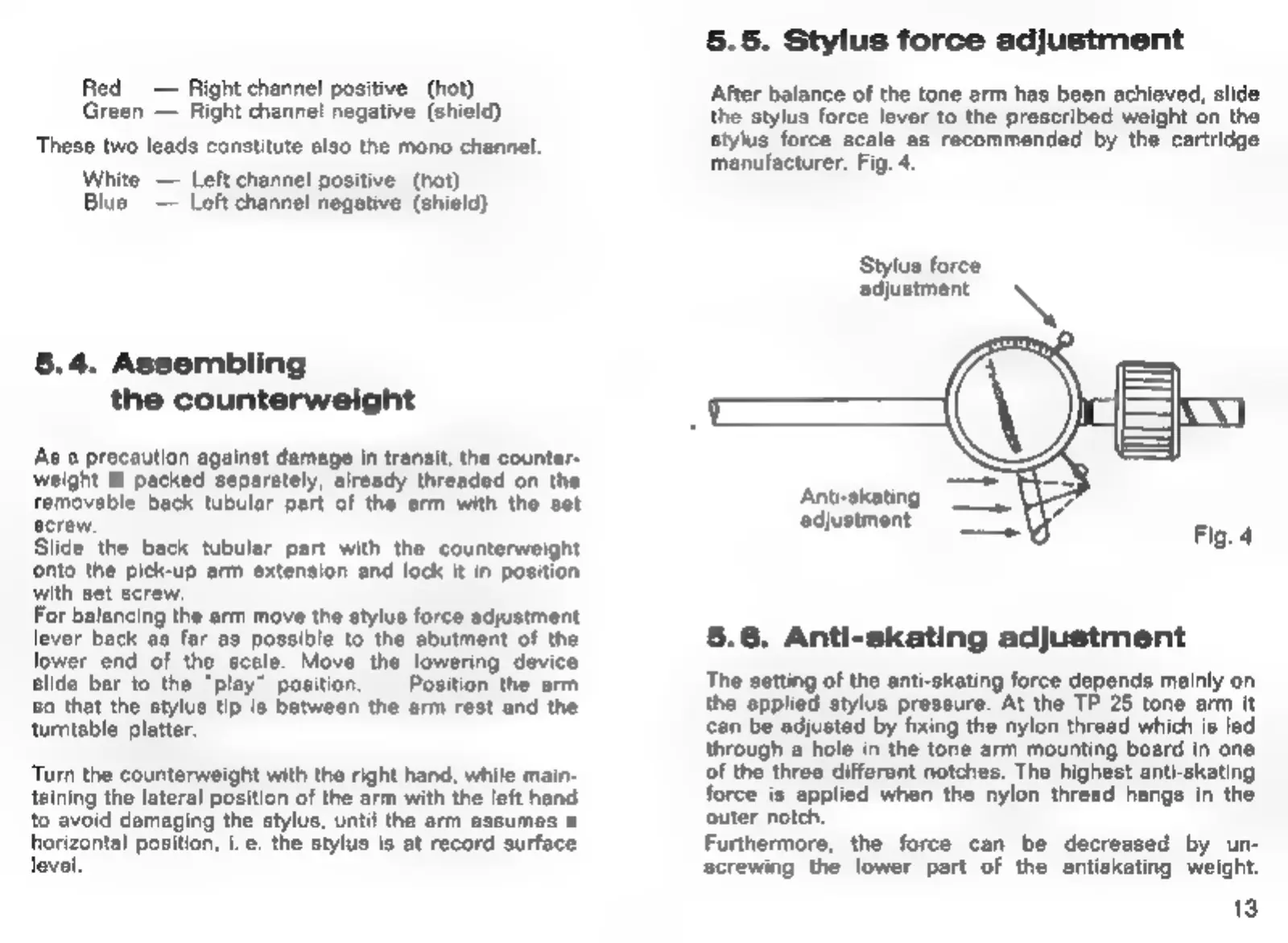
5.5.
Stylus
force
adjustment
After
balance
of
the
tone
arm
has
been
achieved,
slide
the
stylus
force
lever
to
the
prescribed
weight
on
the
stylus
force
scale
as
recommended
by
the
cartridge
manufacturer.
Fig.
4.
Stylus
force
adjustment
\
Anti-skating
adjustment",
Fig.
4
5.6.
Anti-skating
adjustment
The
setting
of
the
anti-skating
force
depends
mainly
on
the
applied
stylus
pressure.
At
the
TP
25
tone
arm
it
can
be
adjusted
by
fixing
the
nylon
thread
which
is
led
through
a
hole
in
the
tone
arm
mounting
board
in
one
of
the
three
different
notches.
The
highest
anti-skating
force
is
applied
when
the
nylon
thread
hangs
in
the
outer
notch.
Furthermore,
the
force
can
be
decreased
by
un-
screwing
the
lower
part
of
the
antiskating
weight.
13

Related product manuals