Page 10
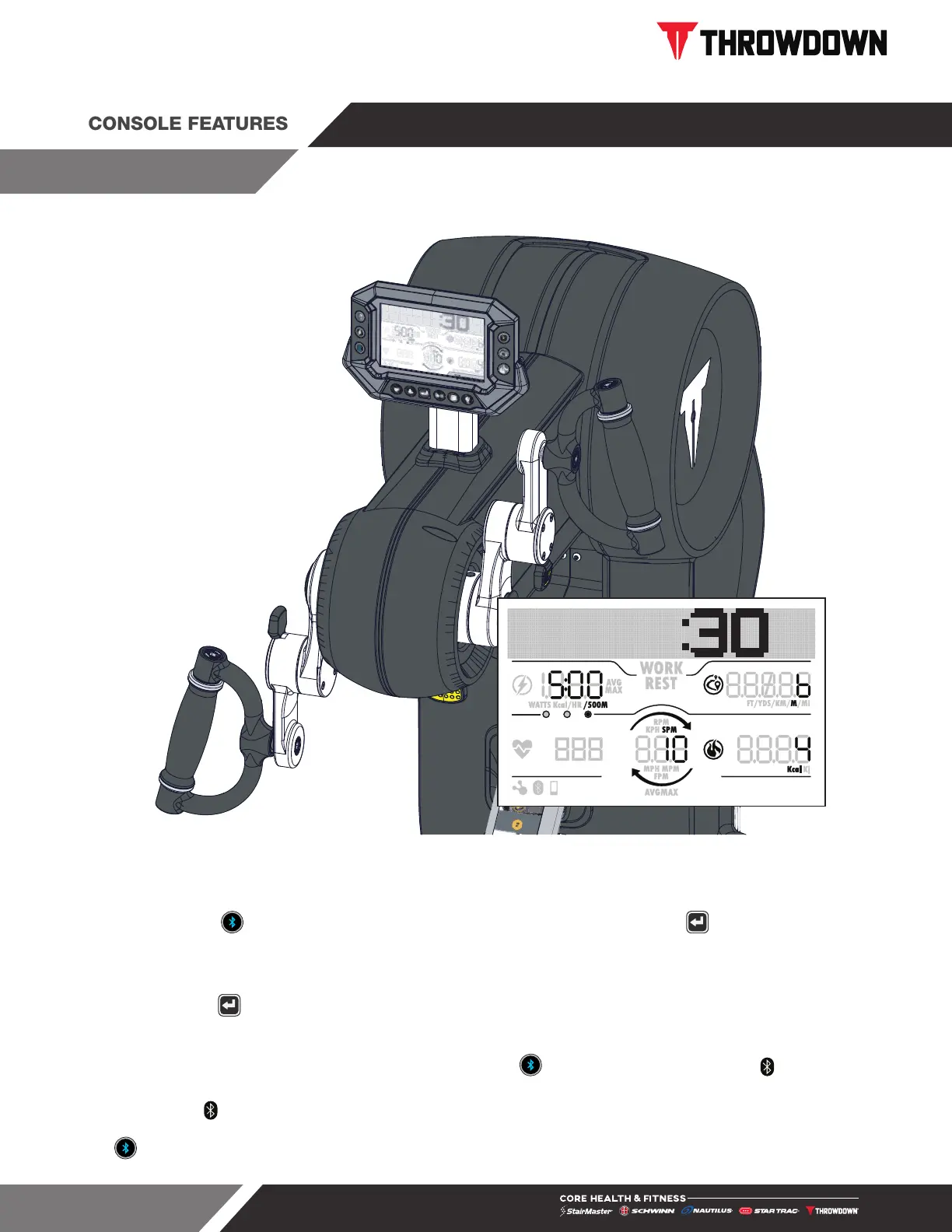
Fig. 13
HIIT Console
To turn on console, press any button or start to workout. Console will display zeros for 15 seconds during
START MODE if no activity is detected. The console will automatically scan for a Bluetooth device for the first
15 seconds. Press to link the console to a Bluetooth device at any time. Press the once to return the
console to IDLE mode or the console will turn itself off after 15 seconds of inactivity.
Press any program button or program buttons sequence to enter PROGRAM mode. Console will track activity.
Console displays SUMMARY mode after TIMEOUT period selected in MAINTENANCE mode or after pressing
the ENTER button .
CONNECTING TO BLUETOOTH
For the first 15 seconds after the console turns on or after the button is pressed, screen icon will blink for
15 seconds. Use the app on your device to pair.
Once paired the screen icon will stay illuminated and the console will return to start mode. If the console
does not pair within 15 seconds, the console will return to start mode. To reset an already paired console, tap
the button to connect a new device.
THROWDOWN HIIT CONSOLE


 To Next Page