11/20
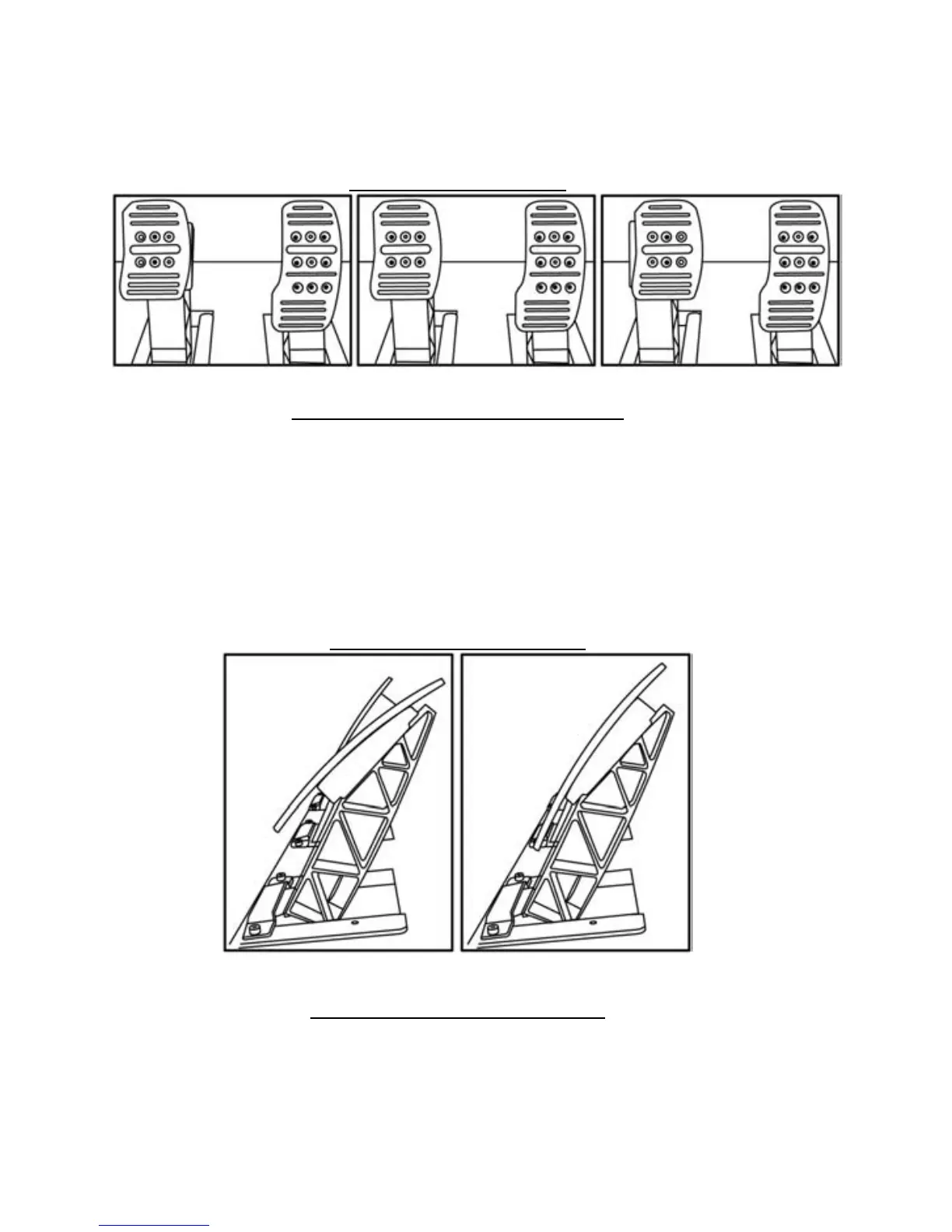
Adjusting the Pedal SPACING
- Using the 2.5mm Allen key supplied (20) loosen the 2 screws holding the “Metal Head (17) and its
support (21)”
- Once you have done so, select your position (to the left, in the center or to the right) then tighten
the screws.
Examples with the brake pedal:
Left position Center position (default) Right position
- 3 for the Accelerator pedal
Number of spacing positions possible per pedal:
- 3 for the Brake pedal
- 3 for the Clutch pedal
Adjusting the Pedal TILT
- Using the 2.5mm Allen key supplied (20) loosen the 2 screws holding the “Metal Head (17) and its
support (21)”
- Once you have done so, turn the “Plastic Head Support (21)” over by 180° then tighten the screws.
Examples with the accelerator pedal:
Less tilted position More tilted position (default)
- 2 for the Accelerator pedal
Number of tilt positions possible per pedal:
- 2 for the Brake pedal
- 2 for the Clutch pedal













 To Next Page