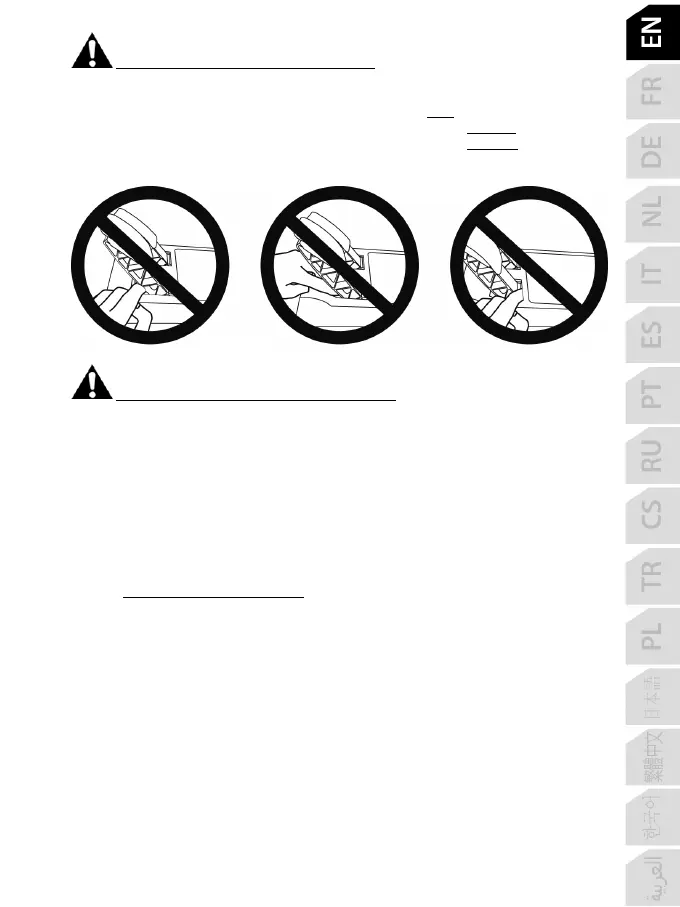
Warning – Pedal set pinch hazard when playing
* Keep the pedal set out of children’s reach.
* During gameplay, never place your fingers on or anywhere near the sides of the pedals.
* During gameplay, never place your fingers on or anywhere near the pedal’s rear base.
* During gameplay, never place your fingers on or anywhere near the pedal’s front base.
NEVER NEVER NEVER
Warning – Pedal set pinch hazard when not playing
* Store the pedal set in a safe place, and keep it out of children’s reach.
UPDATING YOUR RACING WHEEL’S FIRMWARE
The firmware included in your racing wheel’s base can be updated to a more recent version featuring
product enhancements.
To display the firmware version that your racing wheel is currently using and update it if required: on
PC, visit https://support.thrustmaster.com
. Click Racing Wheels / TMX Force Feedback, then
select Firmware and follow the instructions describing the download and installation procedure.









 To Next Page