REMOTE CONTROL
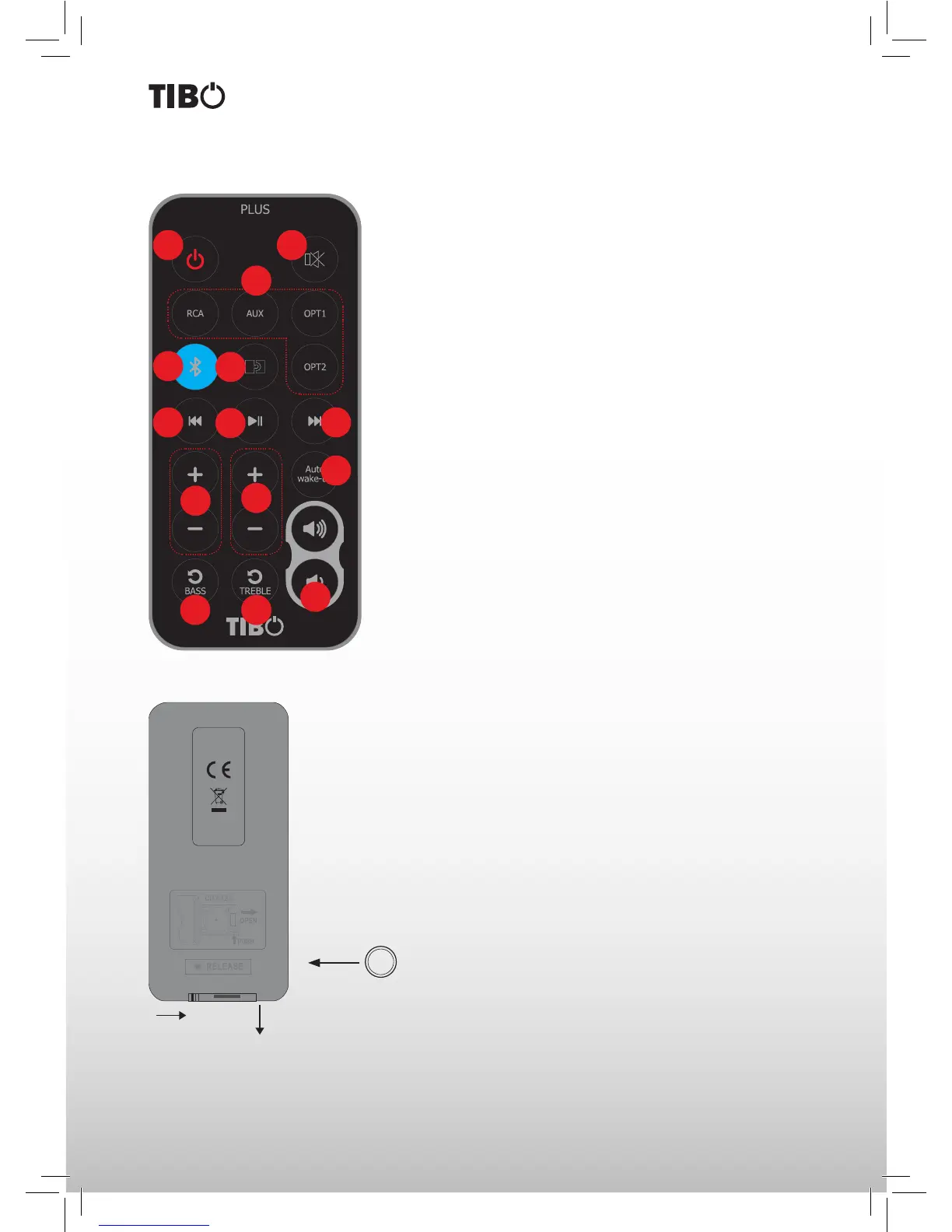
1. Stand by – press to enter stand by mode or return to playback
mode.
2. Mute.
3. Inputs – Optical, Coaxial, Line-in (RCA)
4. Bluetooth – Bluetooth for pairing or select Bluetooth input.
5. Pair - Press this button to start pairing with Bluetooth device.
6. Previous track (Bluetooth function).
7. Play/Pause (Bluetooth function.)
8. Next track (Bluetooth function).
9. Auto Wake-up – automatically turn ON the Plus speakers (while
the unit is Switched Off) when audio signal is detected from either
RCA, AUX, OPT1, OPT2 or Bluetooth.
10. Bass – increase/decrease bass.
11. Treble – increase/decrease treble.
12. Volume – increase/decrease.
13. Reset – reset Bass output.
14. Reset – reset Treble output.
Note: By default auto wake-up function is deactivated as this saves
standby power consumption.
Auto Wake-Up Off: power consumption < 0.5 W
Auto Wake-Up On: power consumption < 3 W
Replacing the battery
Be careful to ensure that it is correctly inserted according to the
polarity markings (+/–). You should only use the battery specied for
this system (CR 2032).
Note: The batteries provided are designed for test use and may
therefore have a shorter lifespan.
Press Pull
+
CR 2032
1 2
3
4
12
9
6
7
8
5
14
11
13
10



 To Next Page