Need help?
Do you have a question about the Tiffen Steadicam Volt and is the answer not in the manual?
Welcome to the future of professional Steadicam stabilizer operating.
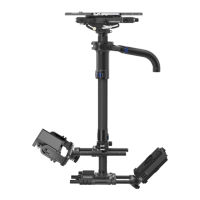
Illustrates the Steadicam Volt shown on an M-1 gimbal with key parts labeled.
Describes the Steadicam Volt Control Box and the new padded dock for protection and easier balancing.
Lists items included with the Volt for M-1 and upgrade kits, plus tools and mount options.
Explains how to achieve neutral balance for maximum balancing assistance from the motors.
Details the extra steps required when powering up the Steadicam Volt system.
Describes how to pick up the sled and activate the Volt system to feel horizon assistance.
Provides tips on optimizing Volt operation with trimming and the two operating modes: normal and friction.
Explains setting trims, quick low mode, and the function of the padded dock.
Details the functions of the three dials on the control box for customizing roll and tilt axis behavior.
Offers suggested settings for various modes and additional tips for optimizing Volt performance.
Guides the user through the process of installing the Volt system onto their gimbal.
Details how to mount the control box to the nose of the sled for regular or goofy operators.
Outlines the initial steps for all gimbals, focusing on preparing the gimbal for Volt installation.
Provides instructions for mounting the Volt motors onto the gimbal assembly.
Explains the important step of pressing the flip button for right-side mounted Volt installations.
Details the process of adding and tensioning the belts that transfer power from motors to the gimbal.
Provides assembly notes for upgrading an Archer or Archer2 gimbal with the Volt system.
Details the procedure for balancing the Archer 2 gimbal before Volt installation.
Provides assembly notes for upgrading a PRO gimbal with the Volt system.
Details the gimbal balancing procedure for U2, Shadow, Clipper, and PRO gimbals.
Addresses common undesirable behaviors and provides checks for troubleshooting the Volt system.
Provides additional information on firmware, shipping cases, and M-1 user guide references.
Lists the pin assignments for various connectors on the Volt system, including display, gimbal, and pan encoder.
 General
| Brand | Tiffen |
|---|---|
| Model | Steadicam Volt |
| Battery | Rechargeable Lithium-ion |
| Type | Stabilizer |
| Material | Aluminum |
| Control | Joystick |

 To Next Page