11 12
Powering up
Adding the Steadicam
®
Volt™ to your system requires an extra step
when powering up, and when picking up your sled. First, you’ll align
the pan encoder while powering on, and later you’ll run the system
when you want the Volt motors active. It’ll become second nature, but
pay close attention while you’re getting started for best results.
IF the control box is mounted
for regular operators (knobs
on the RIGHT) align the gimbal
handle with the REAR of the
post and simultaneously power
on the Volt. Wait 2.5sec while
the system registers the pan
encoder position.
The blue LEDs glow.
You’ll do this EVERY TIME you
power on the Volt.
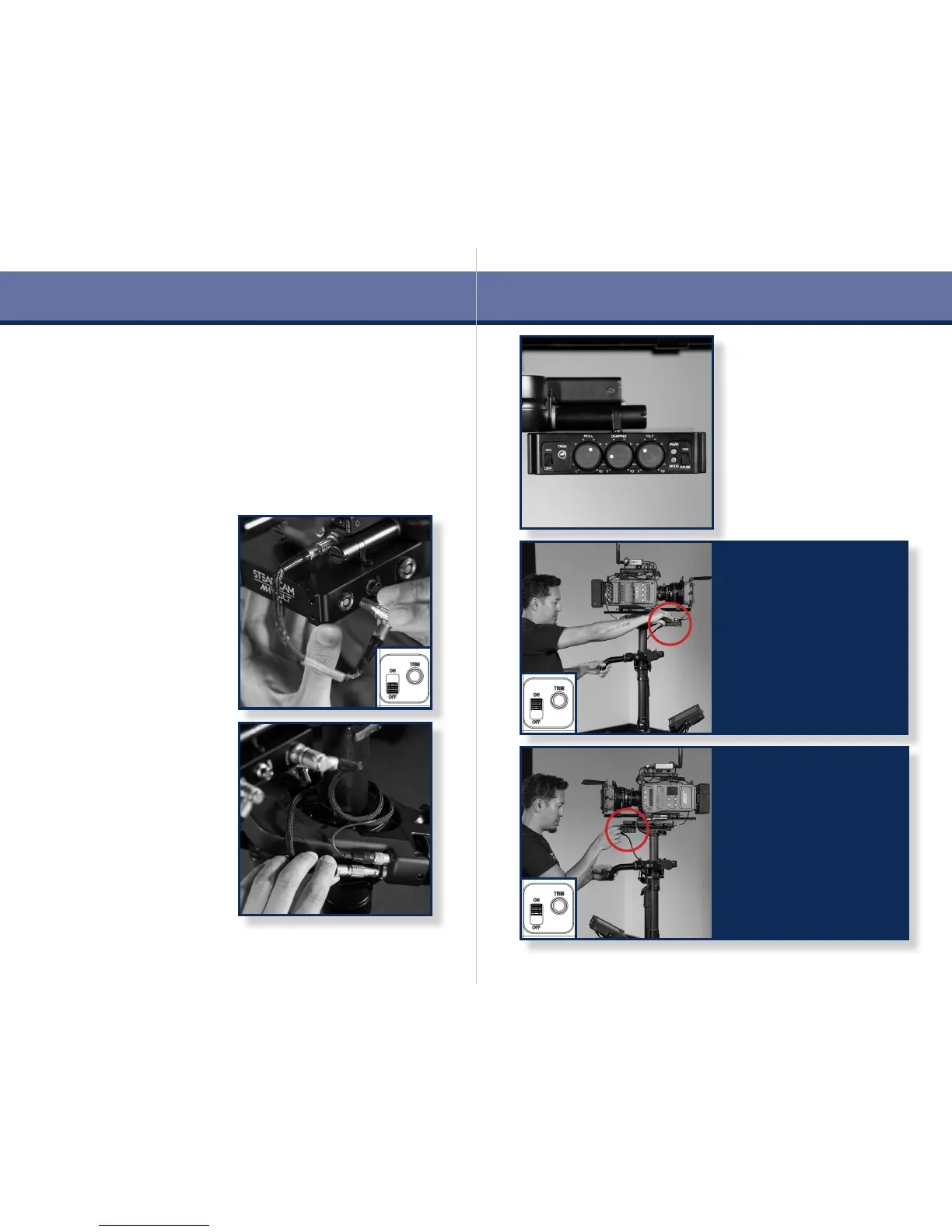
Before powering on the system,
double check that the PAUSE
switch is engaged.
TIP: Consider using the Roll,
Damping and Tilt settings
shown here as a starting point.
More suggestions on page 21.
Make sure the power switch is
in the OFF position and plug in
the power cable from your sled
to the Volt control box.
NOTE: If you’re using an
aftermarket power cable,
conrm the polarity is correct.
Volt is protected against reverse
voltage, but won’t work very
well without power.
Plug in the Volt gimbal cable and
wrap a couple of loops around
the post as needed to control
any slack.
NOTE: The Volt control box will
not power up without the gimbal
cable properly connected.
IF the control box is mounted
for goofy operators (knobs
on the LEFT) align the gimbal
handle with the FRONT of the
post and simultaneously power
on the Volt. Wait 2.5sec while
the system registers the pan
encoder position.
The blue LEDs glow.
You’ll do this EVERY TIME you
power on the Volt.
Power on


 To Next Page