1
The Remote Control
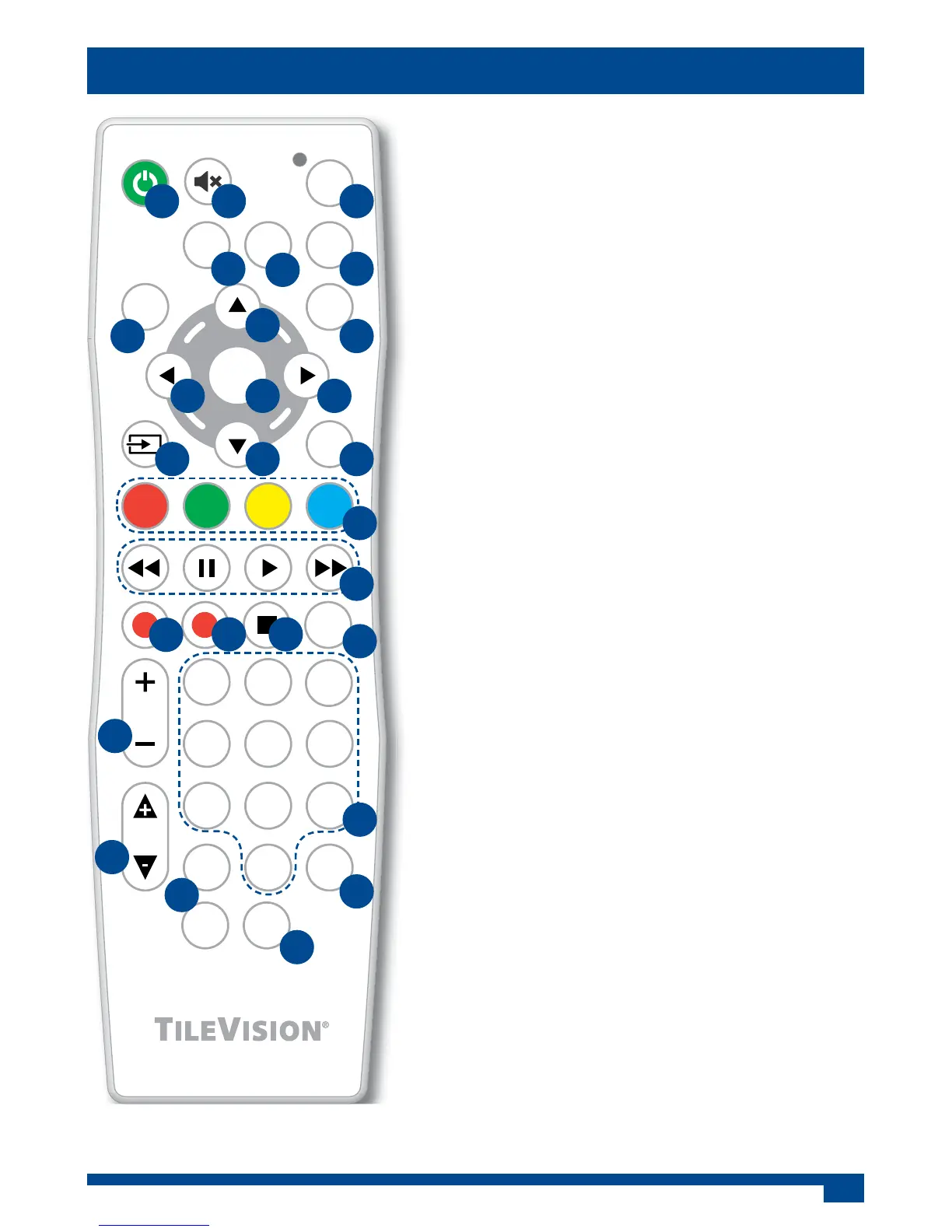
The TV functions above are the defaults for a new remote control which has not been programmed.
1 Power On/O button – Turns the TileVision® on
from, or o to, standby
2 Sound Mute button – Turns the sound on or o
3 SET button – for manual programming.
4 TV ‘Device’ button – Selects the TV’s set of
button functions
5 SAT ‘Device’ button – Selects the Satellite
Receiver’s set of button functions
6 DVD ‘Device’ button – Selects the DVD Player/
Recorder’s set of button functions
7 EPG button – Displays the Electronic
Programme Guide
8 MENU button – displays or closes menus
9 Up button – Menu/EPG navigation
10 Right button – Menu/EPG navigation
11 Down button – Menu/EPG navigation
12 Left button – Menu and EPG navigation
13 OK button – Accepts menu selections
14 Input Source button – Displays the Input
Source menu and allows source selection
15 EXIT button – Closes all on-screen menus and
lists
16 Colour and Teletext buttons – DTV Text and
text menu options
17 Rewind, Pause, Play, and Fast Forward buttons
– For use with TV Sky+™, Virgin V+, DVDs, VCRs,
etc.
18 Record button – For use with TV Sky+™, Virgin
V+, DVDs, VCRs, etc
19 Time Shift Record button
20 Stop button – For use with TV Sky+™, Virgin V+,
DVDs, VCRs, etc
21 PVR button
22 VOL Volume up/down buttons – Adjust the
volume
23 Number entry buttons
24 PR Programme up/down buttons – Selects next
or previous programme
25 Page up/down buttons – EPG navigation
26 Sub button – Turns the subtitles on or o
27 TEXT button – Enters or exits teletext
OK
EPG
SET
TV
MENU
VOL
SUB
PR
TVS/00485/04
123
456
78
0
9
DVD
SAT
EXIT
TEXT
PVR
RS
PG.UP
PG.DN
1 2 3
4
5
6
7 8
9
12 1013
14 11 15
22
24
25
26
27
19
21
20
23
16
17
18


 To Next Page