2
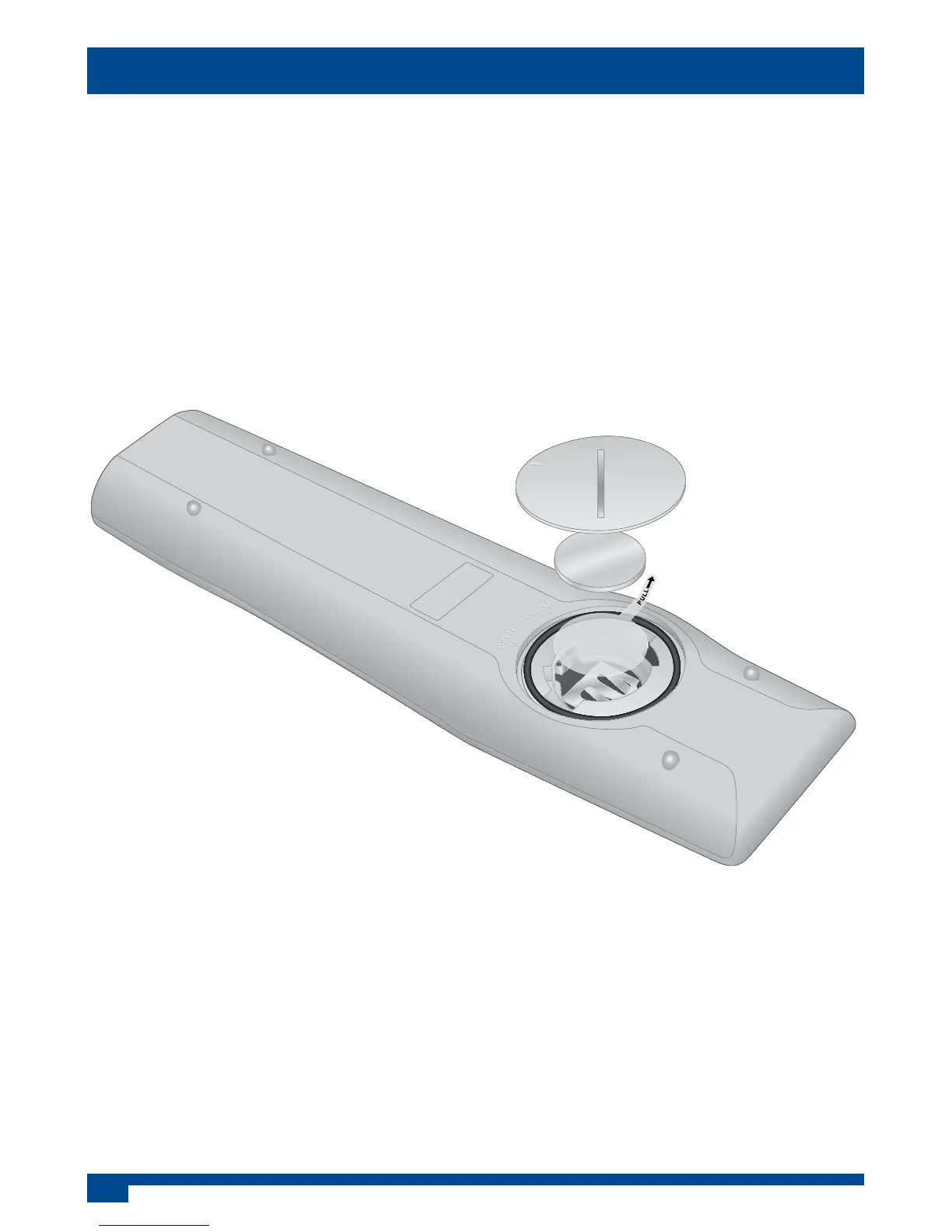
Before the remote control can be used an insulating plastic lm must be removed
from beneath the battery.
Place the remote control face down on a horizontal at surface and use
the opener to release the battery compartment cover by rotating it in an
anti-clockwise direction. Set the battery cover and opener to one side.
Rest one nger lightly on the battery and pull the printed tag to ease the
insulating lm from underneath the battery. Try to avoid touching the black
O-ring as it is coated with light grease.
Replace the battery cover and lock it back in place using the opener.
Activating the Remote Control
Li T hium Cel l
CR 2 032
3V
Li T hium Cel l
CR 2 032
3V
Remote control with battery cover removed
Replacing the Battery
Place the remote control face down on a horizontal at surface and use
the opener to release the battery compartment cover by rotating it in an
anti-clockwise direction. Set the battery cover and opener to one side.
Carefully remove the old battery and dispose of it safely.
Try to avoid touching the black O-ring as it is coated in light grease.
Insert the new CR2032 battery with the positive (+) side upwards. Replace the
battery cover and lock it back in place using the opener.


 To Next Page