EasyManua.ls Logo

Timemaster TM720 - Setting Card Format; Setting Time Card & Pay Period

Default Icon
17 pages
Print Icon
To Next Page IconTo Next Page
To Previous Page IconTo Previous Page
Loading...
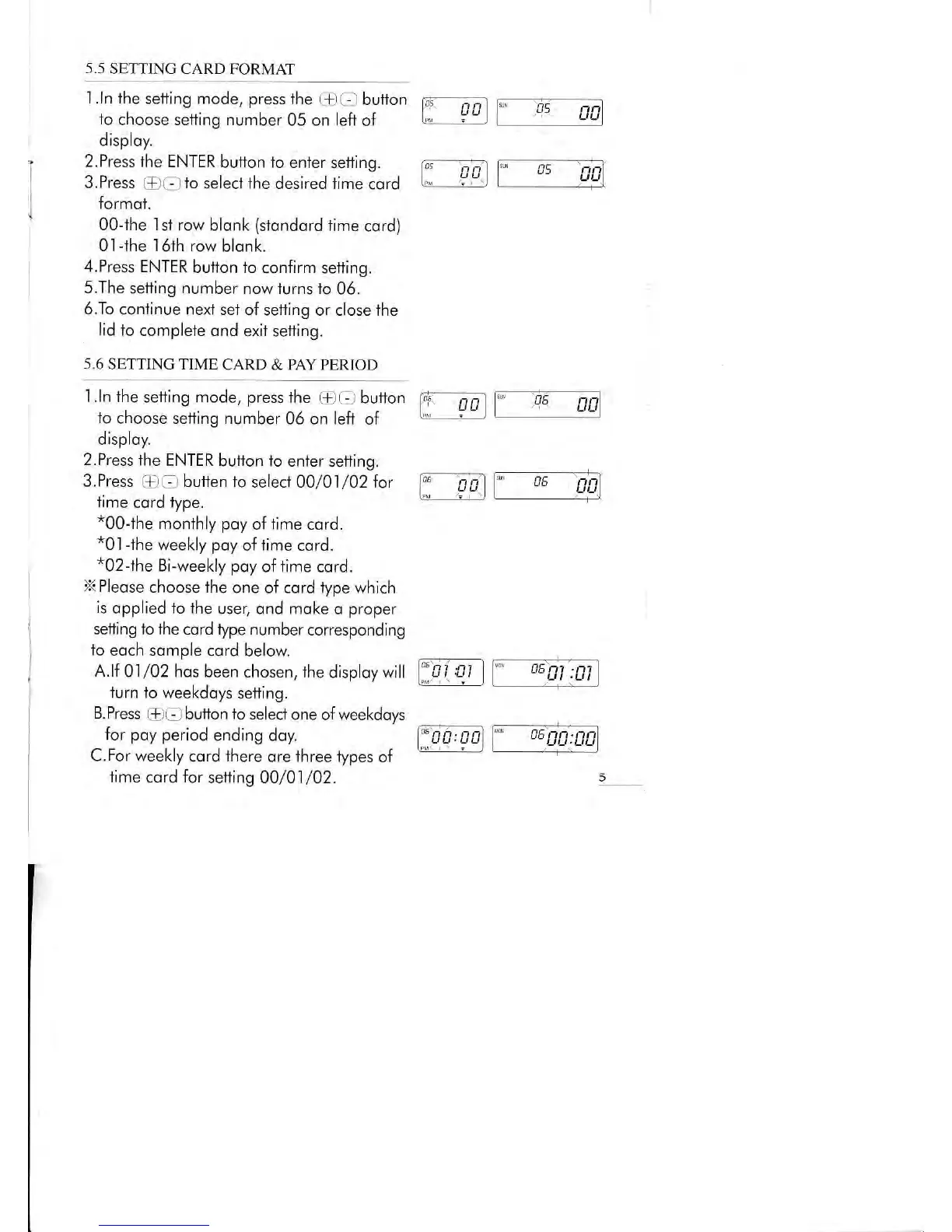
5.5
SETTING CARD
FORMAI
1.ln lhe
setting mode, press
the +
O
bufion p;
;;-1
to
choose setting number
05 on left
of
l, ?
u
)
disploy.
*c5
2. Press
lhe ENTER
buiton to enter
setting.
3.
Press
r.D
Gl
io
select the desired iime
cord
formot.
00-ihe I
st row blonk
(stondord
time
cord)
0l
-lhe
I6th row
blonk.
4.Press ENTER
button to
confirm setting.
5.The
setting
number
now turns to
06.
6.To
conlinue
nexl
set
of setting or close the
lid lo
complete ond
exii sefling.
5.6
SETTING TIME
CARD & PAY PERIOD
l.ln the
sefting mode,
press
lhe
@ -_
button
p;--;;'1
io
choose sefting number
06 on left
of
G!'
-
l :
-l
disploy.
2.Press
the ENTER
button fo enter
setting.
3.Press
(3tf
butten 1o
selecf 00/0.|/02 for
time
cord
type.
*00Jhe
monthly
poy
of time cord.
*01-ihe
weekly
poy
o{
lime
cord.
*02-lhe
Bi-weekly poy
of time
cord.
X
Pleose
choose the
one of cord lype
which
is
opplied io the
user, ond moke
o
proper
seiting 1o the
cord type number
corresponding
B.Press
@O
butfon to select
one of weekdoys
for poy period
ending doy.
C.For weekly
cord
ihere
ore three iypes
of
time cord for
setting 00/01/02.
to
eoch somple
cord below
A.lf
Ol/02 hos
been chosen, lhe
disploy
will
F;
A
)
turn lo weekdoys
setting.
fr;
-;
^
os
g1
:fll
DE
DO:
c5

Related product manuals