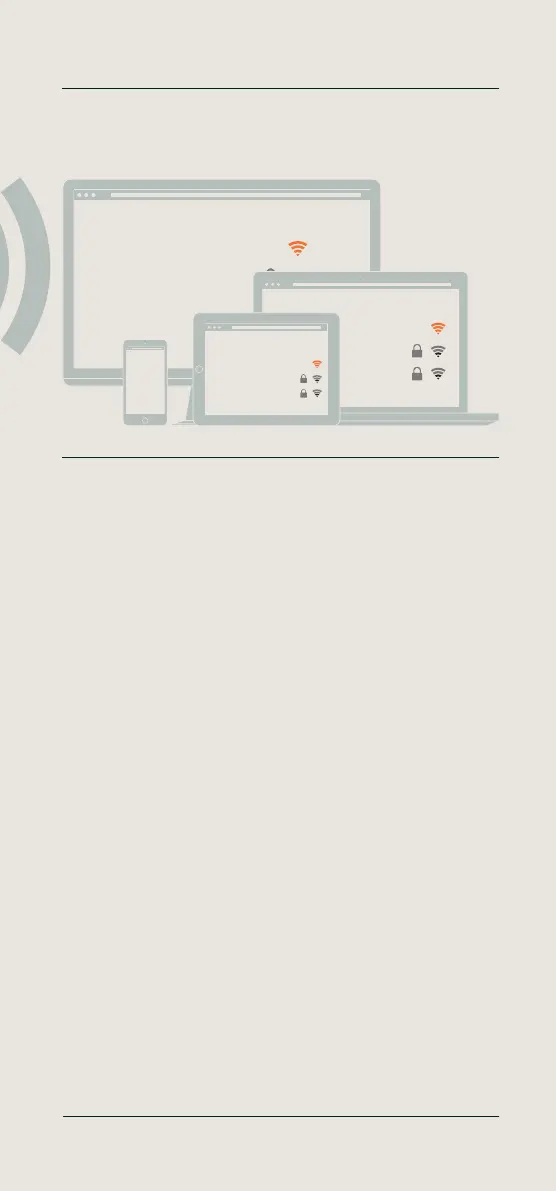
English - Create a connection between your TimeMoto device and
your PC, laptop, tablet or smartphone
Use a PC, laptop, tablet or smartphone to scan for available Wi-Fi
networks. Then select the temporary network that starts with
‘TimeMoto-......’ followed by a six-digit number.
Deutsch - Verbindung zwischen TimeMoto-Gerät und PC, Laptop,
Tablet oder Smartphone herstellen
Suchen Sie mit einem PC, Laptop, Tablet oder Smartphone nach
verfügbaren WLANs. Wählen Sie dann das temporäre Netzwerk aus, das
mit „TimeMoto-......“ beginnt und mit einer sechsstelligen Nummer endet.
Français - Créez une connexion entre votre appareil TimeMoto et
votre PC, PC portable, tablette ou smartphone
Utilisez un PC, portable, tablette ou smartphone pour rechercher les
réseaux Wi-Fi disponibles. Sélectionnez le réseau temporaire qui
commence par «TimeMoto-......» suivi par un numéro à six chiffres.
Nederlands - Breng een verbinding tot stand tussen uw TimeMoto
apparaat en uw PC, laptop, tablet of smartphone
Gebruik een PC, laptop, tablet of smartphone om te scannen naar
beschikbare Wi-Fi netwerken. Selecteer vervolgens het tijdelijke netwerk
dat begint met ‘TimeMoto-.........’ gevolgd door een zescijferig nummer.
Español - Cree una conexión entre su dispositivo TimeMoto y su PC,
portátil, tablet o smartphone
Utilice un PC, portátil, tablet o smartphone para buscar las redes Wi-Fi
disponibles. Luego seleccione la red temporal que comienza con
“”TimeMoto -.....”” seguido de un número de seis dígitos.
Italiano- Crea una connessione tra il tuo dispositivo TimeMoto e il tuo
PC, laptop, tablet o smartphone
Usa un PC, laptop, tablet o smartphone per ricercare le reti Wi-Fi
disponibili. Quindi seleziona la rete temporanea che inizia con
“”TimeMoto-......”” seguito da un numero a sei cifre.
Create a connection between your TimeMoto device and your
PC, laptop, tablet or smartphone
05 Setup your device
Wi-Fi
TimeMoto-123456
Guest Network
Business Network
Wi-Fi
TimeMoto-123456
Guest Network
Business Network
Wi-Fi
TimeMoto-123456
Guest Network
Business Network
More info, articles, tutorials & videos
TM1 and PC Plus Software: support.timemoto.com | TM2: help.timemoto.com


 To Next Page