8
Setting and Using Alarms
1
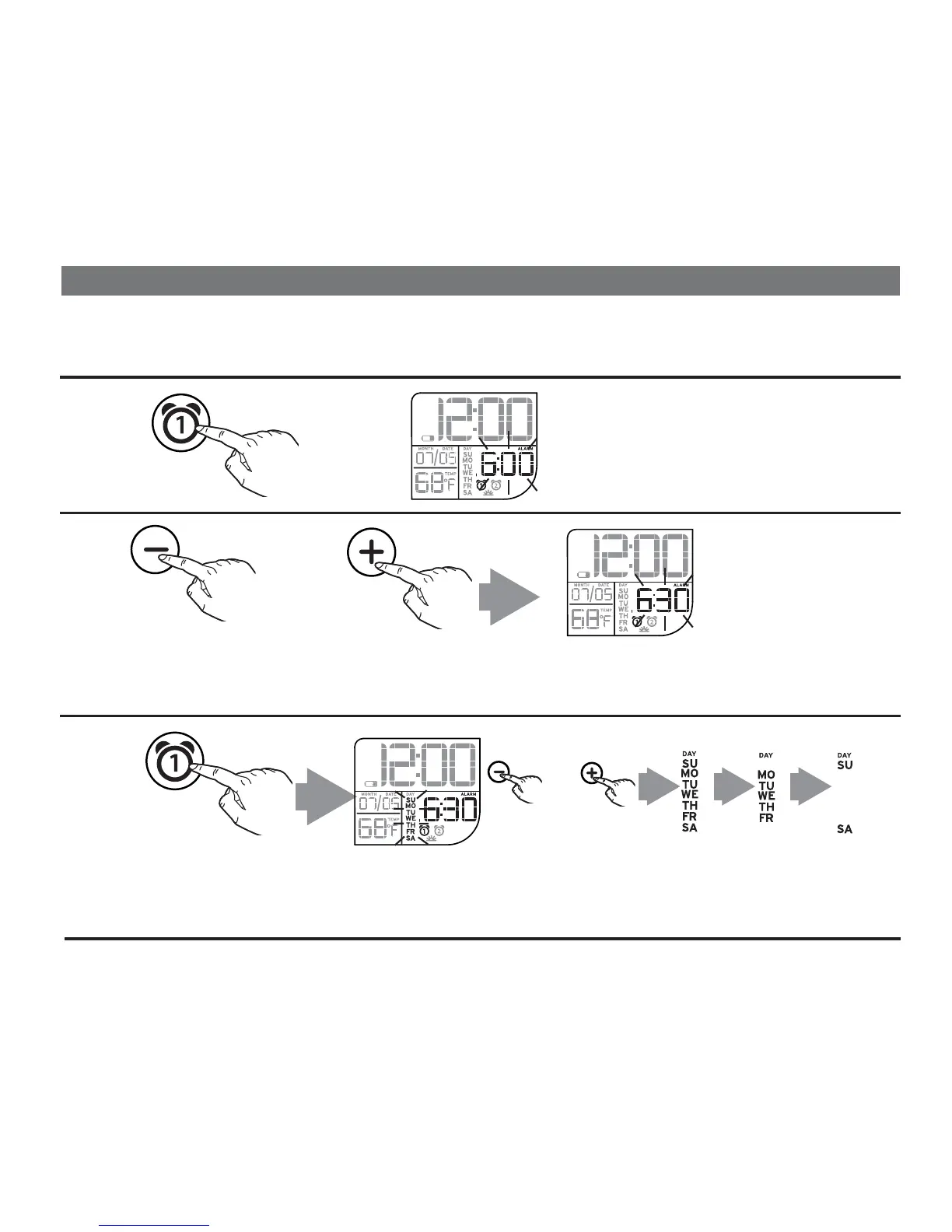
Press and hold the Alarm 1 Button
until
current alarm time
flashes on the
display and a beep sounds.
This unit has two independent alarms, Alarm 1 (buzzer) and Alarm 2 (melody). Each is set and
operates in the same way. Instructions below show setting the buzzer alarm (Alarm 1). Follow the
same method to set the melody alarm (Alarm 2).
2
Press and release the – or + Set Button to adjust the clock to the desired alarm time (press and
hold for rapid adjustment). NOTE: Make sure to set the correct AM or PM time. AM/PM
indicators appear just below the alarm time display.
Press and release the Alarm 1 Button to confirm alarm time. The alarm schedule will flash.
Press and release the – or + Set Button to adjust the alarm schedule for every day, week days or
weekend. Press and release
the Alarm 1 Button to confirm alarm setting. 2 beeps confirm alarm is
armed.
3
OR
OR
PM
AM
PM
AM
PM
AM
every day week days week end


 To Next Page