Need help?
Do you have a question about the Timex T235Y and is the answer not in the manual?
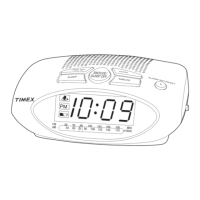
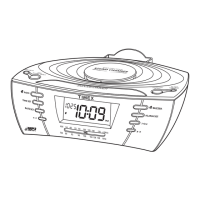
Identifies and describes controls located on the top surface of the unit.
Identifies and describes features located on the rear surface of the unit.
How to connect the unit to a power outlet for operation.
Method for powering the clock radio on and off.
Instructions on how to set the current time on the clock.
How to choose the alarm sound and disarm it.
Procedures to silence an alarm and reset it for the following day.
Fundamental steps for tuning and listening to radio stations.
Steps to save favorite radio stations for quick access.
How to select and listen to stored preset radio stations.
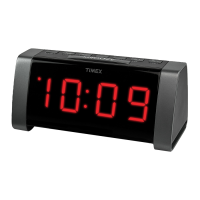
This document describes the Timex Model T235Y Jumbo Display AM/FM Clock Radio, a versatile device designed to provide timekeeping, alarm, and radio functionalities with user-friendly features.
The Timex T235Y serves as a multi-functional clock radio, primarily offering time display, dual alarm settings, and AM/FM radio reception. Its jumbo display ensures clear visibility of the time and other indicators. The device incorporates a battery backup system to maintain time and alarm settings during temporary power interruptions, although the unit itself does not operate on batteries for primary functions. It also features an Aux-in jack, allowing users to connect external audio devices and play their music through the clock radio's speaker. A sleep mode function is included, enabling users to fall asleep to the radio or an external audio source, with the unit automatically powering off after a selected interval.
Power and Basic Operation: To turn the unit ON or OFF, simply press and release the Power/Alarm Reset Button. The unit operates on AC power and does not run on batteries for its main functions. The battery backup system is solely for maintaining settings during power outages.
Setting the Time: Ensure the unit is OFF (indicated by "OFF" on the display). Press and hold the Presets/Clock Button until the time flashes. Use the Tun +/Hours Button to adjust the hour, noting that a PM indicator will light up for PM hours (there is no AM indicator). Use the Tun -/Minutes Button to adjust the minutes. Finally, press and release the Presets/Clock Button to save the time setting.
Setting and Using Alarms: The T235Y features two independent alarms, Alarm 1 and Alarm 2, which are set using the same method. To set an alarm, press and hold the respective Alarm Button (e.g., Alarm 1 Button) until the alarm time flashes. Adjust the hour using the Tun +/Hours Button (observing the PM indicator) and the minutes using the Tun -/Minutes Button. Press and release the Alarm Button to confirm the alarm time.
Selecting Alarm Source and Disarming: After setting the alarm time, repeatedly press and release the Alarm Button to cycle through alarm modes: Buzzer (default), Radio (plays the last AM or FM station at the last listened volume), or Off (disarms the alarm, with no indicator lit).
Resetting Alarms: To silence a sounding alarm and reset it for the next day, press and release the Power/Alarm Reset Button, or the respective Alarm 1 or Alarm 2 Button.
Snooze Function: When an alarm sounds, press and release the Snooze/Sleep Button to silence it for 9 minutes. This can be used multiple times.
Radio Operation (AM/FM): To turn on the radio, press and release the Power/Alarm Reset Button. Press and release the Mode Button to select either AM or FM band. Use the Tun -/Minutes Button or Tun +/Hours Button to manually tune to a desired station. Press and hold these buttons to seek the next clear station. Adjust the volume using the Volume - or Volume + Buttons. For optimal FM reception, extend the FM wire antenna. For AM reception, rotate the unit to improve signal.
Setting Radio Presets: The unit can store up to 20 station presets (10 AM and 10 FM). First, turn on the unit and select the desired AM or FM band using the Mode Button. Tune to the station you wish to save. Press and hold the Presets/Clock Button to enter presetting mode. Use the Tun -/Minutes Button or Tun +/Hours Button to select a preset number (P01-P10). Press and release the Presets/Clock Button to confirm and save the station to that preset number. Repeat for all desired presets.
Listening to Presets: To listen to a saved preset, simply press and release the Presets/Clock Button repeatedly until the desired preset station is selected.
Aux-in Audio: Turn on the unit using the Power/Alarm Reset Button. Connect a standard 3.5mm audio cable (not included) from your external audio device's output/headphone jack to the AUX IN jack on the back of the unit. Press and release the Mode Button until "AUH" appears on the display, indicating AUX mode. Control audio playback from your device and adjust the volume using the Volume - or Volume + Buttons on the unit.
Sleep Mode: In AM/FM or AUX mode, press and release the Snooze/Sleep Button to select a sleep interval (90, 80, 70, 60, 50, 40, 30, 20, 10 minutes) or OFF. The unit will power off after the selected time. Note that this only powers off the Timex unit, not the connected AUX device.
Display Dimmer: Press and hold the Snooze/Sleep Button to toggle between high and low display brightness settings. The dimmer cannot be adjusted when an alarm is sounding.
Product Care: Place the unit on a level surface, away from direct sunlight or excessive heat. To protect furniture, place a cloth or other protective material between the unit and natural wood or lacquered finishes. Clean the unit with a soft cloth moistened with mild soap and water. Avoid using strong cleaning agents like Benzene or thinner, as they can damage the unit's surface.
Installing and Replacing Backup Batteries: The unit requires two "AAA" batteries (not included) for its backup system. Keep the unit connected to AC power when changing batteries to avoid losing settings. To access the battery compartment, press the locking tab on the battery door and remove it. Install the batteries according to the correct polarity (+/-) markings. Replace the battery door. With batteries installed, the display will turn off during a power failure, but the clock will continue to run and maintain alarm settings. Alarms will not sound when operating on battery power alone. The "LOW BATT" indicator will light up when backup batteries need to be replaced.
Battery Cautions and Tips:
Troubleshooting: The manual provides guidance for common issues such as the unit not powering on, alarms not activating, low battery indicator, poor radio reception (AM/FM), unexpected shutdowns, and the unit not responding. Solutions typically involve checking power connections, alarm settings, battery installation, antenna position, or performing a unit reset by unplugging and removing backup batteries for a few minutes.
 General
| Snooze | Yes |
|---|---|
| Wake to | Radio or Buzzer |
| Brand | Timex |
| Model | T235Y |
| Category | Clock Radio |
| Alarm Type | Dual Alarm |
| Power Source | AC Power |
| Type | Digital Clock Radio |
| Display | LED |
| Backup Battery | Yes (9V battery) |


 To Next Page