Need help?
Do you have a question about the Timex T231Y and is the answer not in the manual?
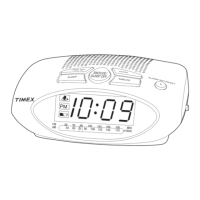
Details buttons and functions located on the top surface of the clock radio.
Details ports and cables found on the rear of the clock radio.
Explains the indicators related to the Alarm 1 source and armed status.
Describes the indicator light that shows when the displayed time is PM.
Shows when the backup batteries need to be replaced for continued operation.
Explains the indicators related to the Alarm 2 source and armed status.
Connects the unit to a working wall outlet for operation.
Instructions for powering the unit on and off using the Power/Mode/Alarm Reset Button.
Steps to adjust the clock's current time using the Hour and Minute buttons.
Steps to set the hour and minute for the alarm using specific buttons.
Choose Buzzer, Radio, or turn the alarm OFF using the Alarm 1 Button.
Silences a sounding alarm and resets it to come on the next day.
Adjusts the radio station and volume using dedicated buttons.
Stores up to 20 AM and 10 FM stations for quick access.
Selects and plays desired preset AM or FM stations.
Connects external audio sources via the 3.5mm AUX IN jack.
Turns the unit on and selects the AUX mode for audio playback.
Controls playback and volume from the connected audio device.
Covers warnings regarding water, ventilation, heat, and power sources.
Guidelines for power cable protection, liquid entry prevention, and attachments.
Instructions for lightning protection, avoiding overloading, and service requirements.
Addresses problems with the unit not powering on or alarms not functioning.
Solutions for poor radio reception and unexpected unit shutdowns.
 General
| Type | Clock Radio |
|---|---|
| Brand | Timex |
| Model | T231Y |
| Display Type | LED |
| Radio Tuner | AM/FM |
| Power Source | AC Power |
| Backup Battery | Yes |
| Alarm | Yes |
| Alarm Type | Buzzer |
| Clock Format | 12-Hour |


 To Next Page