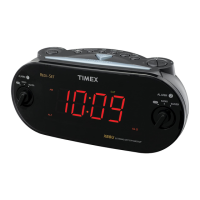
10
L
i
s
t
e
n
i
n
g
a
nd
S
l
ee
p
i
n
g
t
o
t
h
e
R
a
d
i
o
O
p
e
r
a
t
i
n
g
t
h
e
R
a
d
i
o
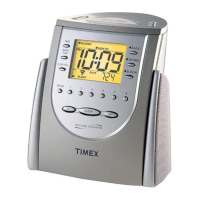
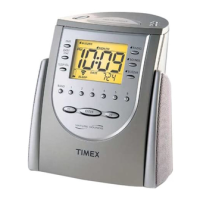
1. Press the
N
P
o
w
e
r
/
S
l
ee
p
B
u
tt
o
n
once to turn on the radio.
N
o
t
e
:
If the
N
P
o
w
e
r
/
S
l
ee
p
B
u
tt
o
n
is pressed more than once, the unit will enter the sleep mode, with the radio operating
on a timer. See Sleeping to the Radio Using the Timer for more information about this feature.
2. Press the L
M
o
d
e
/
D
S
T
B
u
tt
o
n
to select the AM band or one of the two FM bands. The
R
a
d
i
o
B
a
n
d
I
n
d
i
ca
t
o
r will
show which frequency is in use.
3. Press the 1
R
e
v
e
r
s
e
and 6
F
o
r
w
a
r
d
B
u
tt
o
n
s
to tune into a radio station. To scan the stations, hold a button for
about three seconds. The radio will rapidly advance to the next strong signal.
4. You may also use the
M
M
e
m
o
ry
S
e
t
B
u
tt
o
n
s
to select a preset radio station. See the Programming Radio Station
Memories section for instructions on programming radio station settings.
5. Rotate the
O
V
o
l
u
m
e
T
hu
m
b
w
h
ee
l
to adjust the volume level.
6. Press the 3
O
ff
/
R
e
s
e
t
B
u
tt
o
n
to turn the power off.
P
r
og
r
a
mm
i
n
g
R
a
d
i
o
S
t
a
t
i
o
n
S
e
tt
i
n
g
s
This Alarm Clock Radio features a total of 18 programmable radio settings: 12 FM stations and six AM stations. These allow you to preset
your favorite stations and access them quickly.
1. Press the
N
Power/Sleep Button once to turn on the radio.
2. Press the L Mode/DST Button to select a radio band. The AM/FM Radio Indicator will show which band is in use.
3. Press the 1 Reverse and 6 Forward Buttons to find a station to program into the memory.
4. When you have reached the station you wish to program, press and hold one of the six
M
Memory Set Buttons until you hear a
beep. The radio station has now been programmed into that preset slot, and you can reach the station by pressing its
M
Memory
Set Button while the radio is turned on.
5. Follow the above instructions to continue programming radio station settings into the memory. You can save a total of 18 stations
using the three bands.
6. To edit a setting, enter a different radio station as an existing
M
Memory Set Button. This overrides the original setting.
A
n
t
e
nn
a
I
n
f
o
r
m
a
t
i
o
n
a
nd
A
d
j
u
s
t
m
e
n
t
F
M
– Extend the FM wire antenna to its full length and vary the direction to its strongest signal.
A
M
– The AM bar antenna is located inside the cabinet. Rotate the unit until you find the strongest AM signal.
L
a
s
t
S
t
a
t
i
o
n
M
e
m
o
r
y
The tuner always remembers the last station selected before the radio was switched off, and automatically selects
the station again when the radio is turned on.


 To Next Page