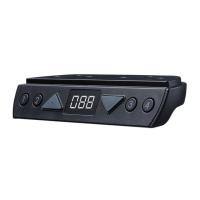
This document is a user manual for the TiMOTION TDH5 Hand Control, providing instructions for programming and troubleshooting. The TDH5 is a hand control designed for adjustable desks, supporting up to four memory positions and offering various programming and maintenance features.
Function Description
The TDH5 Hand Control allows users to adjust the height of a desk, set and recall memorized positions, define upper and lower height limits, and configure other operational parameters. It interfaces with a control box to manage the desk's movement and includes features for collision detection (T-touch or TCS1) and power saving.
Important Technical Specifications
- Memory Positions: Supports a maximum of 4 memorized height positions.
- Height Display: Features a 3-digit display for showing the current desk height.
- Unit Switching: Capable of switching between metric (centimeter) and imperial (inch) units.
- Collision Detection: Integrates with built-in T-touch or external TCS1 sensors for anti-collision functionality. Sensitivity of these sensors can be adjusted.
- Power Saving: Automatically turns off the digital display after 25 seconds of inactivity and enters a low-power standby mode (<0.1W) after 30 seconds of inactivity.
- Error Reporting: The digital display shows error codes (e.g., E00/000, E01, E02, E03, E04, E11, E12, E13, E14, E21, E22, E23, E24, E31, E32, E33, E34) to indicate specific issues, such as reset in progress, overuse protection, unbalanced protection (desk tilt), anti-collision events, motor overcurrent, no signal feedback from motors, or no power consumption from motors.
Usage Features
- Adjusting Height: Users can adjust the desk height by pressing and holding the up or down buttons until the desired height is reached.
- Setting Memorized Positions:
- Adjust the desk to the desired height.
- Press the preferred memory button (1, 2, 3, or 4) along with either the up or down button for 2 seconds. The display will show P1, P2, P3, or P4 to confirm the position is memorized.
- To move the desk to a memorized position, press (and hold, depending on control box settings) the corresponding memory button (1, 2, 3, or 4).
- Setting Upper and Lower Height Limits:
- Setting Upper Limit: Adjust the desk to the desired upper limit. Press the up and down buttons together for less than 3 seconds, then hold and release the up button. Re-press the up button more than 3 times slowly. A beep confirms the setting.
- Disabling Upper Limit: Move the desk to the set upper limit and repeat the setting procedure.
- Setting Lower Limit: Adjust the desk to the desired lower limit. Press the up and down buttons together for less than 3 seconds, then hold and release the down button. Re-press the down button more than 3 times slowly. A beep confirms the setting.
- Disabling Lower Limit: Move the desk to the set lower limit and repeat the setting procedure.
- Note: Some control boxes may not support height limit functionality. Pressing buttons for more than 3 seconds will initiate "Reset" mode.
- Presetting Desk Starting Height:
- Press the down button until the desk reaches its lowest position, then release.
- Re-press the down button for 5 seconds; the display will flash for 10 seconds.
- Adjust the starting height number using the up or down buttons.
- After 10 seconds, the display stops flashing, confirming the new starting height.
- Switching Metric and Imperial Units:
- Press memory buttons 1, 2, and 4 simultaneously for 5 seconds. The display will show "C-I".
- To choose metric (centimeter), press button 2; the display will show "C".
- To choose imperial (inch), press button 3; the display will show "I".
- If no input is received within 5 seconds, the system reverts to normal operation.
- Adjusting T-touch or TCS1 Sensitivity:
- Press memory buttons 1 and 2 for 5 seconds. The display will flash the current sensitivity level (0-9).
- Use the up or down button to adjust the sensitivity level.
- Press memory buttons 1 and 2 again (or wait 5 seconds) to return to normal operation.
- Note: If TCS1 is connected to a control box with built-in T-touch, both sensitivities change simultaneously. Some control boxes may not support this functionality, displaying "0-0" if not supported or no TCS1 is connected.
- Waking Up the Control: Press any button to light up the display or wake the system from standby mode.
Maintenance Features
- Resetting the Device: Simultaneously press and hold the up and down buttons for 3 seconds until both columns are in the lowest position. The control box will beep, and the display will show the starting height. A reset is required for first-time desk operation.
- Restoring Factory Settings: After performing a reset (as described above), continue pressing the up and down buttons for 15 seconds. The control box will beep twice, and the digital display will show "---". This restores memorized positions, desk starting height, upper and lower height limits, and T-touch/TCS1 sensitivity to original factory settings.
- Troubleshooting (Error Codes): The manual provides a comprehensive list of error codes, their descriptions, situations, and recommended actions:
- 0-0 (flashing): No built-in T-touch or TCS1 detected. Check connections or replace defective device.
- E00/000: Reset in progress. Hold up/down buttons to run desk down until beep, then release.
- E01 (3 beeps): Overuse protection. Wait 5 minutes.
- E02 (2 beeps): Unbalanced protection (desk tilt). Even out load, perform reset. If persistent, M1 column may be defective.
- E03 (no beep, desk reverse 40mm): Anti-collision. Remove obstacle; desk returns to normal after reversing cycle.
- E04 (no beep, desk reverse 30mm): T-touch protection. Remove obstacle; desk returns to normal after reversing cycle.
- E11 (5 beeps): M1 motor overcurrent/overloaded. Remove heavy load, perform reset. If persistent, M1 column may be defective.
- E12 (5 beeps): M2 motor overcurrent/overloaded. Same actions as E11 for M2 column.
- E13 (5 beeps): M3 motor overcurrent/overloaded (for 3rd column). Same actions as E11 for M3 column.
- E14 (5 beeps): M4 motor overcurrent/overloaded (for 3rd column). Same actions as E11 for M4 column.
- E21 (1 long beep): No signal feedback from M1. Unplug/replug motor cable, perform reset. If persistent, M1 column may be defective.
- E22 (1 long beep): No signal feedback from M2. Same actions as E21 for M2 column.
- E23 (1 long beep): No signal feedback from M3. Same actions as E21 for M3 column.
- E24 (1 long beep): No signal feedback from M4. Same actions as E21 for M4 column.
- E31 (4 beeps): No power consumption from M1. Same actions as E21 for M1 column.
- E32 (4 beeps): No power consumption from M2. Same actions as E21 for M2 column.
- E33 (4 beeps): No power consumption from M3. Same actions as E21 for M3 column.
- E34 (4 beeps): No power consumption from M4. Same actions as E21 for M4 column.


 To Next Page
 General