2 REV. 00
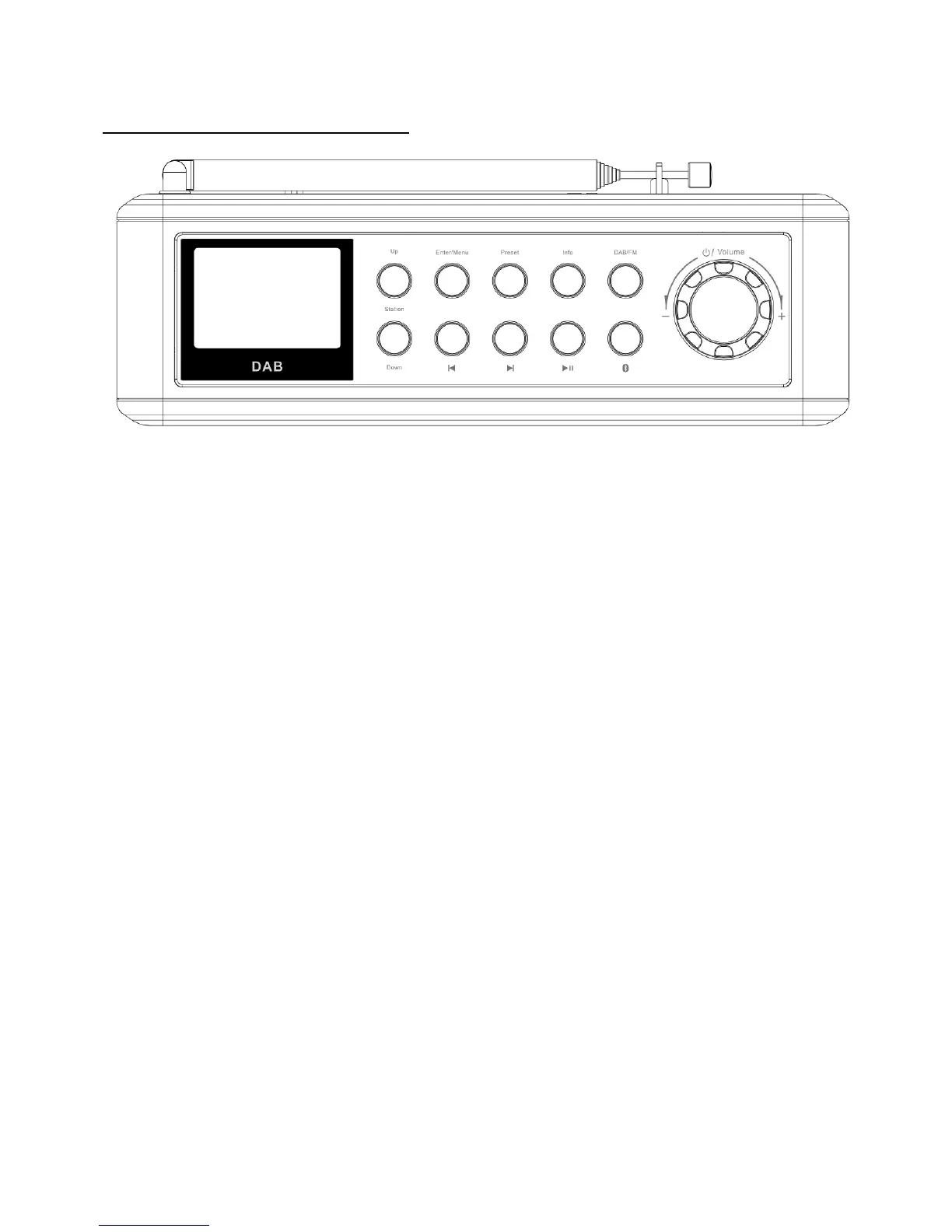
INTRODUCTION OF OPERATION BUTTONS:
1. Standby: Long press to turn on or off.
2. DAB/FM: Switch mode between DAB & FM.
3. Info: Short press to check DAB/FM information.
4. Enter/Menu:
Short press to go to Menu to set Radio/AUDIO/TIME, and check the version of software.
Or to reset system.
5. DOWN (tune-)
DAB/FM tune: Long press to search FM radio downwards when the unit is under FM mode.
Short press to adjust set when the unit is under Menu mode.
6. UP (tune+)
DAB/FM tune: Long press to search FM radio upwards when the unit is under FM mode.
Short press to adjust set when the unit is under Menu mode.
7. Preset:
DAB/FM preset store and play.
Short press to return when the unit is under menu status.
8. Volume dial: adjust volume up and down.
9. Bluetooth: short press to go to Bluetooth mode.
10.PLAY/PAIRING:
Short press to play/pause under Bluetooth mode.
Long press to pairing via Bluetooth.
11. PREVIOUS: go to previous track under Bluetooth mode.
12. NEXT: go to next track under Bluetooth mode.



 To Next Page