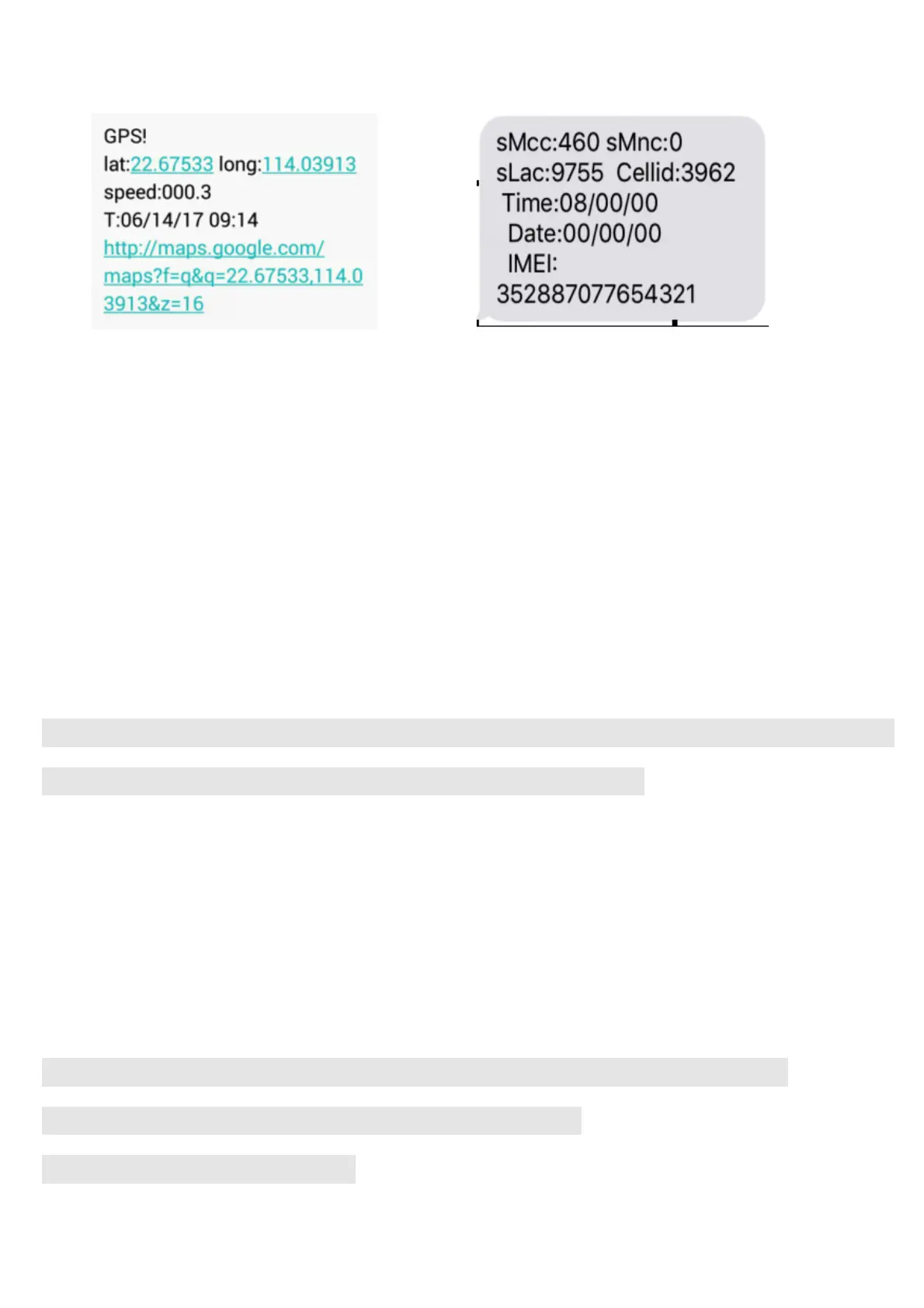
Pic(1)have gps signal Pic(2)no gps signal
Pic 1:Replied real-time tracking information under GPS satellites signal.
u Lat:22.67533 lon:114.03913 Positioning of the latitude and longitude values.
u Spd:000.3 This refers to the device moving speed. The unit is km/h.
u T:06/14/17 09:14 real-tracking time, the Default is London time. You can set
a time zone by sms command
Google Link: This is the link to the Google map showing the position of the device.
Pic 2:Replied LBS information without GPS satellites signal.
u smcc:27a4 1223: Real-time LBS data.
u Time:08/00/00 LBS positioning time.
If you receive positioning information is picture 2, please go out the outdoor and
Walk around with gps tracker,for receive The satellite signal
5.2. Admin number setting (support 5pcs admin number )
After admin number setting, all alarm message will send authorization number
Set the first authorization number, then set the second, third, fourth and fifth
authorization numbers use the first authorization mobile phone number
device has two ways alarm, the first ways (SMS + platform): way123456 1
the Second way, (SMS+ platform+call): way123456 2
If you choose the second mean:



 To Next Page