15English
light (breathing). These can be congured according to your
wishes.
• DPI sengs: In this menu, you can congure the DPI levels and
the corresponding DPI values.
• X/Y sensivity: You can adjust the sensivity of the Y and X axis
in this menu
• Double-click speed: The double-click speed denes the maximum
me between two clicks, so that it can be registered as a double
click and not two individual clicks.
• Scrolling speed: The scrolling speed of the mouse wheel can be
congured here
• Polling rate: Select your preferred polling rate to dene the inter-
vals at which the mouse sends the posion data to the computer.
A polling rate of 1000 Hz means that data is sent 1000 mes per
second
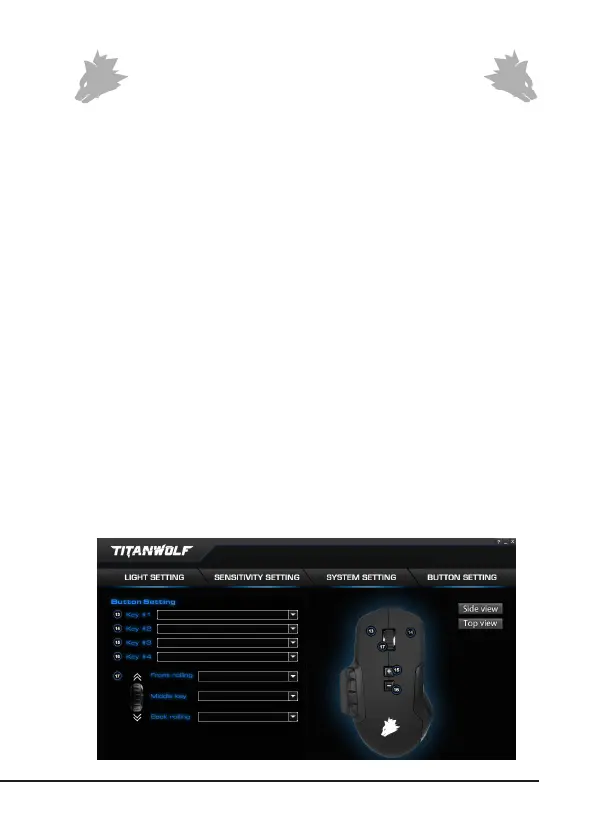
• Conguring the mouse buons: The buons at the top of the
mouse as well as those at the side can be freely congured. Please
click on "Top View" or "Side View" to make the desired sengs.
To recongure a buon, click on the number corresponding to the
desired buon in the list on the right of the mouse diagram. The
mapping of numbers and buons is shown in the diagram. You can
not only choose from precongured opons, but also make indi-
vidual sengs. A special feature is the opon of creang macros,
which is explained in detail in secon 5.3.



 To Next Page