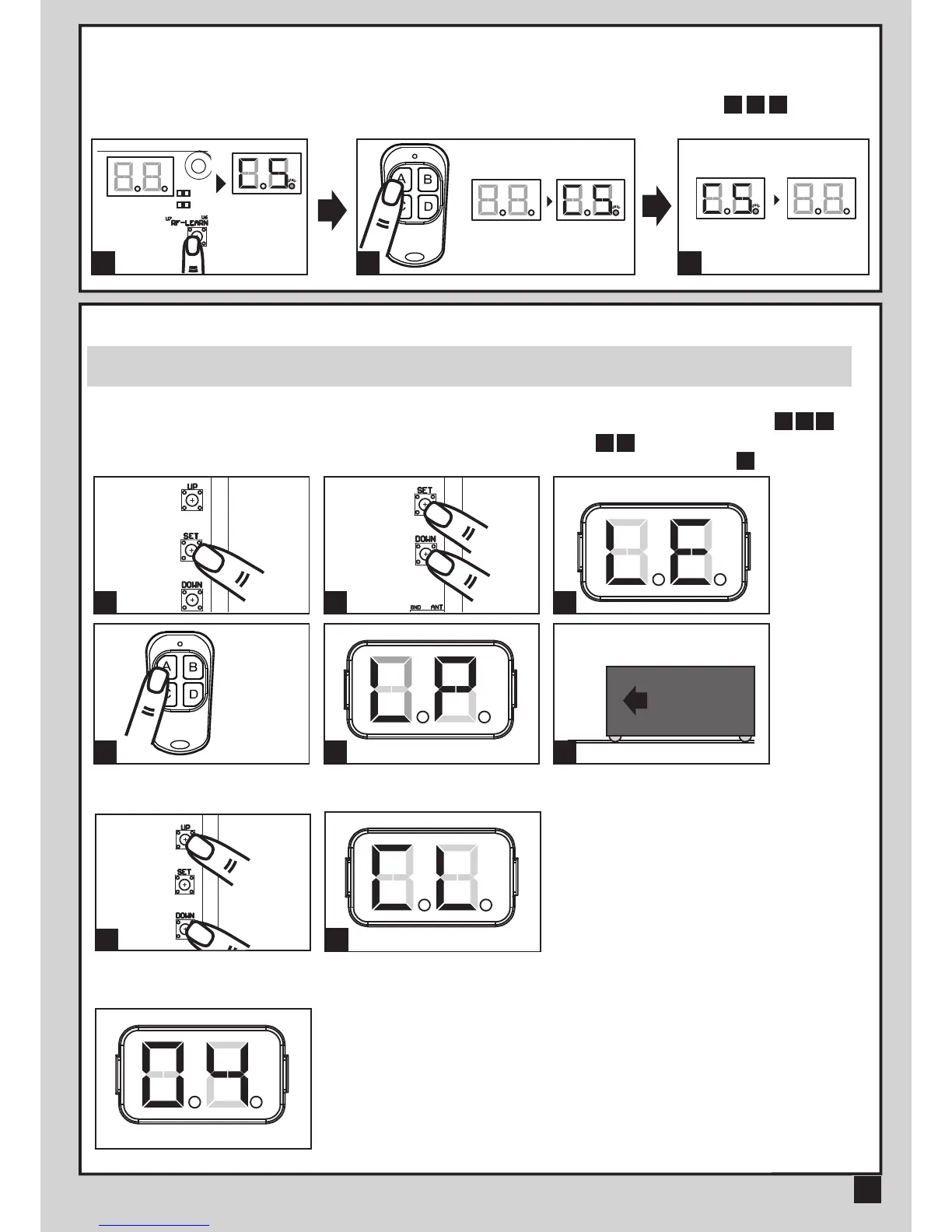
3.2 TRANSMITTER MEMORIZING AND ERASING PROCESS
3.3 SYSTEM LEARNING, RESET PROCESS, AND LED DISPLAY
(1) To Complete the System Learning:
Step1: Press “SET”; then press “SET” + “DOWN” for 3 seconds, and the LED display shows “LE”
Step2: Press left button (A) on time, the LED display should show “LP”
Step3: The gate goes to Auto-learning, please wait for the learning process to be completed
(2) To Reset Factory Setting:
Press UP and DOWN for 3 seconds, and the LED display shows “CL”
(3) Motor current auto-detection
The LED display shows the current consumption of the motor
"0.4" : During the system learning procedure, the control panel will automatically detect the
current consumption from each motor, indicate the resistance level of the gate whiling the
motor operation. If this reading increase instantly or stay in high reading, please check if
any object in between of the gate moving area, and contact your installer for inspection.
(1) Transmitter Memorizing: Press “RF Learn” button for 2 seconds, and the LED display shows “CS”; then press the transmitter
left button (A); the LED display will blink twice and then be off. The transmitter learning is completed.
(2) Erasing Memory: Press "RF Learn" button for 5~6 seconds as right LED display is on, then wait for LED display off.
LED display
ON
2 Sec
LED display
blink twice
LED display OFF
1 3



 To Next Page