12
OFF
ON
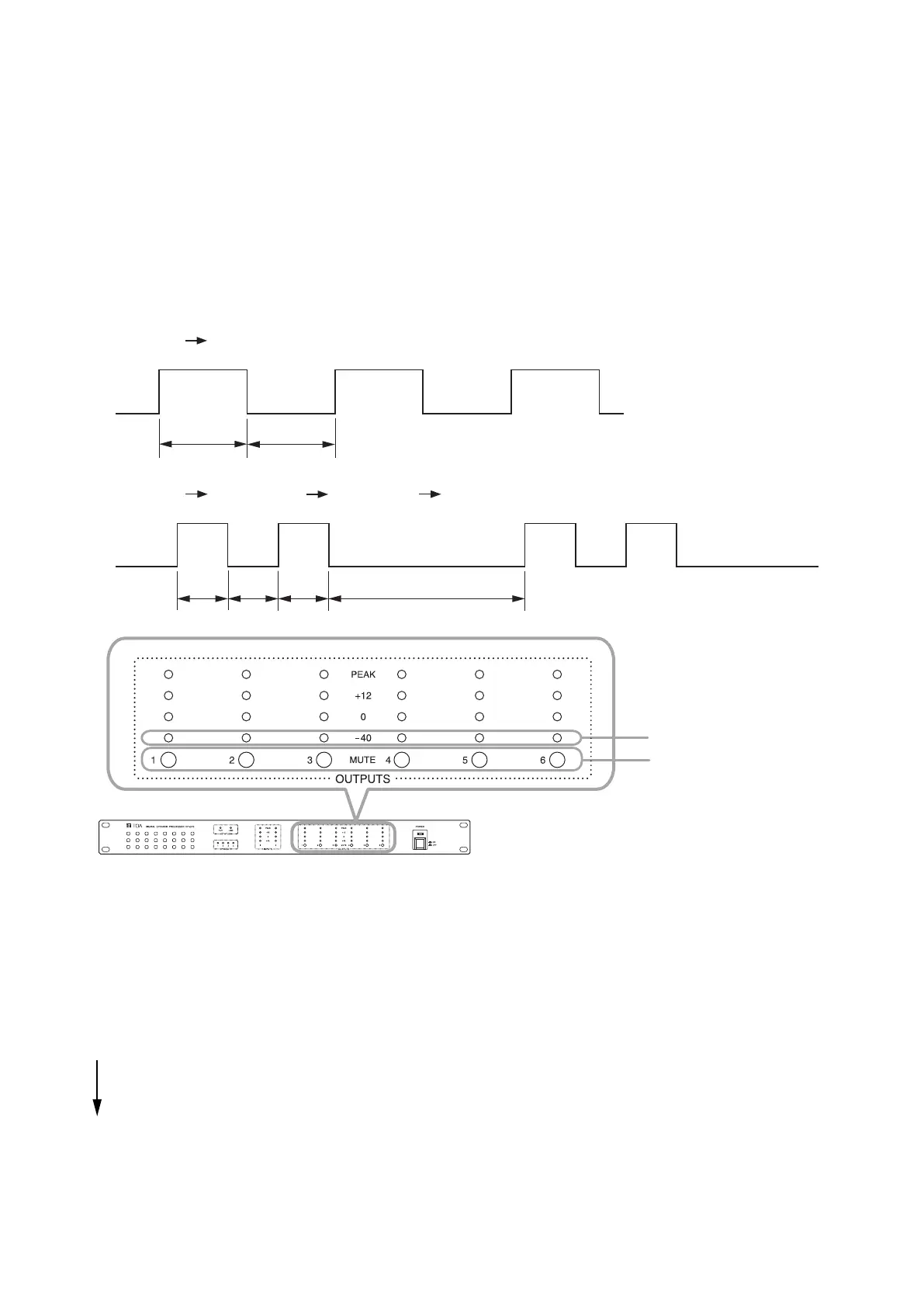
0.5 sec 0.5 sec
OFF
ON
0.9 sec
0.2 sec 0.2 sec 0.2 sec
"−40" output level indicators
Mute switches
DP-SP3
8. MUTE FUNCTION OPERATION
The DP-SP3 can perform Mute function operation.
Usethisfunctionwhenwishingtomuteeachoutput.
UsetheDP-SP3unitorthesuppliedDP-SP3PCSoftwaretoperformmuteoperation.
The DP-SP3 can perform each individual output mute, while the DP-SP3 PC Software can perform both each
individualoutputmuteandsimultaneousmuteofalloutputs(MuteAll).
For the operations of the supplied DP-SP3 PC Software, read the separate DP-SP3 Software Instructions.
8.1. Mute Indicators
Fortheoutputchannelonwhichthemutefunctionisoperating,the“−40”levelindicatorofthecorresponding
outputchannellightsorange,ashes*
1
,orashesintermittently*
2
.
*
1
0.5sec.ON 0.5 sec. OFF, then this cycle repeats.
*
2
0.2sec.ON 0.2 sec. OFF 0.2sec.ON 0.9 sec. OFF, then this cycle repeats.
There is a priority order for the mute operating indications between the operation performed from the DP-
SP3 and that performed using the DP-SP3 PC Software. If multiple mute operations overlap, then the mute
operating indication with the higher priority is activated.
[Indication priority level of mute operation and indicator status]
Priority level
High
1.MuteAllusingtheDP-SP3PCSoftware: Intermittentlyashes(Flashestwice,thenrepeats.)
2.MuteandContactcontrolmutebytheDP-SP3: Flashes
3. An individual mute using the DP-SP3 PC Software
andExternalcontrolmute: Lights
Low



 To Next Page