28
10. CHECKING THE SETTING OF THE FBS FUNCTION IN DETAIL
WT-D5800 is equipped with the FBS (Feedback Suppressor) function. Its dynamic mode operation controls
acoustic feedback in real time.
The FBS function can be turned ON/OFF in setting mode of the WT-D5800. See the WT-D5800 instruction
manual for details.
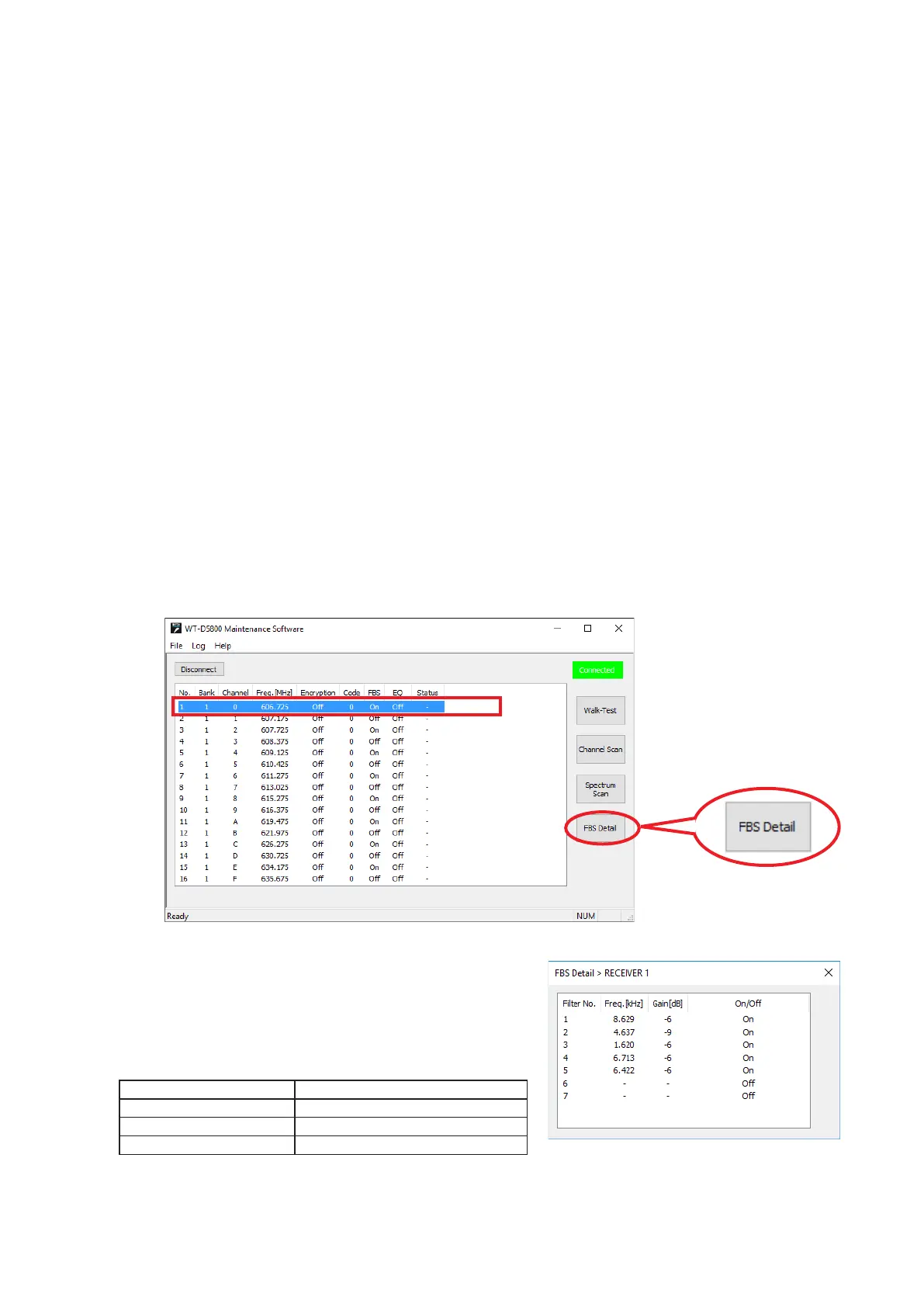
The WT-D5800 Maintenance Software will show the detailed settings of the FBS function.
Note
The detailed settings of the FBS function cannot be checked while the Walk-Test, storing Background Log,
Channel Scan, or Spectrum Scan is executed.
Tips
For WT-D5800, the dynamic feedback control function can be set to be turned ON/OFF.
• When the setting is ON, the parameters for the FBS lter will be automatically set to control acoustic feedback
dynamically.
• When the setting is OFF, the parameters for the FBS lter will not be set automatically and the feedback will
not be controlled dynamically.
• When the function is turned from ON to OFF, or WT-D5800’s power is turned OFF, the lter generated
automatically during feedback detection with the dynamic mode will be cleared.
[Checking the Detailed Settings]
Step 1. Select a receiver that is connected that needs to be checked from the list on the main screen.
Step 2. Click on the FBS Detail button.
2
1
Displays the FBS filter’s parameters for the selected
receiver by showing it in the On/Off format.
The FBS filter’s parameters will be automatically set when
the acoustic feedback control function is set On.
The setting and setting ranges are shown below.
Setting Setting range
Central frequency 0.06 – 11 (kHz), 1/24 oct step
Gain –6, –9, −12 (dB)
FBS lter On/Off On, Off
Note: The Q value is 34.623 (xed).



 To Next Page