6
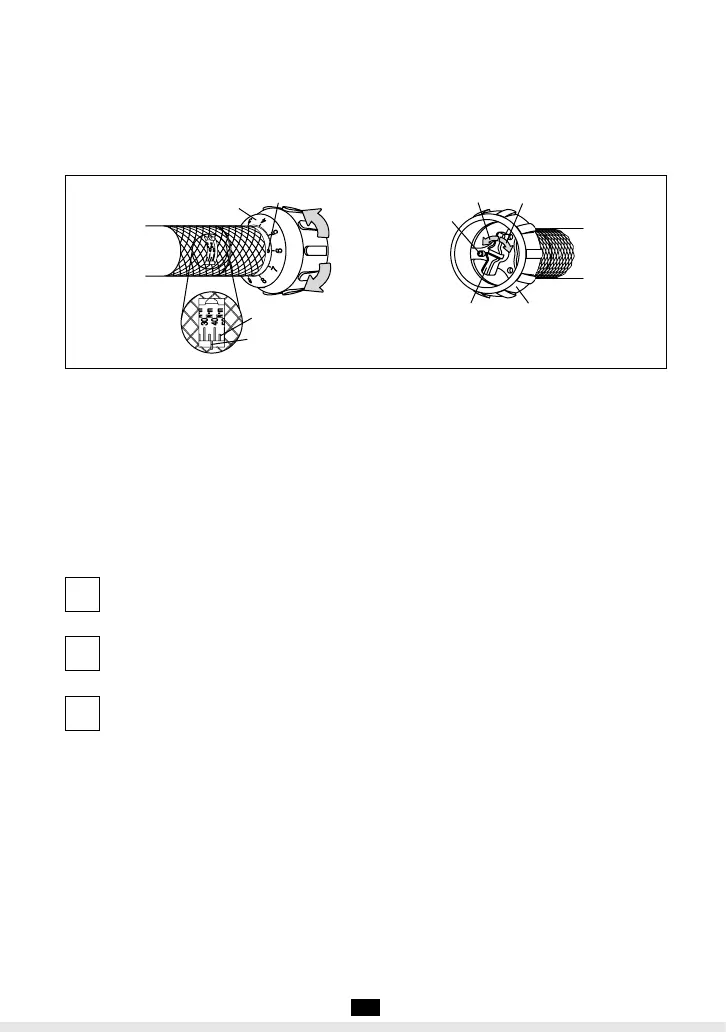
図7
Fig.7
例)セットトルク36N・mの合わせ方
❶主目盛を見ながら、副目盛を回し30N・
mの目盛り線が、目盛基線に近づいたら副
目盛を確認します。次に副目盛の0を赤い
点に合わせます。セットトルク30N・m
になります。
❷副目盛を見ながら、右方向(プラス方向)
に回し、副目盛の6を赤い点に合わせます。
セットトルク36N・mになります。
Example To set torque at 36N・m
❶
While reading Main Graduation, turn
Supplementary Graduation until 30N・m
on Main Graduation comes close to
Graduation Datum Line and then, align 0
on Supplementary Graduation with red
dot. Now, torque set is 30N ・m.
❷While reading Supplementary Gradu-
ation, turn clockwise until 6 on Supple-
mentary. Graduation is aligned with the
red dot. Torque is set at 36N ・m.
ソケットをボルト又はナットの頭部に合
わせます。
2
Apply the socket on to a bolt head or
nut.
トルクレンチを右に回して締めつける。
3
Turn the torque wrench clockwise to
fasten the bolt. (Refer to items 6 and
11 for Precaution for use)
「カチン」音がしたら締め付け完了。
4
Stop pulling the wrench when you
hear a "click".
●
QL1.5N4〜QL12N4,QL4-MH,QL-MH型の場合(図7)
①ロッカーをゆるめる(左回転)
②副目盛を回してトルク値を合わせる(主目
盛+副目盛)。
③ロッカーをロックする(右回転)(ロック
の際にロッカーにピンが当たるときはピン
の位置を変える。)
●
For QL1.5N4〜QL12N4,QL4-MH,QL-MH Series (Fig. 7)
①Turn the locker to the left to unlock the
Supplementary Graduation.
②Turn the Supplementary Graduation to set
a torque (combination of values on the
Main and Supplementary Graduations).
③Turn the Locker to the right to lock the
Supplementary Graduation (Reposition
the pin if it contacts the Locker).
副目盛
SupplementaryGraduation
赤点
RedLine
セットトルク増
TorqueSetUP
セットトルク減
TorqueSetDOWN
副目盛
SupplementaryGraduation
ロッカー
Locker
ピン
Pin
解放
Unlock
固定
Lock
目盛基線
GraduationDatumLine
目盛線
GraduationLine
主目盛MainGraduation
PDF作成.indd7PDF作成.indd7 2012/04/1711:45:002012/04/1711:45:00


 To Next Page