5
4
使用方法
How to use
トルク値をセットする。
1
Set a torque.
図6-1
Fig.6-1
図6-2
Fig.6-2
500
600
700
GRADUATIONS
主目盛(a)Main 副目盛(b)Suppl.
20
セットトルクSetTorque
600+20620N・m
調整ボックス
AdjustmentBox
調整ボックスAdjustmentBox
エキステンション
ExtensionHandle
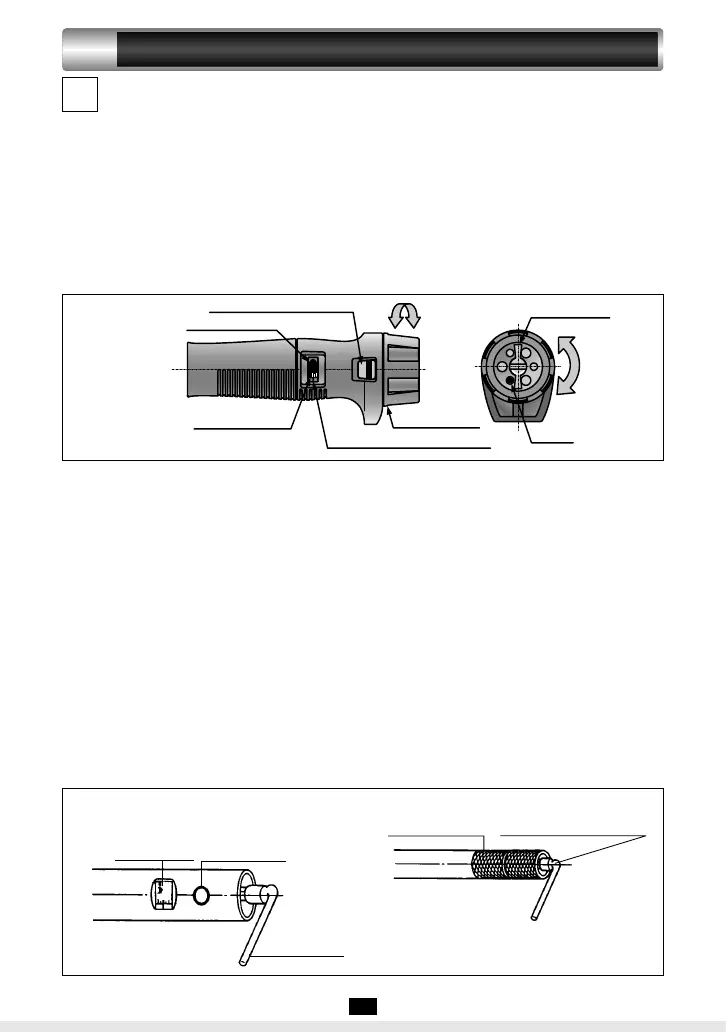
●QL25N〜QL280N型の場合(図5)
トルク値をセットする。
①ロッカーをゆるめる(左回転)
②副目盛を回してトルク値を合わせる(主目
盛+副目盛)。
③ロッカーをロックする(右回転)(ロック
の際にロッカーにピンが当たるときはピン
の位置を変える。)
●QL25N〜QL280N (Fig. 5)
Set a torque.
①Turn the locker to the left to unlock the
Supplementary Graduation.
②Turn the Supplementary Graduation to set
a torque (combination of values on the
Main and Supplementary Graduations).
③Turn the Locker to the right to lock the
Supplementary Graduation (Reposition
the pin if it contacts the Locker).
LOCK
0
20
40
N・ m
目盛基線GraduationBasicLine
目盛線Graduation
副目盛Sup.Grad.
主目盛MainGrad.
副目盛窓Sup.GradWindow
減少
増加
ロッカーLocker
ピンPin
増加
減少
図5
Fig.5
●QLE型の場合(図6)
①−a
エキステンションハンドルを取付けない時
(図6−1)本体に附属の調整ボックスの
四角側を差し込む。
①−b
エキステンションハンドル取付け後(図
6−2)調整ボックスを回してトルクをセ
ットする(主目盛+副目盛)。
②エキステンションハンドルは根元部まで本
体に完全に取り付けて下さい。
③QLE型にはロックは不要(クリックで固
定)。
●For QLE Series (Fig. 6)
①-a
When you do not use the Extension Handle
(Fig.6-1): Insert the attached Adjustment
Box into square shaft of main body.
①-b
When you use the Extension Handle (Fig.
6-2): Mount the handle, then insert the
attached Adjustment Box into square shaft .
②Turn the Adjustment Box to set a torque
(combination of values on the Main and
Supplementary Graduations).
③The Extension Handle must be fixed tight
with the main body.
④For the QLE Series, Supplementary
Graduation need not be locked (it locks
automatically).
PDF作成.indd6PDF作成.indd6 2012/04/1711:44:522012/04/1711:44:52


 To Next Page