EasyManua.ls Logo

Tomra AUTOSORT - 7.3.4 Sequence Diagram

Tomra AUTOSORT
84 pages
Print Icon
To Next Page IconTo Next Page
To Previous Page IconTo Previous Page
Loading...
User Manual
Electrical connections
36 
7
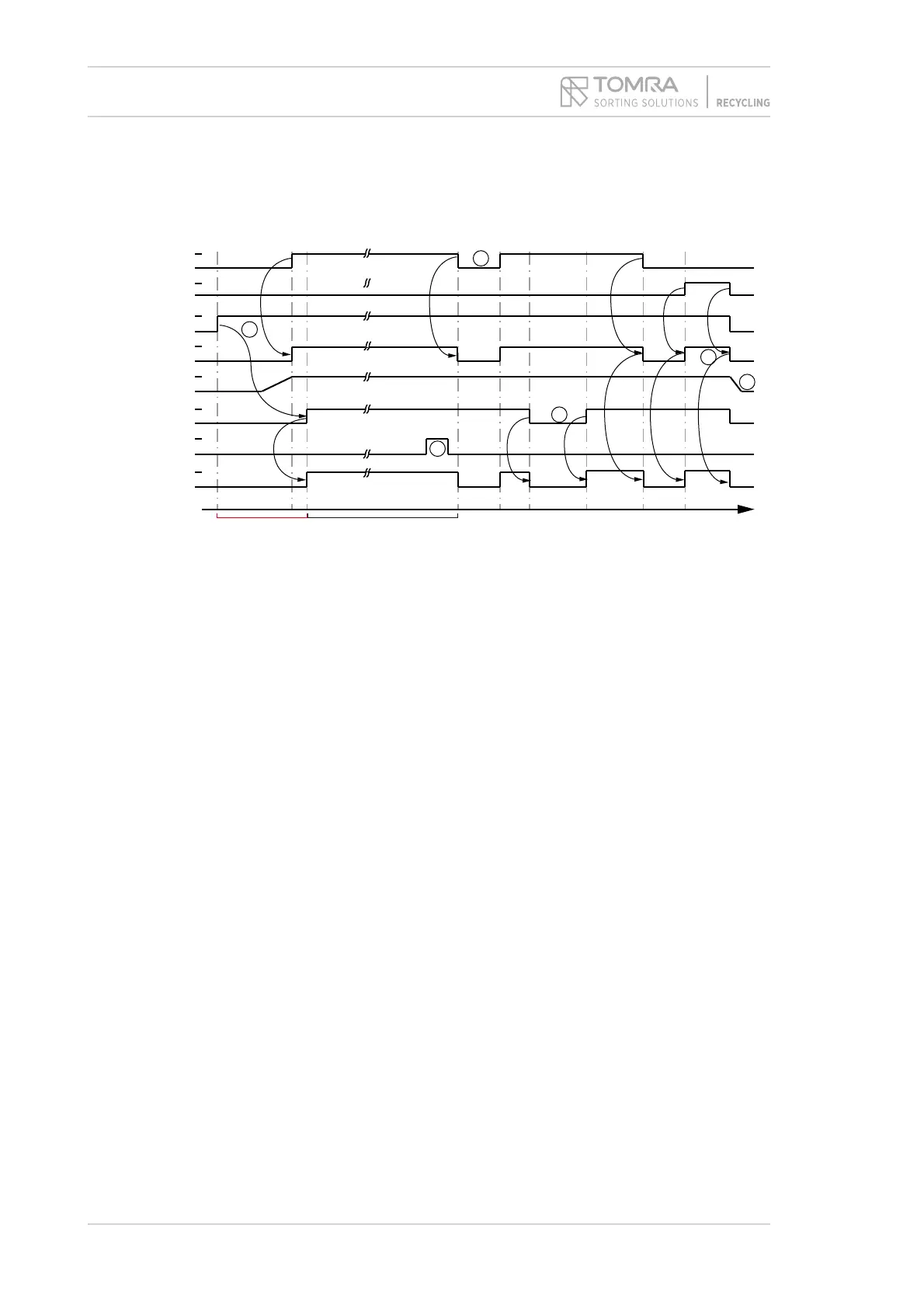
7.3.4 Sequence diagram


Fig. 12: Sequence diagram for PLC programming
 

 





 


 

 


 
 

The “light manual” is a user input in the operating software. It is activate by setting the check
“Always activate lamps” in the “Lights” dialog and is used for service and maintenance of the
machine. “Light manual” is not a signal and there is no hardware button.
~ 50 sec
Running
Common
Warning
Ready
Belt velocity
Lamp
Power switch
Light manual
Remote
Start/stop
24V
0V
auto
0
manual
1 -on
0 - off
on
off
100%
0%
1 -on
0 - off
1 -on
0 - off
1 -on
0 - off
1
2
4
3
5
t
normal o
p
eration
6

Table of Contents

Other manuals for Tomra AUTOSORT

Related product manuals