Sologic TS-5611 7
Sologic TS-5611
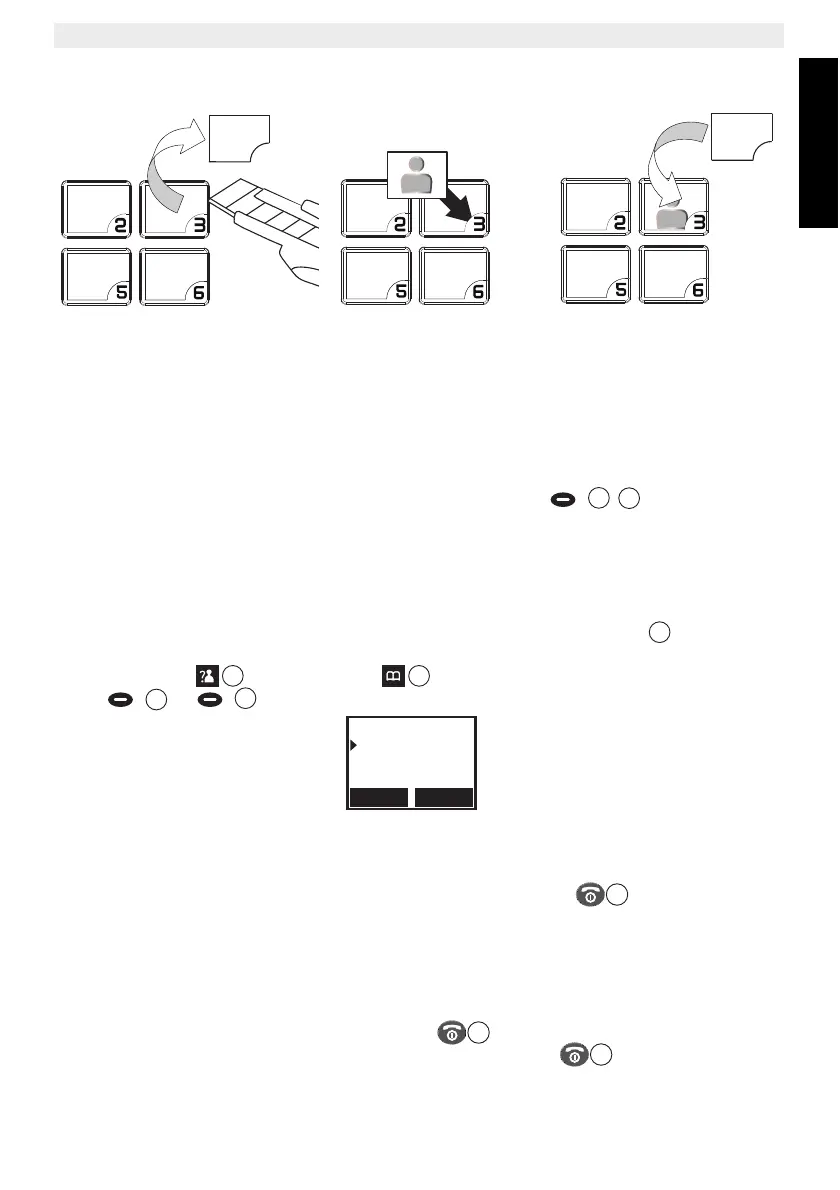
To change the photo:
1. Remove the transparant protection film by a sharp tool and take out the existing photo
out of the key.
2. Insert the photo by putting the right lower corner first as shown on above photo.
3. Put the trasparant protection film back.
3.4 Display keys handset
Display keys (soft keys) are located directly under the display / . The function of
these 2 keys changes depending on the operation mode. The actual function is displayed as
text directly above the 2 menu keys.
3.5 Navigating the menu
The handset has a menu system which is easy to use. Each menu leads to a list of options.
When the handset is switched On and in standby, press the left menu key to open the
main menu.
Press the up key or the down key to scroll to the menu option you want. Then
press or to select further options or confirm the setting displayed.
Exit or go back one level in the menu:
To go to the previous level in the menu, press ‘Back’.
To cancel and return to standby at any time, press the on/off key . If no button is
pressed for 15 seconds, the handset returns to standby automatically.
4 Handset operation
4.1 Turning the handset on/off
• To turn the handset on, press the on/off key or put the handset inside the base.
• To turn the handset off, press and hold down the on/off key , till the handset
switches off.
13
13
Select Back
CID Book
Phonebook
BS Settings



 To Next Page