123
20. CHANGING THE SETTINGS
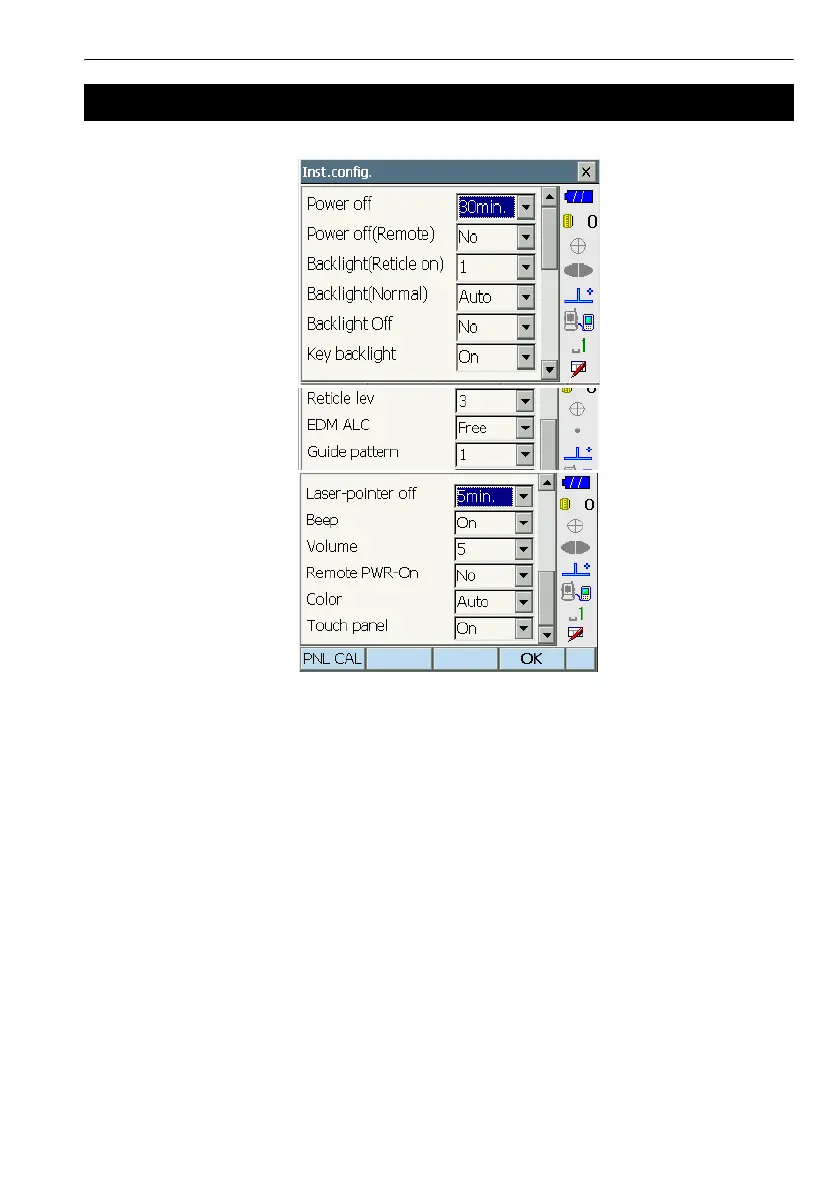
Items set and options (*: Factory setting)
Power off & : No/5min./10min./15min./30min.*
Power off (Remote)& : No*/5min./10min./15min./30min.
Backlight (Reticle On) & : 0 to 8 (1*) (Brightness level on pressing {J})
Backlight (Normal) & : 0 to 8 / Auto (Auto*)
Backlight Off & : No*/30sec/1min./5min./10min.
Key backlight & : Off/On*
Reticle lev & : 0 to 5 level (3*)
EDM ALC & : Free*/Hold
Guide pattern : 1* (simultaneous)/2 (alternating)
Laser-pointer off & : No/1min./5min.*/10min./30min.
Beep : On*/Off
Volume : 1 to 5 (3*)
Remote PWR-On : Yes/No*
Color & : 1/2 (monochrome) / Auto (Auto*)
Touch panel : On (fixed)
$
•Press [PNL CAL] to display the touch panel calibration screen.
C"8.1 Configuring the Touch Panel"
20.2 Instrument Configuration



 To Next Page