5
Instruction
1.
It is necessary to be reset manually after
the initial installation and power off.
Note: The anti-Collision function is not enabled during all resets. Please note that there is a potential risk
of pinching in this case, and be sure no obstacles in the desk’s path.
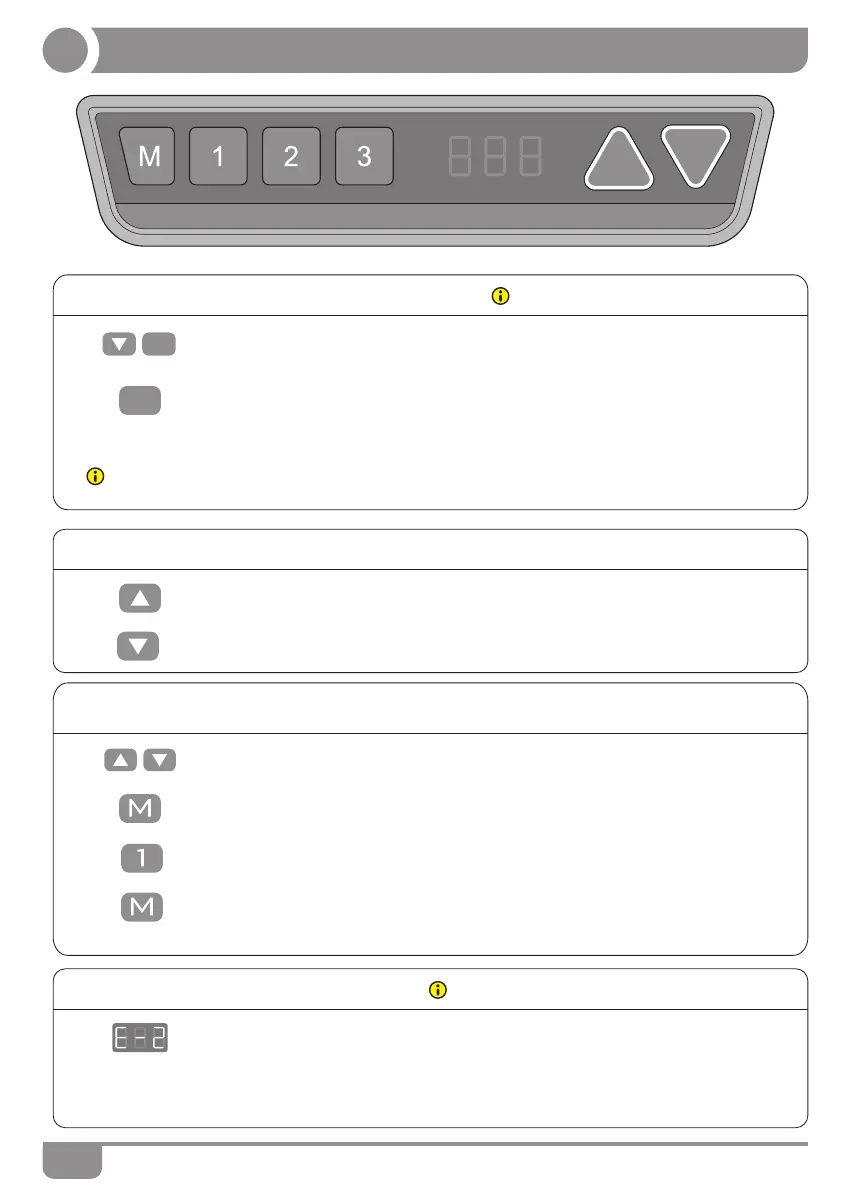
● Manual Reset
• Keep pressing down key till display shows “E-1” and “rES” alternately and
release the key.
• Keep pressing down key, the desktop will move slowly down and return back
till the display shows “ 70(27.6'') ”.
2.
• Release the key , the height-adjustable desk can be used normally.
3.
• Once the desktop encounters any obstacle in its path, the screen displays
"E-2".
1.
Before use, please make sure removing obstacle in
advance and human body is in the safe position.
● Anti-Collision function
• The desktop will move a defined distance in opposite direction, and it would
be used normally after removing the obstacle.
● Saving position
1. • Adjust the desktop to the height you want to save.
2. • Keeping pressing “M” key , till the display will show “S --”.
• Press "1" , and the display will show alternately as “S-1” and the desktop
height.
3.
• Keep pressing up key till the required height is reached.
1.
● Up and Down
• Keeping pressing down key till the required height is reached.
2.
rES
70
• Press “M” key, the first memory position is set successfully .Similar progress
for 2 and 3 memory positions.
4.


 To Next Page