This document is an operation manual for the DF02.01 Height-Adjustable Desk, providing instructions for installation, operation, and troubleshooting.
Function Description:
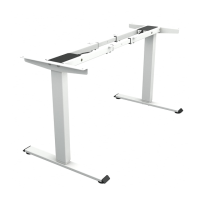
The DF02.01 is an electric height-adjustable desk designed to allow users to easily change the desk's height to suit their needs, promoting ergonomic working positions. It features a control unit with a digital display and memory presets for convenient height adjustments. The desk includes an anti-collision function for safety and the ability to set container and self-stop positions to limit movement.
Important Technical Specifications:
- Input Voltage: 220~240VAC / 100~130VAC
- Output Voltage: 24VDC
- Max Loading: 1000N (approximately 220 lbs)
- Height Range (without desktop): 70~120 cm (27.6" ~ 47.3")
- Duty Cycle: 2 minutes on / 18 minutes off (This indicates that the motor can operate continuously for 2 minutes, followed by an 18-minute rest period to prevent overheating and ensure longevity.)
- Working Environment Temperature: 0-40°C
Usage Features:
Installation:
The installation process is designed for two people and takes approximately 25 minutes. It involves:
- Connecting Tubes: Setting the right and left tubes flat, inserting the extension tube, and pre-tightening M6*8 screws.
- Inserting Columns: Placing the columns between the left and right tubes, aligning holes, and pre-tightening M6*10 screws.
- Mounting Side Brackets: Attaching side brackets to each column and fastening with M6*10 screws.
- Attaching Feet: Lining up screw holes on the feet and columns, then fastening with M6*30 screws.
- Desktop Placement and Connections: Checking desktop width, adjusting the frame to fit (adjustable from 1088~1500mm), and fastening the frame to the desktop. The control box, handset, extension cable, and power cord are then connected. For TOPSKY boards, M6*16 screws are provided; for other boards, tapping screws are needed.
- Handset Installation and Cable Management: Installing the handset on the desktop edge to avoid interference and tidying up all power cables with cable clips.
Operation:
-
Manual Reset: Essential after initial installation or power off.
- Press and hold the "Down" key until the display shows "E-1" and "rES" alternately, then release.
- Press and hold the "Down" key again; the desk will move slowly down and then return, displaying "70" (27.6").
- Release the key; the desk is ready for normal use.
Note: The anti-collision function is not enabled during resets, so ensure no obstacles are in the desk's path.
-
Up and Down Adjustment:
- Press and hold the "Up" key to raise the desk to the desired height.
- Press and hold the "Down" key to lower the desk to the desired height.
-
Saving Position: The desk can store up to three memory positions.
- Adjust the desk to the desired height.
- Press and hold the "M" key until the display shows "S--".
- Press "1" (or "2" or "3") to save the current height to that memory slot. The display will show "S-1" (or "S-2" or "S-3") and the saved height.
- Press "M" again to confirm.
-
Anti-Collision Function:
- If the desktop encounters an obstacle during movement, the screen will display "E-2".
- The desk will move a defined distance in the opposite direction. It can be used normally after removing the obstacle.
Note: Before use, ensure obstacles are removed and human body parts are in a safe position.
-
Container and Self-Stop Positions: This function limits the desk's movement range, useful when a container or shelf is above or below the desktop.
- Press and hold the "M" key for 3 seconds until the display shows "S--" to enter the setup menu.
- Press the "Up" key until "HLP" flashes.
- Press "1" (H-P); the display shows "H-P" and the current height.
- Use the "Up" or "Down" keys to reach the desired upper limit.
- Press "M" to set the upper limit.
- To set the lower limit, press "2" (L-P) after step 1 and 2. The display will show "L-P" and current height. Keep pressing "Down" until the desired lower limit is reached, then press "M" to set it.
Note: Only enable this function when truly needed.
-
Change Displayed Unit (cm/inch):
- Press and hold the "M" key until "S--" is displayed.
- Press the "Up" key until "Unt" is displayed.
- Press "1" to set the unit to "cm". The display will show "Unt" and the height unit by "cm". Press "M" to save.
- Press "2" to set the unit to "inch". The display will show "Unt" and the height unit by "inch". Press "M" to save.
-
Amend Desktop Height Displayed: This allows adjusting the displayed height to match actual measurements.
- Press and hold the "Down" key until "E-1" and "rES" alternately display, then release.
- Press and hold the "M" key until "Ur" and "OFF" alternately display.
- Use "Up" or "Dn" several times until "End" and the current height are displayed.
- Press "1", "2", and "3" respectively to adjust the first, second, and third numbers of the displayed height. Each press increases the number by 1.
- Press "M" to save the changed height.
-
Plug Detection (E-3 rES):
- If the display shows "E-3" and "rES", it indicates a motor connection issue.
- Reconnect the main cable and wait at least 5 seconds.
- Ensure all plugs are connected.
- Follow the manual reset procedure.
-
Reset to Factory Setting:
- Press and hold the "M" key until the display shows "FAC".
- Press "M" again to reset the control unit to factory settings, including memory positions, container, and self-stop positions.
Maintenance Features:
-
Troubleshooting Codes:
- rES: Manual resetting required.
- ovr: Overloading. Remove load from the desktop until it is less than 800N (175 LBS) for further operation.
- E-2: Anti-Collision function activated. Remove the obstacle for normal use.
- dut: Operated continuously without suitable rest. Allow the desk to rest for approximately 15 minutes.
- E-4 / The height between two legs exceed 1 inch: Stop operation and perform a manual reset.
- E-3: Check cables and ensure they are well connected. Perform a manual reset.
-
General Cautions:
- Keep children and pets away during operation.
- Unplug the power cord during thunderstorms or if not in use for a long time.
- Ensure the desktop does not touch the wall.
- Ensure no obstacles are in the desk's path, and no objects are above 20" under the desk.
- Keep products away from corrosive gas, liquid, and dusty objects.
- Do not disassemble the product privately to avoid damage or injury.
- Read instructions carefully to prevent damage or injury from abnormal operation.
- Manual reset is required after initial installation or power off.
Warranty:
The product comes with a 1-year warranty. Within this period, if there is functional damage, contact customer service with the Order-ID. Providing pictures or details of the issue will help facilitate a quick solution.
- Email: service@topskyfurniture.com
- Customer Service Phone: +1 725-333-1988
Additional Resources:
- Installation Guide Video: https://youtu.be/xrdva-E0nU4 (QR code provided)
- Usage (Major Functions) Video: https://youtu.be/neO0EO-4iFo (QR code provided)


 To Next Page
 General