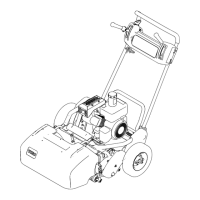
5.Squeezethehandleendsinwardandinstallthemon
themountingpins(Figure3).
Figure3
1.Handleend
6.Securethehandleendstothemountingpinswiththe
bolts,washers,andlockwasherspreviouslyremoved
(
Figure3).
7.Securethebottomofhandlearmstoeachsideof
themowerwiththeboltsandlocknutspreviously
removed(Figure3).Ensurethatyouinstallthe
bushingsinthehandlearmmountingholes.
8.Securethehandlearmstotherearoftheframewith
thehairpincottersandringpinspreviouslyremoved
(
Figure3).
9.Securethecablestothehandlewithcableties
(Figure4).
Figure4
1.Cabletie
AdjustingtheHandle
1.Removethehairpincottersfromtheringpinson
eachsideofthemower(Figure2).
2.Whilesupportingthehandle,removetheringpins
fromeachsideandraiseorlowerthehandletothe
desiredoperatingposition(
Figure2).
3.Installtheringpinsandhairpincotters.
2
InstallingtheKickstand(Model
04035Only)
Partsneededforthisprocedure:
1Kickstandassembly
1
Spring
Procedure
Note:Thefastenersareshippedlooselyinstalledonthe
kickstandassembly.
1.Hookspringintoholeinspringbracketandonto
springretainerwhilealigningkickstandwith
mountingholesinrearframe(
Figure5).
Figure5
1.Kickstand
3.Springretainer
2.Springbracket4.Spring
2.Mountthekickstandtoeachsideoftheframewith
abolt,lockwasher,spacer,atwasherandlocknut
(Figure5).Positionthespacerinthekickstand
mountinghole.
10


 To Next Page