1
InstallingtheWeight
Partsneededforthisprocedure:
4
Bolt(3/8x1-1/4inches)
4
Locknut(3/8inch)
1
Leftweightmountingbracket
1Rightweightmountingbracket
4Washers
1Weightbracket
2
Bolt(3/8x1inch)
1Flatweight
1
Suitcaseweight
1Keyedcrossbar
Procedure
Note:Thisprocedureisonlyformodelswithcontrol
levers.Steeringwheelmodelsdonotneedweights
installed.
CAUTION
Thebaggerchangestheweightdistributionof
themachine.Operatingthemachinewithout
thefrontweightsmaycauseanunstable
conditionwhichcouldresultinalossof
control.
Ensurethefrontweightsareproperlyinstalled
beforeoperatingthemachinewiththebagger
attachment.
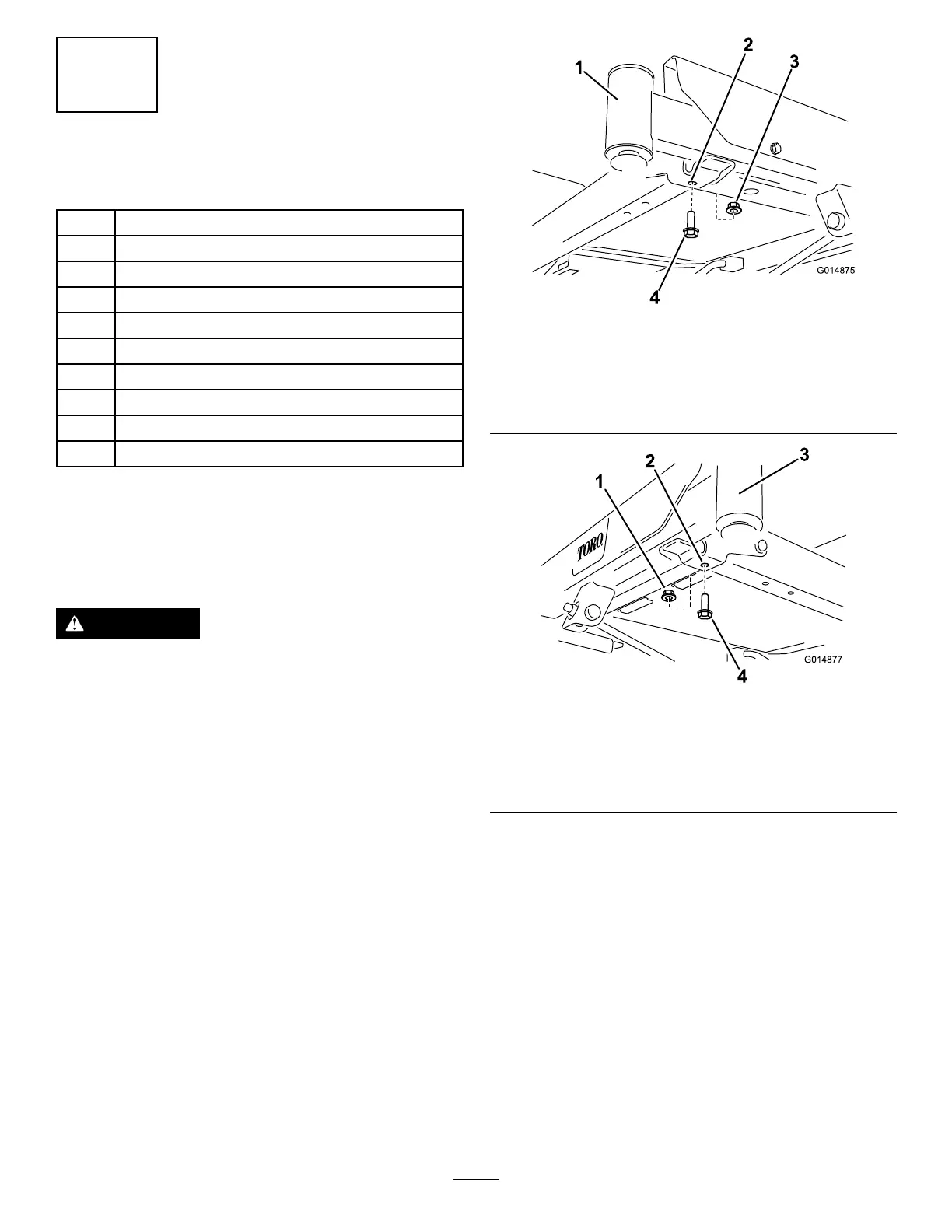
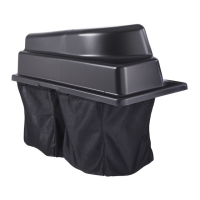
1.Locatethefrontboltsontheundersideofthe
frame(Figure3andFigure4).
2.Removethe2bolts(3/8x1inch)and2locknuts
(3/8inch).Retainthelocknuts.
g014875
Figure3
1.Front-rightcaster(castor
forkandwheelnotshown
forclarity)
3.Locknut(3/8inch)
2.Fronthole,rightside
4.Bolt(3/8x1inch)
g014877
Figure4
1.Locknut(3/8inch)3.Frontleftcaster(castor
forkandwheelnotshown
forclarity)
2.Fronthole,leftside4.Bolt(3/8x1inch)
3.Locatetheleftandrightweight-mounting
bracketsinlooseparts.
4.Installtheleftbrackettotheundersideofthe
frameusing2bolts(3/8x1-1/4inches),2
washersand2locknuts(3/8inch)(Figure5).
Note:Use1locknutfromloosepartsand1
locknutthatyoupreviouslyremoved.
5


 To Next Page