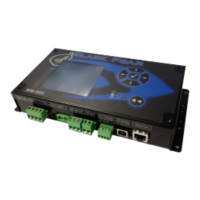
BN interface Installation Manual
15
-EN
3-2. LED
4 Factory default settings
LED LED color Use
POWER Red Power indicator
LINK(Uh) Orange Uh Line communication status indicator
ERROR Red Uh Line communication error indicator
CPU Green Communication status indicator in the BN interface
L1 Green BACnet communication status indicator
L2 Red BACnet communication status indicator, setting error indicator
/
/
&38
/,1.8K
32:(5
(5525
䣒䣑䣙䣇䣔 䣎䣋䣐䣍䢪䣗䣪䢫 䣅䣒 䣗
(5525
䣒䣑䣙䣇䣔 䣎䣋䣐䣍䢪䣗䣪䢫 䣅䣒䣗
(5525
No. Item Factory default setting
1 IP address
IP address 192.168.1.100
Subnet mask 255.255.255.0
2 UDP port 47808 (0xBAC0)
3 Device object instance number 100
4 Address setting switch 1
5 Test switch All OFF
6 Uh Line termination resistance select switch OFF


 To Next Page
 Loading...