41-EN
ENGLISH
<Delete>
L Push a number (1 to 20) whose pattern you
want to delete.
The schedule list ranges on two pages.
M Switch the list using the [Previous ▲] and
[Next ▼] buttons.
The Detail Setting screen (Fig. 24-3) appears.
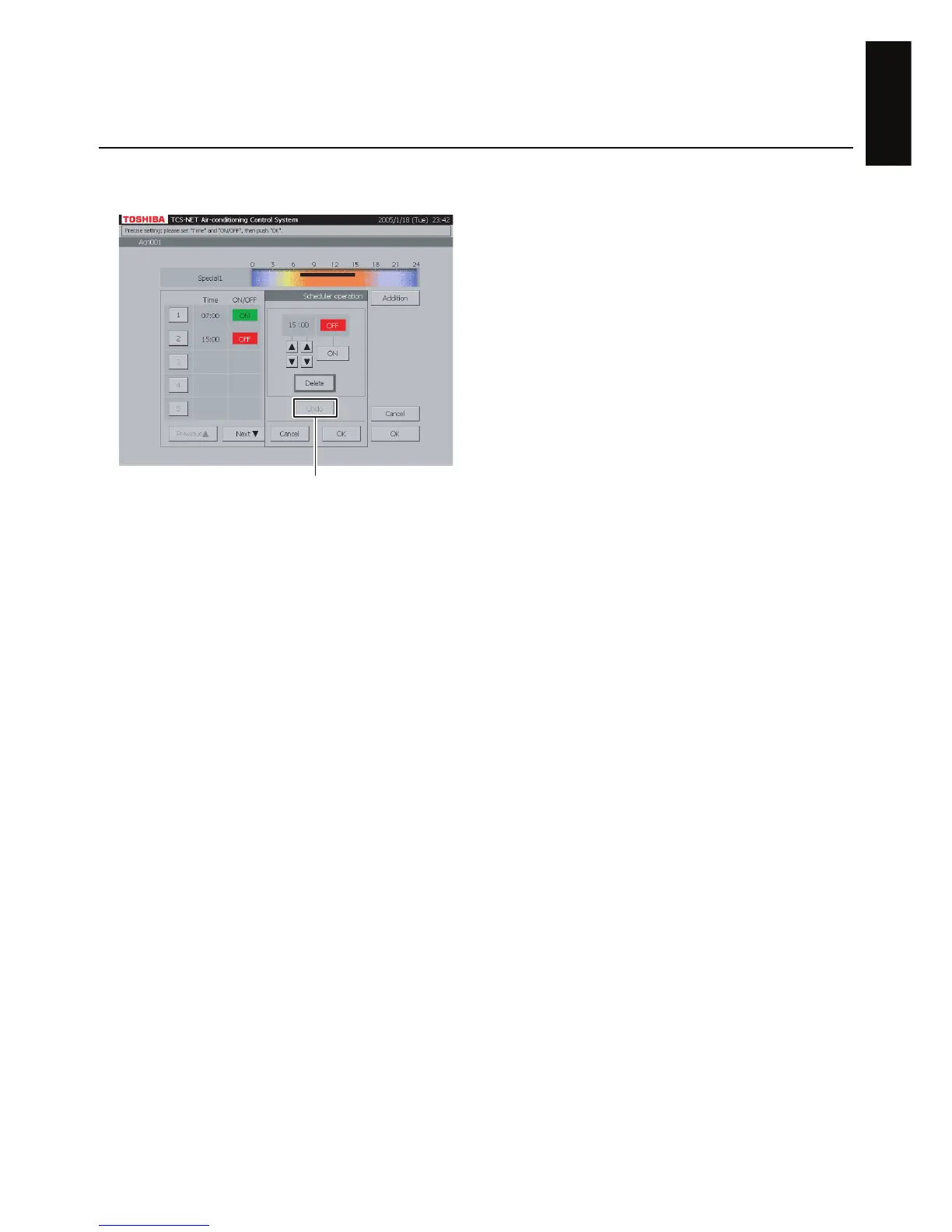
N Push [Delete].
The outline of the [Delete] button is highlighted
gray (Fig. 24-4).
To undo the deletion to the previous state, push
[Undo].
O Push [OK] on the Detail Setting screen to delete
the selected pattern.
If you do not delete the pattern, push [Cancel]
on the Detail Setting screen.
P Confirm the addition, change or deletion setting,
and then push [OK].
If you cancel the addition, change or deletion
setting, push [Cancel].
Fig. 24-4 Master Schedule Detail Setting
Screen (Delete Operation)
To undo (N)


 To Next Page
 Loading...