EN-72
Other Settings (continued)
HOW TO OPERATE (continued)
51
Version display
The version of TCS-NET Air-conditioning Control
System can be checked.
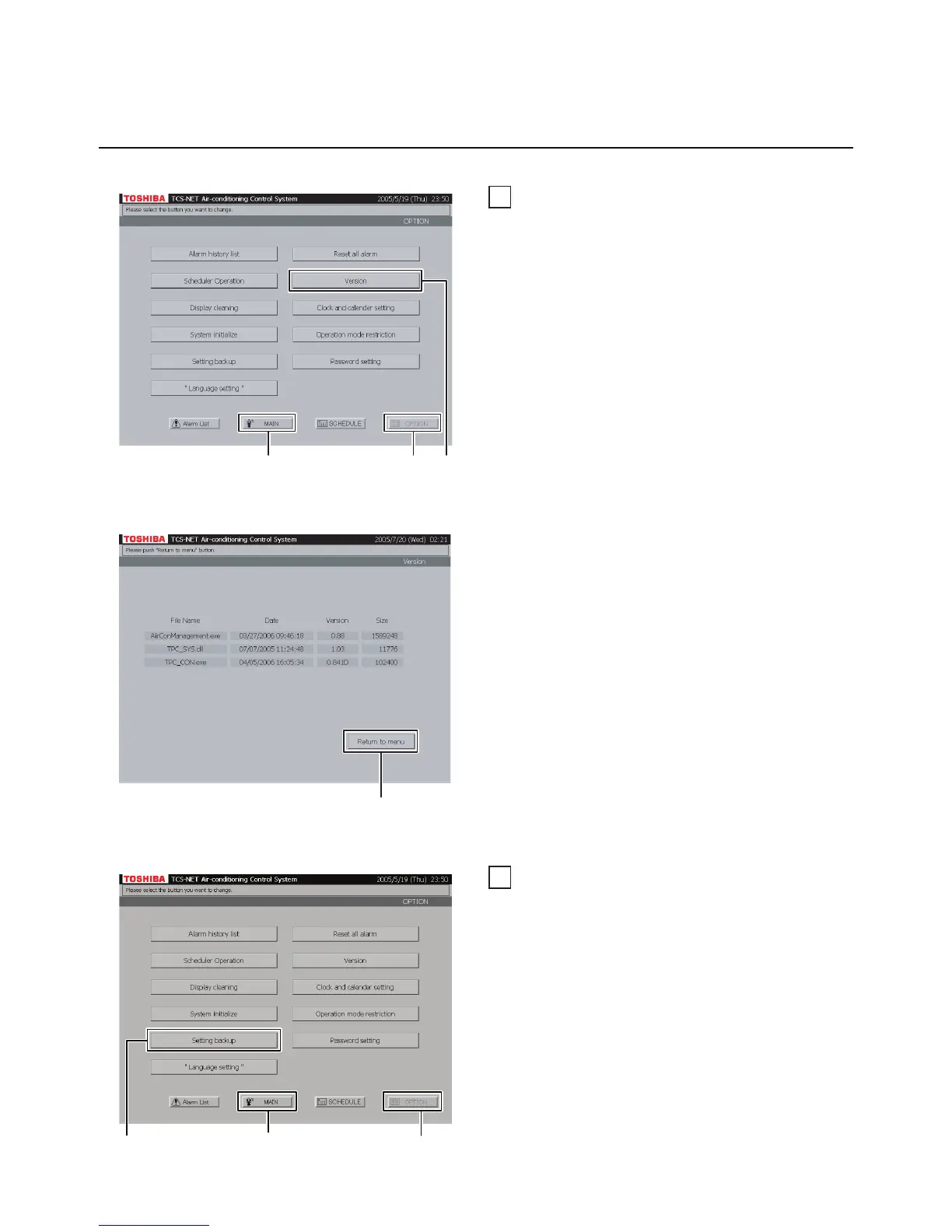
A Push [OPTION]. The Menu Screen (Fig. 51-1)
appears.
To return to the Monitoring Screen, push [MAIN].
B Push [Version] to display the Version screen
(Fig. 51-2).
Fig. 51-2 Version Screen
Fig. 52-1 Menu Screen
Fig. 51-1 Menu Screen
52
Backup of setting information
Used when creating the backup data for the air
conditioner setting information (an address and
schedule) stored in CF (Compact Flash) card.
A Push [OPTION]. The Menu Screen (Fig. 52-1)
appears.
To return to the Monitoring Screen, push [MAIN].
B Push [Setting backup] to display the
Confirmation Message screen (Fig. 52-2).
C Push [Return to menu] to return to the Menu
Screen (Fig. 51-1).
A
To return to Monitoring screen (A)
B
C
To return to Monitoring screen (A)
BA


 To Next Page
 Loading...