4.USING TEMPLATES
Using Scan Templates 97
4 USING TEMPLATES
When the equipment has scanned more than 1000 pages in a job, the “The number of originals
exceeds the limit. Do you want to save stored originals?” message appears. If you want to save
the scans, press [YES].
When the temporary workspace is full on the equipment’s hard disk, a message appears and the
job is canceled. The available workspace can be viewed on the TopAccess [Device] tab.
If the number of jobs waiting to store scans in the equipment’s hard disk exceeds 20, a message
appears to indicate that the equipment’s memory is full. In this case, wait a while until memory
becomes available again or delete unnecessary jobs from [JOB STATUS].
Using templates for Scan to E-mail (When SMTP is selected for authentication method)
The procedure for using templates for the Scan to E-mail function differs slightly when the “User
Authentication for Scan to Email” setting on TopAccess is set to use SMTP to authenticate users. In this case,
follow the steps below.
1
Place the original(s).
For help, refer to the Quick Start Guide.
3
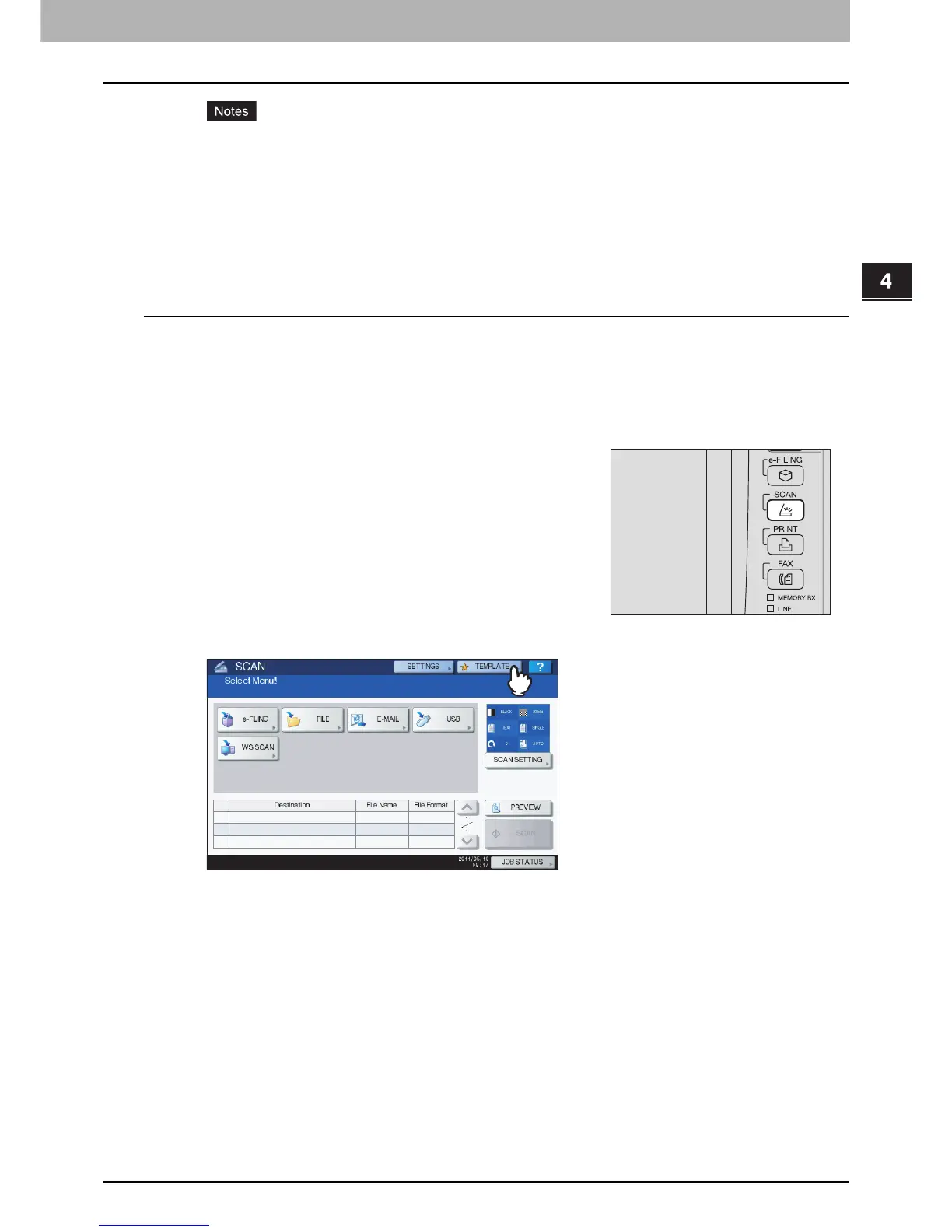
On the touch panel, press [TEMPLATE] to display the TEMPLATE menu.
2
On the control panel, press the [SCAN] button to
enter the SCAN menu.



 To Next Page
 Loading...






