EasyManua.ls Logo

Toshiba PC-E70 - Operating Controls; Front View Controls; Back Panel Connections

Toshiba PC-E70
18 pages
Print Icon
To Next Page IconTo Next Page
To Previous Page IconTo Previous Page
Loading...
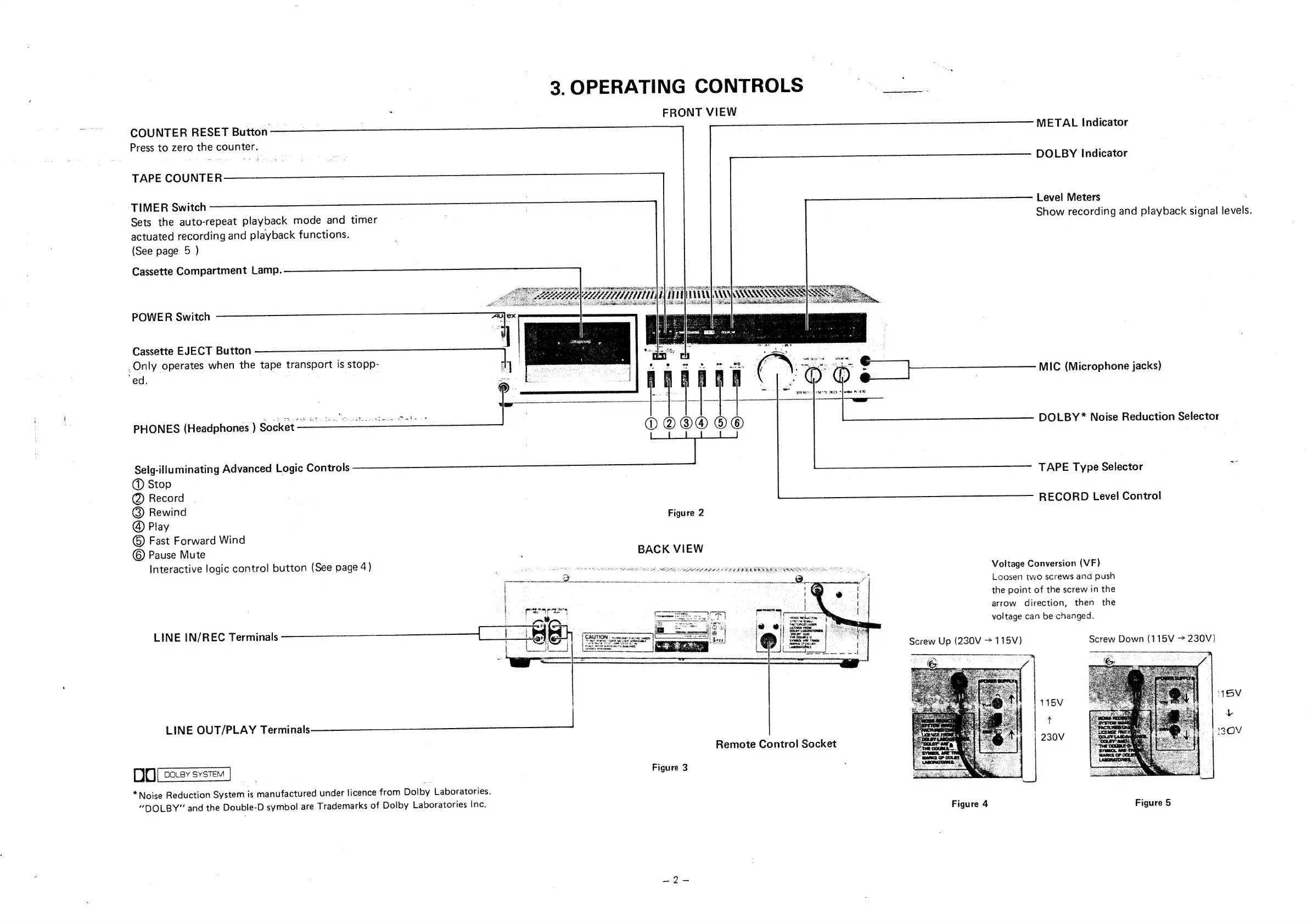
3.
OPERATING
CONTROLS
:
FRONT
VIEW
COUNTER
RESET
Button
METAL
Indicator
Press
to
zero
the
counter.
DOLBY
Indicator
TAPE
COUNTER
Level
Meters
TIMER
Switch
Show
recording
and
playback
signal
levels.
Sets
the
auto-repeat
playback
mode
and
timer
actuated
recording
and
playback
functions.
(See
page
5
)
Cassette
Compartment
Lamp.
POWER
Switch
ine.
Cassette
EJECT
Button
a
_Only
operates
when
the
tape
transport
is
stopp-
|
‘ed.
f;
oO
©
~
+
i
eee
MIC
(Microphone
jacks)
DOLBY*
Noise
Reduction
Selector
PHONES
(Headphones
)
Socket
——
Selg-illuminating
Advanced
Logic
Controls
@
Stop
@
Record
@
Rewind
Figure
2
@
Play
©
Fast
Forward
Wind
©
Pause
Mute
.
BACK
VIEW
Interactive
logic
control
button
(See
page
4)
;
er
Terre!
meee
TT
ee
Sree
ean
Ren
eee
Voltage
Conversion
(VF)
a]
Loosen
two
screws
and
push
the
point
of
the
screw
in
the
arrow
direction,
then
the
voltage
can
be
changed.
TAPE
Type
Selector
RECORD
Level
Control
pescapesens
a,
LINE
IN/REC
Terminals
an
|
t
1
St
|
a
Screw
Up
(230V
>
115V)
Screw
Down
(115V
>
230V)
LINE
OUT/PLAY
a
ee
eee
ae
DO
assser]
Figure
3
*
Noise
Reduction
System
is
manufactured
under
licence
from
Dolby
Laboratories.
“DOLBY”
and
the
Double-D
symbol
are
Trademarks
of
Dolby
Laboratories
Inc.
Figure
4
Figure
5
Remote
Control
Socket

Related product manuals