SET DATA
SETTING
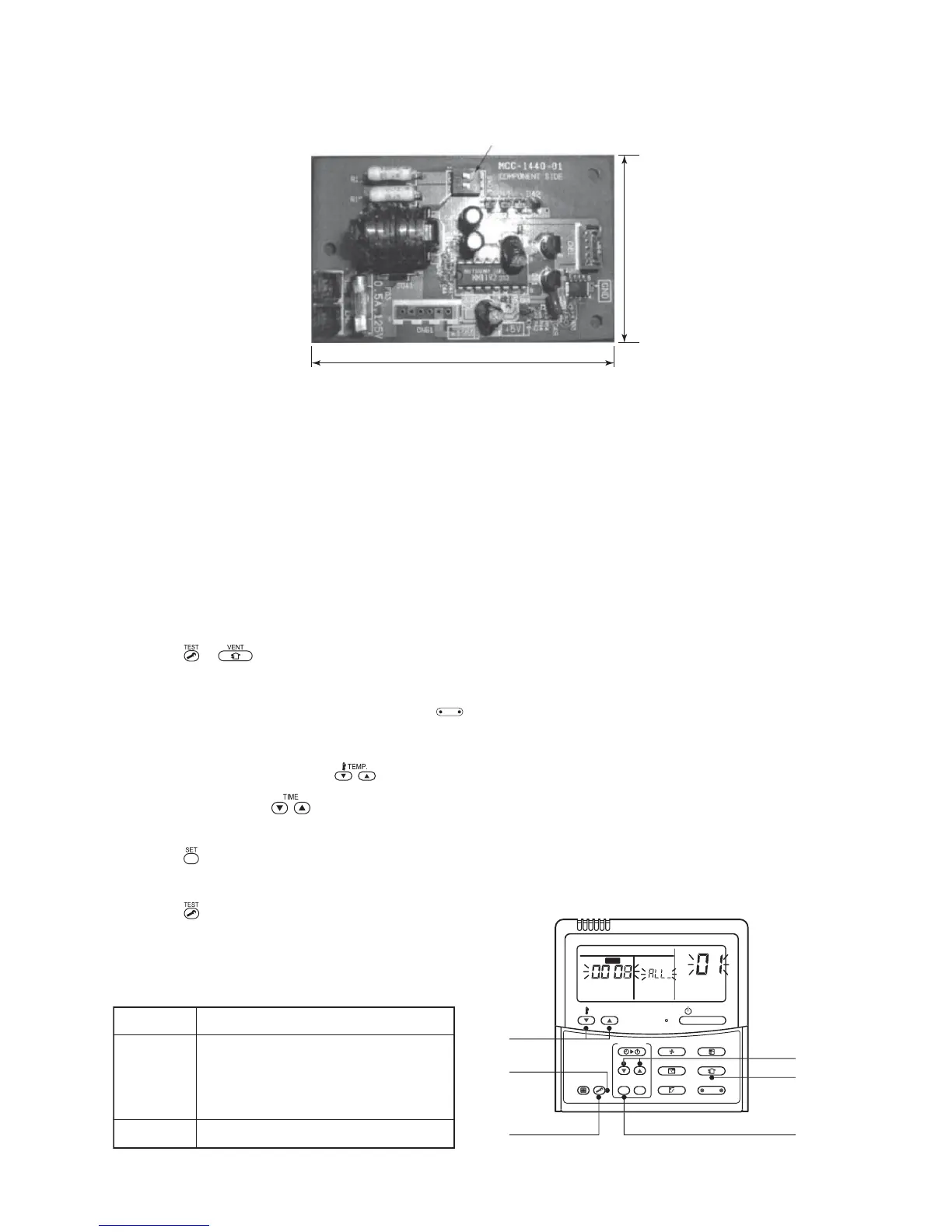
6. External view of P.C. board assembly
7. Address setup
In addition to set up the central control address, it is necessary to change the indoor unit number.
(Line/Indoor/Group address). For details, refer to 1:1 model connection interface Installation Manual.
9-3. How to Set up Central Control Address Number
When connecting the indoor unit to the central control remote controller using 1:1 model connection interface,
it is necessary to set up the central control address number.
• The central control address number is displayed as the line No. of the central control remote controller.
How to set up from indoor unit side by remote controller
<Procedure> Perform setup while the unit stops.
1 Push + buttons for 4 seconds or more.
When group control is executed, first the unit No. is displayed and all the indoor units in the group control
are selected. In this time, fans of all the selected indoor units are turned on. (Fig. 1)
(Keep ALL displayed status without pushing
UNIT LOUVER
button (button of the left side).)
In case of individual remote controller which is not group-controlled, Line address and Indoor unit address
are displayed.
2 Using temperature setup buttons, specify CODE No.
0303
0303
03.
3 Using timer time buttons, select the SET DATA.
The setup data is shown in the table below (Table 1).
4 Push button. (OK if display goes on.)
• To change the item to be set up, return to Procedure 2.
5 Push button.
The status returns to usual stop status.
Terminator (SW01)
52
85



 To Next Page