– 84 –
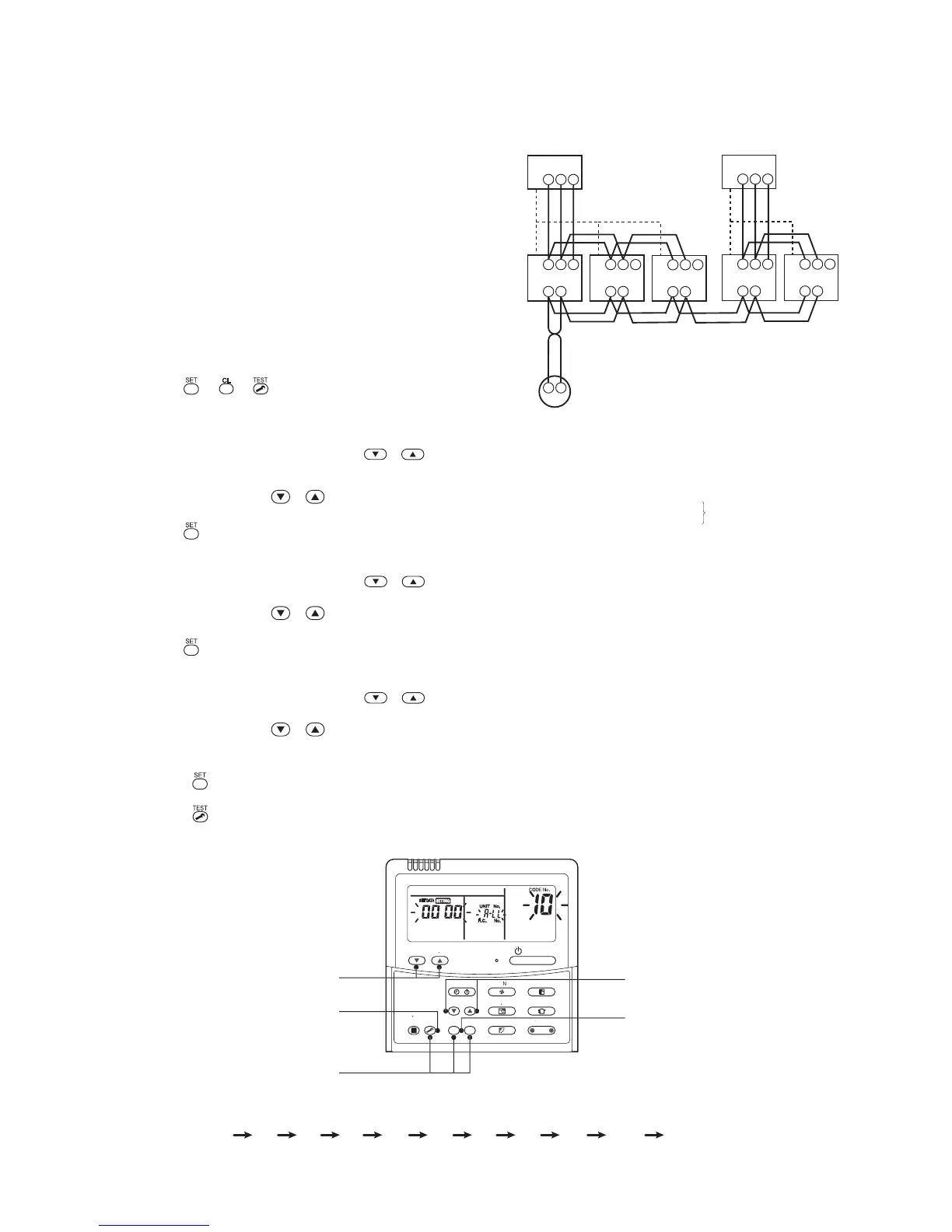
10-3. Address Setup (Manual Setting from Remote Controller)
(Example of 2-lines wiring)
(Real line: Wiring, Broken line: Refrigerant pipe)
For the above example, perform setting by
connecting singly the wired remote controller
without remote controller inter-unit wire.
Group address
Individual : 0000
Header unit : 0001
Follower unit : 0002
In case of group control
Outdoor
Indoor
A B
A B
1 2 3
Indoor
A B
1 2 3
Indoor
A B
1 2 3
Indoor
A B
1 2 3
1 2 3
Outdoor
1 2 3
Remote controller
Line address → 1
Indoor unit address → 1
Group address → 1
1
2
2
1
3
2
2
1
2
2
2
2
Indoor
A B
1 2 3
<Operation procedure>
1 2 3 4 5 6 7 8 9 10 11 END
1
3, 6, 9
END 11
2, 5, 8
4, 7, 10
In case that addresses of the indoor units will be
determined prior to piping work after wiring work
• Set an indoor unit per a remote controller.
• Turn on power supply.
1 Push + + buttons simultaneously for 4
seconds or more.
2 (Line address)
Using the temperature setup
/ buttons,
set 12 to the CODE No.
3 Using timer time / buttons, set the line address.
4 Push button. (OK when display goes on.)
5 (Indoor unit address)
Using the temperature setup
/ buttons, set
1313
1313
13 to the CODE No.
6 Using timer time / buttons, set 1 to the line address.
7 Push button. (OK when display goes on.)
8 (Group address)
Using the temperature setup
/ buttons, set
1414
1414
14 to the CODE No.
9 Using timer time / buttons, set
00000000
00000000
0000 to Individual,
00010001
00010001
0001 to Header unit, and
00020002
00020002
0002 to
Follower unit.
10
Push button. (OK when display goes on.)
11
Push button.
Setup completes. (The status returns to the usual stop status.)



 To Next Page