– 85 –
10-4. Confirmation of Indoor Unit No. Position
1. To know the indoor unit addresses though position of the indoor unit body is recognized
• In case of individual operation (Wired remote controller : indoor unit = 1 : 1)
(Follow to the procedure during operation)
1 2
END
Operation
<Operation procedure>
2
1
<Procedure>
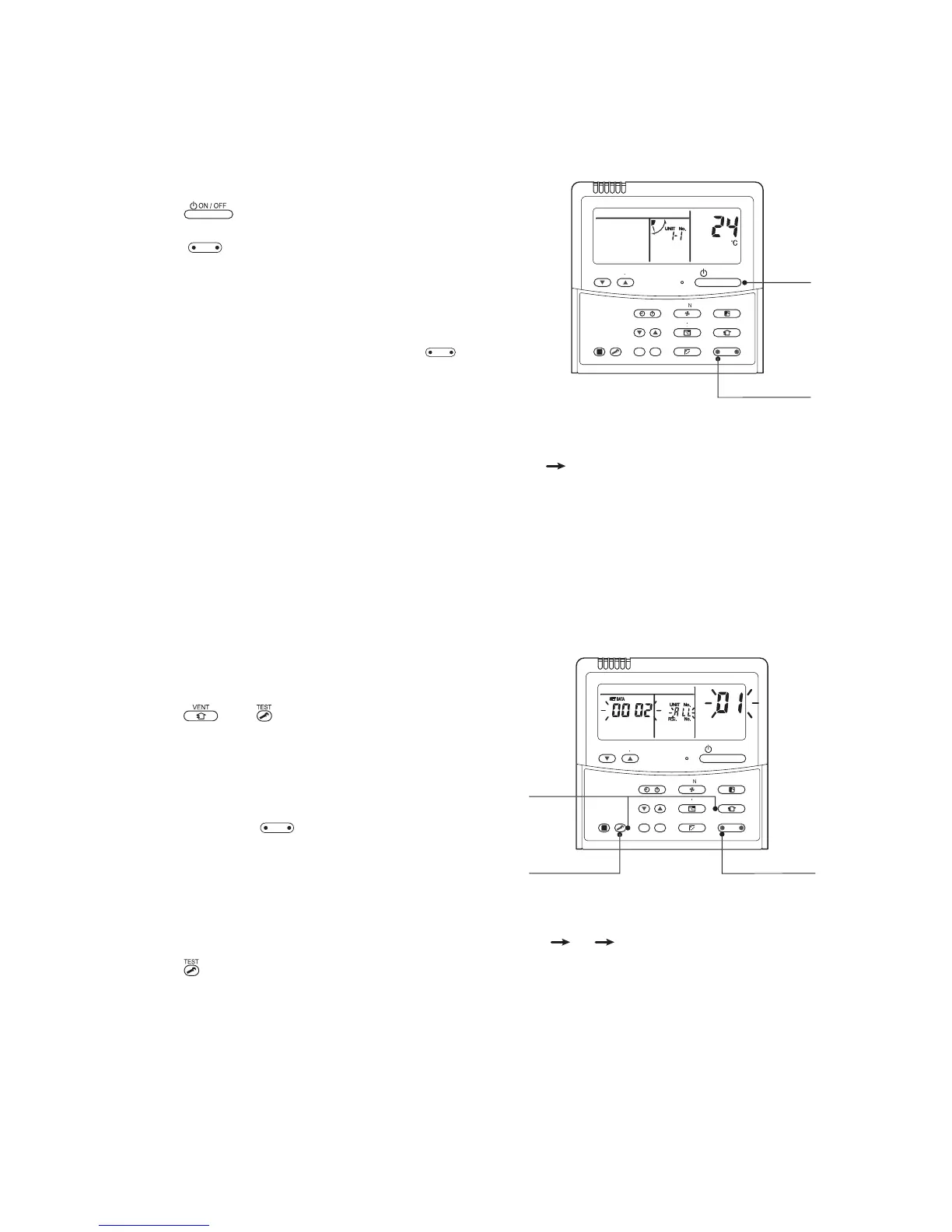
1 Push button if the unit stops.
2 Push
UNIT LOUVER
button (button of the left side).
Unit No. 1-1 is displayed on LCD.
(It disappears after several seconds.)
The displayed unit No. indicate line address and indoor unit
address. (When other indoor units are connected to the
identical remote controller (Group control unit), other unit
numbers are also displayed every pushing
UNIT LOUVER
button
(button of the left side).
2. To know the position of indoor unit body by address
• To confirm the unit No. in the group control
(Follow to the procedure during operation) (in this procedure, the indoor units in group control stop.)
<Procedure>
The indoor unit numbers in the group control are
successively displayed, and fan, louver, and drain pump
of the corresponding indoor unit are turned on.
(Follow to the procedure during operation)
1 Push and buttons simultaneously for
4 seconds or more.
• Unit No. ALL is displayed.
• Fans and louvers of all the indoor units in the group
control operate.
2 Every pushing
UNIT LOUVER
button (button of the left
side), the unit numbers in the group control
are successively displayed.
• The unit No. displayed at the first time indicates the
header unit address.
• Fan and louver of the selected indoor unit only
operate.
3 Push button to finish the procedure.
All the indoor units in the group control stop.



 To Next Page