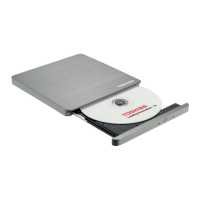
The Toshiba XM-6201B is a SCSI CD-ROM drive designed for installation in personal computers. This manual provides comprehensive instructions for setting up, installing, and using the drive, along with detailed technical specifications and care guidelines.
Function Description
The XM-6201B is a 32X speed SCSI CD-ROM drive, capable of reading data from various CD-ROM formats. It connects to a computer via a SCSI interface card, allowing for efficient data transfer with minimal CPU usage, making it suitable for demanding applications such as databases, games, and video. The drive supports audio CD playback through a sound card and speakers, and includes a headphone socket and volume control for direct audio output.
Important Technical Specifications
- Applicable Disk Formats: Red-book, Yellow-book, CD-ROM XA, CD-I Bridge (Photo-CD, Video-CD), CD-I, CD-I Ready, CD-G, and Multisession (Photo-CD, CD-Extra, CD-RW, CD-R).
- Data Capacity (Yellow-book): 2048 bytes/block (mode 1), 2336 bytes/block (mode 2).
- Rotational Speed:
- 1X (CLV): Approx. 200 to 530 rpm
- 6-10X (PCAV): Approx. 2,000 to 3,000 rpm
- 13.8-32X (CAV): Approx. 6,900 rpm
- Transfer Rate:
- Sustained block transfer rate: 75 blocks/s (1X), Approx. 450-750 blocks/s (6-10X), Approx. 1,035-2,400 blocks/s (13.8-32X).
- Sustained data transfer rate (mode 1): 150 Kbytes/s (1X), Approx. 900-1,500 Kbytes/s (6-10X), Approx. 2,070-4,800 Kbytes/s (13.8-32X).
- Sustained data transfer rate (mode 2): 171 Kbytes/s (1X), Approx. 1,026-1,710 Kbytes/s (6-10X), Approx. 2,359-5,472 Kbytes/s (13.8-32X).
- Burst (SCSI-2 interface): 5 Mbytes/s (async), 10 Mbytes/s (sync).
- Access Time (32X):
- Average random access time: 90 ms Typ.
- Average random seek time: 85 ms Typ.
- Average full stroke access time: 140 ms Typ.
- Data Buffer Capacity: 256 Kbytes.
- Disk Loading: Auto front loading (open tray).
- Air Flow: Not required.
- Acoustic Noise: 45 dB (IEC 179 A) max at 1 metre.
- Power Supply: +5V DC, +12V DC.
Reliability:
- Hard Read Error Rate: Mode 1: Less than 10^-15, Mode 2: Less than 10^-12 (allowing 5 retries).
- Mean Time Between Failures: 100,000 power-on hours.
Power Supply, I/O Terminals (bare drive):
- Voltage: +5V ± 5% operating, ± 8% start; +12V ± 5% operating, ± 8% start.
- Current (typical):
- Idle (laser off, motor off): +5V 0.33 A, +12V 0.08 A.
- Continuous read (data/audio): +5V 0.14 A (1X), +12V 0.43 A (1X).
- Pause (laser on, motor on): +5V 0.48 A (13.8-32X), +12V 0.40 A (13.8-32X).
- Average (20% random access): +5V 0.54 A (13.8-32X), +12V 0.46 A (13.8-32X).
- Maximum (100% random access): +5V 0.55 A (13.8-32X), +12V 0.61 A (13.8-32X).
- Peak in executing access (10 to 300ms): +5V 1.13 A (13.8-32X), +12V 1.19 A (13.8-32X).
- Signal Interface Connector: Complies with SCSI-2 specification.
- Headphone Output Level: 0.9 Vrms typical (load = 100 ohm).
Environment:
- Temperature (operating): 5 to 50°C.
- Temperature (storage): -10 to 60°C.
- Humidity (operating): 8 to 80%.
- Humidity (non-operating, wet bulb: 27°C): 5 to 95%.
Dimensions:
- Dimensions (without bezel): 146 X 41.5 X 193mm (W/H/D).
- Weight: 0.98 kg (net).
Usage Features
- SCSI-2 Interface: The drive is a SCSI-2 device, allowing connection to an existing SCSI interface card. Users need to set the SCSI ID using jumpers on the drive. Up to seven SCSI devices can be chained together.
- Tray Operation: Features an auto front-loading disk tray. To load a disk, open the tray, place the disk, and gently push the tray to close it.
- Front Panel Controls:
- Disk Tray: For loading and ejecting CDs.
- EJECT Button: Opens the disk tray. Can be inhibited via a jumper setting.
- Emergency Eject: A small opening next to the eject button allows manual disk removal in case of power failure using a pointed instrument (e.g., a straightened paper clip).
- BUSY Light: Flashes slowly when attempting to locate a disk or if the disk is dirty. Stays on during data transfer. Goes out when the drive is ready.
- Headphones Socket: For connecting headphones or external audio equipment (amplifier, cassette recorder).
- Volume Control: Adjusts the audio level from the headphones socket; does not affect the audio output from the rear connector.
- Jumper Settings:
- SCSI ID Number: Three leftmost jumpers set the SCSI ID (0-7). ID 7 is typically reserved for the interface card.
- Parity Jumper: Jumper 4 should be OFF.
- Termination Jumper: Jumper 5 should be ON if the drive is the last in a SCSI chain, OFF otherwise.
- Eject Suppression Jumper: Jumper 6 (ON) inhibits the EJECT button, giving full control to the computer. Set to OFF for button operation.
- Test Jumper: Jumper 7 should always be OFF.
- Terminator Power Supply Jumper: Supplies power to terminating resistors on the SCSI bus. Can be left ON as at least one device on the bus must supply terminator power.
- Driver Software: Compatible with DOS, Windows 3.x, Windows 95, Windows NT, and OS/2. Drivers for DOS/Windows 3.x are typically supplied with the SCSI interface card. 32-bit operating systems usually include built-in SCSI drivers.
Maintenance Features
- Care Guidelines:
- Avoid exposure to extreme temperatures, excessive dust, or high humidity.
- Do not install near devices producing strong electrical waves or magnetic fields.
- No user-serviceable parts inside.
- Install on a flat, stable surface to prevent vibration.
- Do not place reflective objects in the disk tray to avoid hazardous laser radiation exposure.
- Installation: Requires opening the computer case, finding a free half-height drive bay, connecting SCSI and power cables, and optionally a sound cable. The manual emphasizes reading all instructions before starting and ensuring the computer is switched off and disconnected from power.
- Mounting: The internal drive should be mounted within 20° of the horizontal or 10° of the vertical. It has 12 M3 screw mounts, with screw length not exceeding 3 ± 0.5mm.
- Service Procedure: The official European distributor is responsible for customer support. Users should contact their supplier for problems.
- Declaration of Conformity: The Toshiba XM-6201 complies with Council Directive 89/336/EEC (CE mark).
- Laser Safety: This is a Laser Class 1 device. Disk access uses a laser beam, but the laser poses no risk to the user. Any operation not defined in the user guide should only be attempted by an authorized Toshiba representative.

 Need help?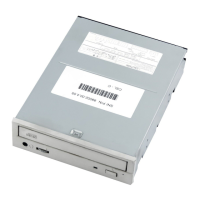

 To Next Page
 General