16
Note: When connecting the power cord, please use the pipe for
preventing cutting the power wire.
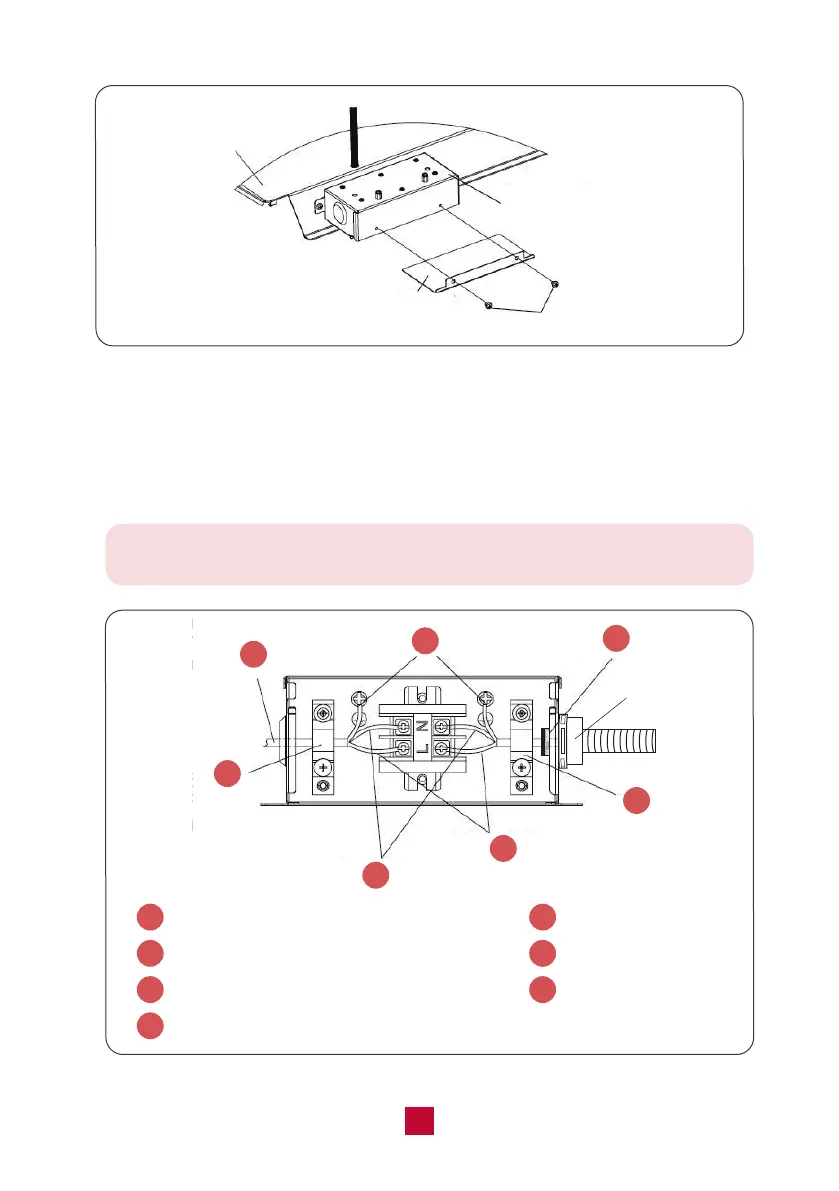
● Connect the power cord to the black, white, and ground wires found in the junction
box with a terminal board.
CAUTION: Connect black wire to black wire, white wire to white wire, and the ground
wire to earth. (see Figure 13)
Pipe
1
Power cord comes from the rooftop unit
2
Ground wire (yellow-green)
3
Power supply wire (not included)
5
Neutral wire (white)
6
Live wire (black)
7
Stain relief (clamp)
4
Stain relief (clamp)
2
1
3
4
5
6
7
Figure 13
Figure 12
Frame
Cover
Junction Box
2 Screws


 To Next Page
 Loading...