40
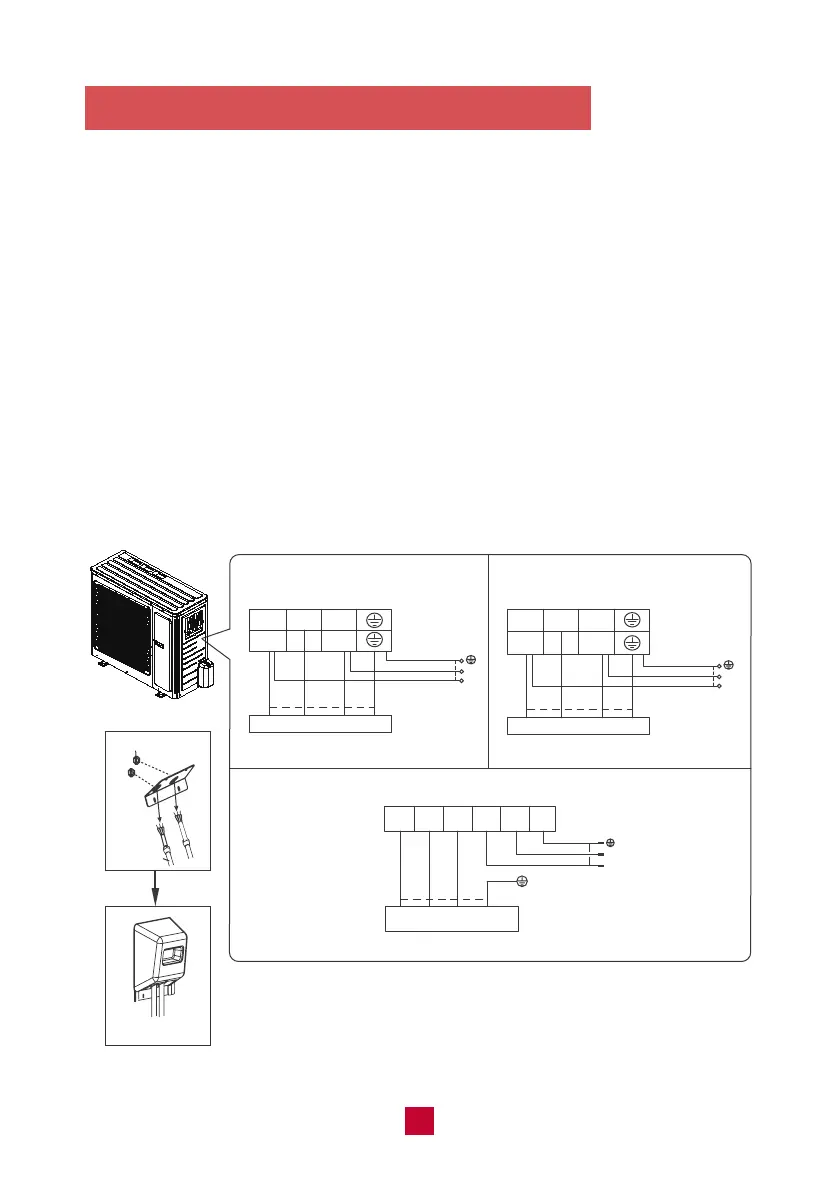
5. Connect the Signal and Power Cables
● Remove the wire cover on the outdoor unit. All wiring must be performed in
accordance with the wiring diagrams shown below.
● Match the wire colors with the labels on the terminal block and firmly screw the
U-Lug of each wire to its corresponding terminal on the terminal block.
● After checking to make sure every connection is secure, loop wires around the
terminals to secure the connection.
● Use a cable clamp to fasten the cable to the unit. Screw the cable clamp down
tightly.
● Insulate unused wires with PVC electrical tape. Arrange them so that they do
not touch any electrical or metal parts.
● Replace the wire cover on the side of the unit and screw it in place.
WIRE CONNECTING DIAGRAM
L1 L2
N L
black
GWH09AFC-A3DNA1A/O
GWH12AFC-A3DNA1A/O
N(1) 2 3
black
Indoor unit connection
lock nut
Indoor unit connection
Finish
conduit
2 3 L1 L2 G
red
black
Indoor unit connection
N(1) 2 3
black(brown)
white
(blue)
green
(yellow-green)
green
black(brown)
(
yellow-
green
)
green
(
yellow-
green
)
white
(blue)
green
(yellow-green)
L2
L1
POWER
L
N
POWER
white
(blue)
red
(brown)
white
(blue)
red
(brown)
N(1)
green(yellow-green)
GWH18AFD-D3DNA1A/O
white(blue)
black
(brown)
L2
L1
POWER
green
(brown)
(yellow-
green)
white
(blue)
GWH09AFC-D3DNA1A/O
GWH12AFC-D3DNA1A/O

 To Next Page
 Loading...