18/32
3. Adjustments of the operating lever
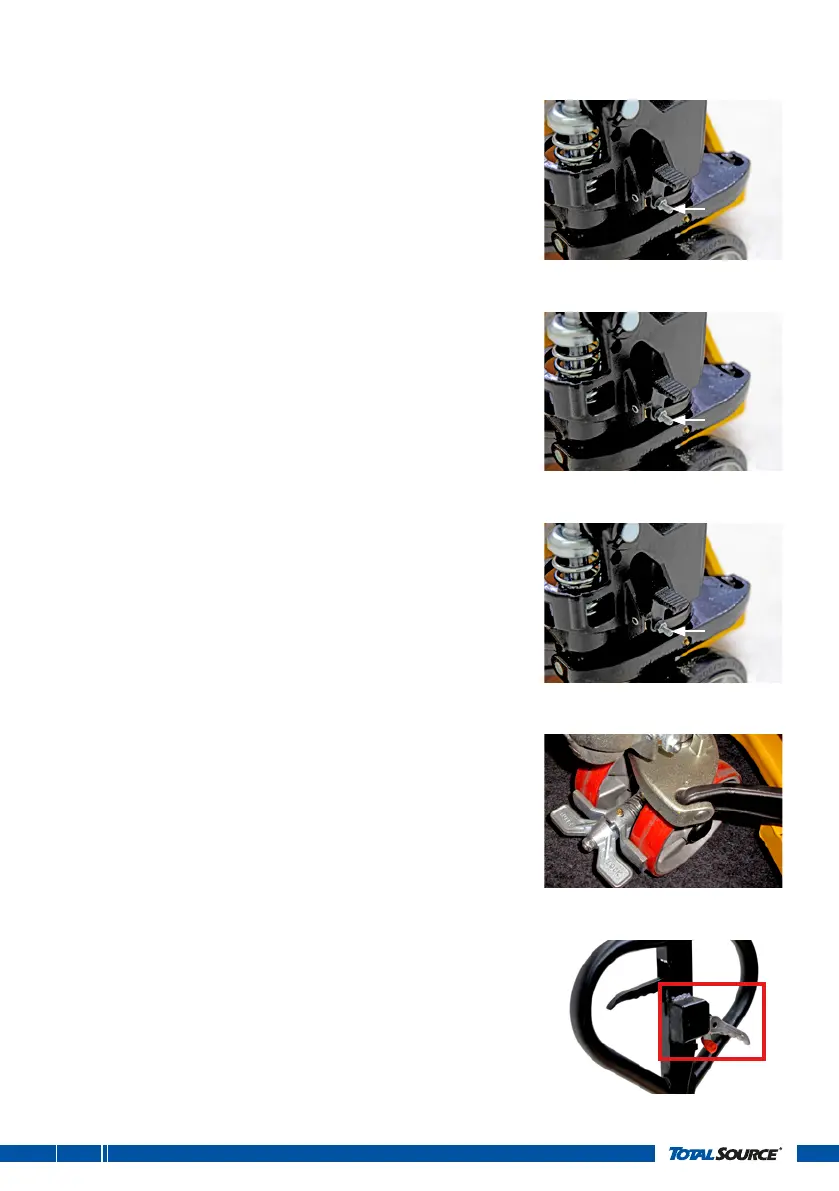
Adjustment of neutral position:
1. Place the operating lever in the normal position.
2. Push the tiller handle to the lowest position.
3. Regulate the adjusting nut and screw on the linkage so
that, when the tiller handle is pumped, the forks neither
raise nor lower.
Adjustment of lifting position:
1. Place the operating lever in the lifting position.
2. Pump the tiller handle; the linkage is not operated,
the forks raise and tilt while the release valve remains
completely closed.
3. If the forks do not lift, regulate the adjusting nut and
screw until normal lift and action is obtained.
Adjustment of lowering position:
1. Pull the operating lever in the lowering position.
2. The linkage is operated, causing the discharge and
pressure valve to open completely, and the forks to
lower.
3. If the forks don’t lower, regulate the adjusting nut and
screw until a normal lowering action is attained.
Option: foot brake
The pallet truck can be equipped with a foot brake on
the steering wheels. For assembling instructions,
seechapter5. When applied, the foot brake prevents the
pallet truck from moving.
To apply the brake, push the brake down with your feet.
Torelease the brake, pull the brake up.
Option: handbrake (for all models)
When the pallet truck is equipped with a handbrake there is
an extra lever on the handle.
To apply the brake, push the grey handle upwards.
Torelease the brake, push the red and grey handle down.


 To Next Page