EasyManua.ls Logo

TOTALINE P374-2300 - User Manual

TOTALINE P374-2300
20 pages
Print Icon
To Next Page IconTo Next Page
Loading...
Part Number P374-2300
CONTENTS
Page
GENERAL ............................................2
CONFIGURATION ....................................3-12
Thermostat Display ....................................3
Heat or Cool Indicator .................................4
Thermostat Front Panel Buttons .........................4
Thermostat Programming Buttons .......................4
Set Clock ............................................7
Programming Thermostat Schedules .....................7
OPERATION ........................................13,14
Auto-Changeover .....................................13
Two-Stage Operation ..................................13
Clock Backup ........................................13
Fan Operation .......................................13
Emergency Heat .....................................13
Electric Heat .........................................14
Holiday Mode ........................................14
Dry Contact Switch/External Device .....................14
Remote Temperature Sensor ...........................14
OWNER’S
MANUAL
CPV230
Commercial Thermostat
Manufacturer reserves the right to
discontinue, or change at any time,
specifications or designs without notice
and without incurring obligations.
REPLACEMENT COMPONENTS DIVISION
R CARRIER CORPORATION 11/97
LITERATURE NUMBER P374-3SO
PRINTED IN CHINA
Question and Answer IconNeed help?

Do you have a question about the TOTALINE P374-2300 and is the answer not in the manual?

Summary

General Thermostat Information

Thermostat Configuration Options

Thermostat Display Overview

Details the information displayed on the thermostat screen.

Heat or Cool Status Indicator

Explains the colored indicator light for heating or cooling mode.

Front Panel Button Functions

Describes the purpose and operation of the buttons on the thermostat's front panel.

Programming Buttons Access

Details how to access and use the buttons located under the thermostat cover.

Setting the Thermostat Clock

Guide on adjusting the current time and day displayed on the thermostat.

Programming Daily Schedules

Instructions for setting occupied and unoccupied time periods and temperatures.

Thermostat Operation Modes

Automatic Mode Switching

How the thermostat automatically switches between heating and cooling modes.

Two-Stage Heating and Cooling

Explanation of how the second stage of heating or cooling is activated.

Power Loss Clock Backup

How the thermostat maintains time during power interruptions.

Fan Operation Control

Details on continuous fan operation versus cycle-based operation.

Emergency Heat Functionality

Guide on activating and using the emergency heat feature.

Electric Heat Usage

Specific considerations for using the electric heat option.

Holiday Mode Scheduling

Instructions for setting and activating the holiday operating mode.

External Device Integration

How dry contact switches or external devices influence thermostat operation.

Remote Temperature Sensor Use

How to utilize an external sensor for temperature readings.

Summary

General Thermostat Information

Thermostat Configuration Options

Thermostat Display Overview

Details the information displayed on the thermostat screen.

Heat or Cool Status Indicator

Explains the colored indicator light for heating or cooling mode.

Front Panel Button Functions

Describes the purpose and operation of the buttons on the thermostat's front panel.

Programming Buttons Access

Details how to access and use the buttons located under the thermostat cover.

Setting the Thermostat Clock

Guide on adjusting the current time and day displayed on the thermostat.

Programming Daily Schedules

Instructions for setting occupied and unoccupied time periods and temperatures.

Thermostat Operation Modes

Automatic Mode Switching

How the thermostat automatically switches between heating and cooling modes.

Two-Stage Heating and Cooling

Explanation of how the second stage of heating or cooling is activated.

Power Loss Clock Backup

How the thermostat maintains time during power interruptions.

Fan Operation Control

Details on continuous fan operation versus cycle-based operation.

Emergency Heat Functionality

Guide on activating and using the emergency heat feature.

Electric Heat Usage

Specific considerations for using the electric heat option.

Holiday Mode Scheduling

Instructions for setting and activating the holiday operating mode.

External Device Integration

How dry contact switches or external devices influence thermostat operation.

Remote Temperature Sensor Use

How to utilize an external sensor for temperature readings.

Overview

The device is a TOTALINE Signature CPV230 Commercial Thermostat, designed for wall-mounted, low-voltage control of HVAC (heating, cooling, and ventilation) systems to maintain room temperature. It is a 7-day programmable thermostat, allowing for separate heating and cooling set points and auto-changeover capability to facilitate energy savings through occupied and unoccupied programming schedules.

Function Description:

The CPV230 thermostat offers comprehensive control over HVAC systems with a focus on programmability and energy efficiency. It allows users to set up to three occupied and one unoccupied time/temperature settings per 24-hour period, with programs stored for seven independent days. The internal NEVERLOST™ memory ensures that programs are retained indefinitely even during power interruptions, eliminating the need for batteries.

The thermostat features a configurable security level, which can restrict access to certain functions like changing set points or programming schedules. If specific functions are unavailable, it indicates that the security level may need to be reconfigured by an installer.

Important Technical Specifications:

  • Part Number: P374-2300
  • Memory: NEVERLOST™ internal memory for unlimited program retention during power interruptions.
  • Programmability: 7-day programmable with up to 3 occupied and 1 unoccupied time/temperature settings per 24-hour period.
  • Temperature Range: Set points can be configured between 35 to 99°F (1 to 37°C).
  • Clock Backup: Maintains time for a minimum of 48 hours without external power or batteries in case of power loss.

Usage Features:

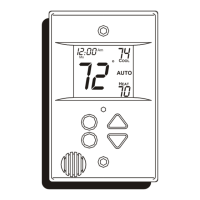
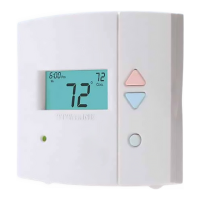
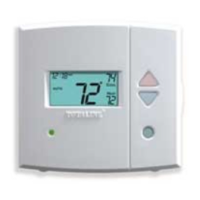
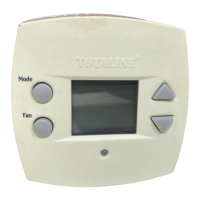
The thermostat display, located in the center of the device, provides a wealth of information including:

  • Mode: OFF, HEAT, COOL, AUTO, or PROGRAM ON.
  • Fan Setting: FAN ON or blank (auto).
  • Override Indication: Indicates when a program override is active.
  • Room Temperature: Current ambient temperature.
  • Desired Temperature: User-set temperature.
  • Service Filter Indicator: Alerts when the air filter needs attention.
  • Time of Day: Current time.
  • Day of the Week: Current day.
  • Schedule Period: Occupied 1, 2, or 3; or Unoccupied.
  • Setup Indicator: Indicates programming mode.
  • Lock Indicator: Shows when the keypad is locked.
  • Start/Stop Indicator: Used in schedule period program mode.

Front Panel Buttons:

  • UP ARROW and DOWN ARROW: Used to raise or lower the desired set point. In AUTO mode, these adjust both heating and cooling set points. In Cooling or Heating mode, they adjust only the respective set points. These buttons are also used in programming mode for scrolling through options or answering yes/no prompts.
  • OVERRIDE Button: Forces the thermostat from Unoccupied mode into Occupied 1 mode comfort settings for a default of 30 minutes. Pressing it repeatedly adds 30 minutes, up to a maximum of 4 hours. Pressing it again after 4 hours cancels override mode. During override, the Override icon and Occupied 1 icon are displayed, and the time of day alternates with minutes remaining. Set points are adjustable during override. If pressed in Occupied mode, it immediately switches to Unoccupied mode until the next Occupied start time.
  • Heat or Cool Indicator: A light on the bottom left cover that glows red for Heating mode and green for Cooling mode.

Programming Buttons (accessible under the hinged thermostat cover):

  • MODE Button: Selects the operating mode (OFF, HEAT, COOL, AUTO, PROGRAM ON). In AUTO mode, it enables automatic changeover between heating and cooling. In PROGRAM ON, it follows stored schedules.
  • FAN Button: Selects fan operation. "FAN ON" runs the fan continuously for improved air circulation during occupied schedules (except when Mode is OFF). In Unoccupied mode, the fan runs only during heating or cooling operation, even if set to FAN ON (energy-saving smart fan feature). If not set to FAN ON, the fan runs only during heating or cooling.
  • HOLIDAY Button: Places the thermostat into Holiday mode, enforcing unoccupied set points. The duration can be set from 1 to 99 days, disabling Holiday mode with a setting of 0. The thermostat enters Holiday mode at midnight of the next day after activation and remains active until midnight of the last configured day. During Holiday mode, the remaining days blink, and the "Unoccupied" icon is displayed. The Override button remains active, but the Dry Contact Switch is ignored.
  • PROGRAM Button: Used to enter programming mode for daily schedules.
  • SET CLOCK Button: Allows changing the time and day displayed on the thermostat.

Keypad Lockout:

To lock or unlock the keypad, press and hold the Mode button, then simultaneously press the UP and DOWN ARROW buttons. The "Locked" icon appears or disappears accordingly.

Operation Modes:

  • Auto-Changeover: In AUTO mode, the thermostat automatically switches between heating and cooling to maintain the desired temperature without manual intervention.
  • Two-Stage Operation: The second stage of heating or cooling activates if the first stage has been on for at least 2 minutes and the temperature differential from the set point is equal to or greater than the set point plus the deadband plus 2 degrees.
  • Emergency Heat: Available for heat pump applications. Activated by pressing and holding the Fan button, then pressing the UP button for 2 seconds. "EH" is displayed, the fan operates, and the second stage of heat is energized (compressor locked out). Only OFF and HEAT modes are available in Emergency Heat. Deactivated by repeating the same button sequence.
  • Electric Heat: If enabled in advanced setup, the fan turns on immediately with a heat demand. This feature is for electric heating applications only, not gas heat.
  • Dry Contact Switch/External Device: Allows an external device to force the thermostat into Occupied 1 mode. The Occupied 1 icon blinks each second when activated.
  • Soft Start: When multiple thermostats are controlled by a single external device, this option staggers HVAC equipment turn-on times, potentially causing a delay after entering Occupied 1.
  • Remote Temperature Sensor: If connected, the thermostat ignores its internal sensor and uses the remote sensor's reading. The degree symbol above the temperature reading blinks to indicate remote sensor use.

Programming Thermostat Schedules:

The schedule planning involves setting up to 7 days (Monday through Sunday), with each day having 2, 3, or 4 time periods (Occupied 1, 2, 3, and Unoccupied). Each occupied period has a start time, stop time, heating set point, and cooling set point. The unoccupied period has a heating set point and a cooling set point. The unoccupied time period is active when no occupied period is active.

Programming Procedure:

  1. Enter programming mode by pressing the Program button.
  2. Set the maximum number of Occupied periods (1, 2, or 3) using UP/DOWN ARROW buttons, then press Mode.
  3. Set cooling and heating set points for Occupied 1 (35-99°F/1-37°C) using UP/DOWN ARROW buttons, pressing Mode after each.
  4. Set cooling and heating set points for Unoccupied (35-99°F/1-37°C or "OF" for no unoccupied cooling/heating) using UP/DOWN ARROW buttons, pressing Mode after each.
  5. Select the starting day of the week (M-S) using UP/DOWN ARROW buttons, then press Mode.
  6. Set Start Time for Occupied 1 using UP/DOWN ARROW buttons, then press Mode.
  7. Set Stop Time for Occupied 1 using UP/DOWN ARROW buttons, then press Mode.
  8. Turn Occupied 1 period ON/OFF for the day using UP/DOWN ARROW buttons.
  9. Repeat steps for Occupied periods 2 and 3 (if selected).
  10. Copy Command: After programming a day, the "Copy" command appears. Use UP ARROW for YES to copy the schedule to the next day, or DOWN ARROW for NO to program the next day manually. The schedule can be copied until Sunday is reached; Sunday's schedule cannot be copied to Monday.
  11. After all times and set points are entered for each day, press the Program button to finish.

Schedule Overriding:

The schedule can be temporarily overridden by pressing the UP or DOWN ARROW buttons to change the desired temperature. The thermostat will use this new set point until the next scheduled time period begins.

Maintenance Features:

  • Service Filter Indicator: The thermostat includes an indicator to remind users when the air filter needs servicing or replacement.
  • Warranty: All Totaline products are backed with a one-year warranty by Carrier Corporation, covering defects in material and workmanship. This warranty covers replacement parts but excludes labor or other costs incurred for diagnosis, repair, removal, installation, shipping, servicing, or handling. It also excludes normal maintenance, damage from faulty installation, misapplication, abuse, improper servicing, unauthorized alteration, improper operation, power issues, environmental damage, or use of non-COMPANY parts. The warranty applies only to the original installation location and becomes void upon reinstallation.

Support and Troubleshooting:

In case of device malfunction, the manual recommends the following steps:

  1. Contact the installer.
  2. Contact the nearest TOTALINE distributor.
  3. Contact CARRIER CORPORATION Consumer Relations Department (P.O. Box 4808, Syracuse, NY 13221; Telephone: 1-800-227-7437).

The manual includes a section for recording unit model number, serial number, date of installation, installer, owner name, and installation address for future reference.

TOTALINE P374-2300 Specifications

General IconGeneral
BrandTOTALINE
ModelP374-2300
CategoryThermostat
LanguageEnglish

Related product manuals