TouchTunes Karaoke Installation and Setup Guide
Installing TouchTunes Karaoke
Connecting the Video Interface Module (VIM) to the location’s TV
14
Connecting the Video Interface Module (VIM) to the location’s TV
1. Consider the following, then determine where you will be placing the video interface module.
• The VIM should not be in the way of performers, and it should placed relatively close to the components it
must connect to (i.e. the location’s television and network hub).
• TouchTunes recommends mounting the VIM behind the location’s television.
2. Plug one end of the 50 foot cat-5 RJ-45 Ethernet cable into the VIM’s Ethernet port.
3. Plug the other end of the 50 foot cat-5 RJ-45 cable into the router that the Virtuo is also connected to.
4. Plug the VIM’s power supply adapter into the VIM, and plug the power supply adapter into a power socket.
5. Connect the location’s television to the VIM:
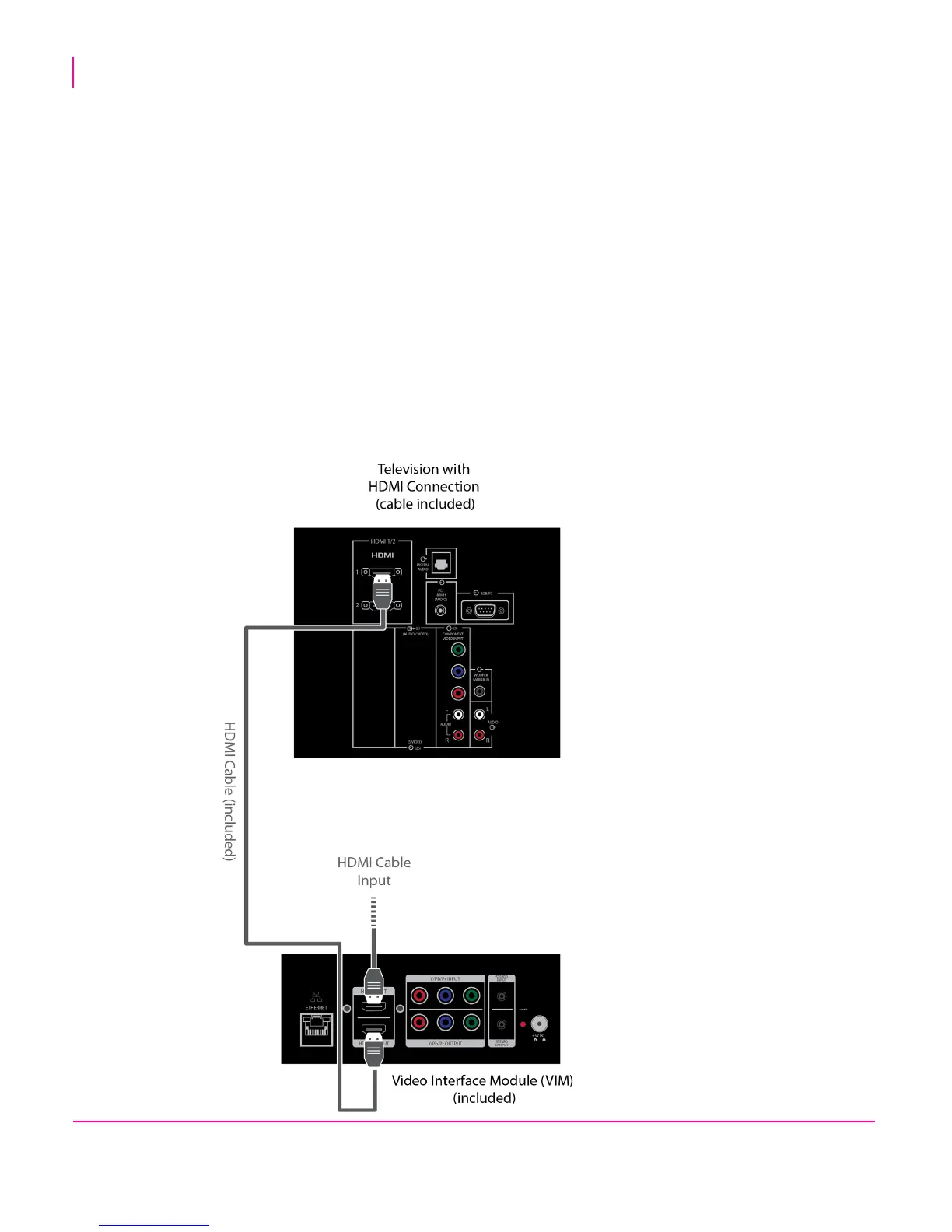
If the location’s television supports HDMI
• Unplug the HDMI cable from the IN port on the location’s television
• Connect the HDMI cable from your location’s source to the VIM’s HDMI IN port
• Plug one end of the HDMI cable provided into the VIM’s HDMI OUT port and the other end into the television’s
HDMI IN port.


 To Next Page