TouchTunes Karaoke Installation and Setup Guide
Installing TouchTunes Karaoke
Connecting Virtuo to the Location’s DHCP Network (if required)
16
Connecting Virtuo to the Location’s DHCP Network (if required)
A network running DHCP is required for each location using the Karaoke Service. The Virtuo and the VIM
must be connected to the same DHCP network.
1. If your location has a network but currently does not have any open network ports, you will be required to install
a network switch.
2. If your location has a network, but is not running DHCP, you will be required to install a router with a connection
for the Virtuo and VIM.
3. If your location has no network (i.e. a Wireless modem), you will be required to install a router with a connection
for the Virtuo and VIM.
Connecting the Video Interface Module (VIM) to the DHCP
Network
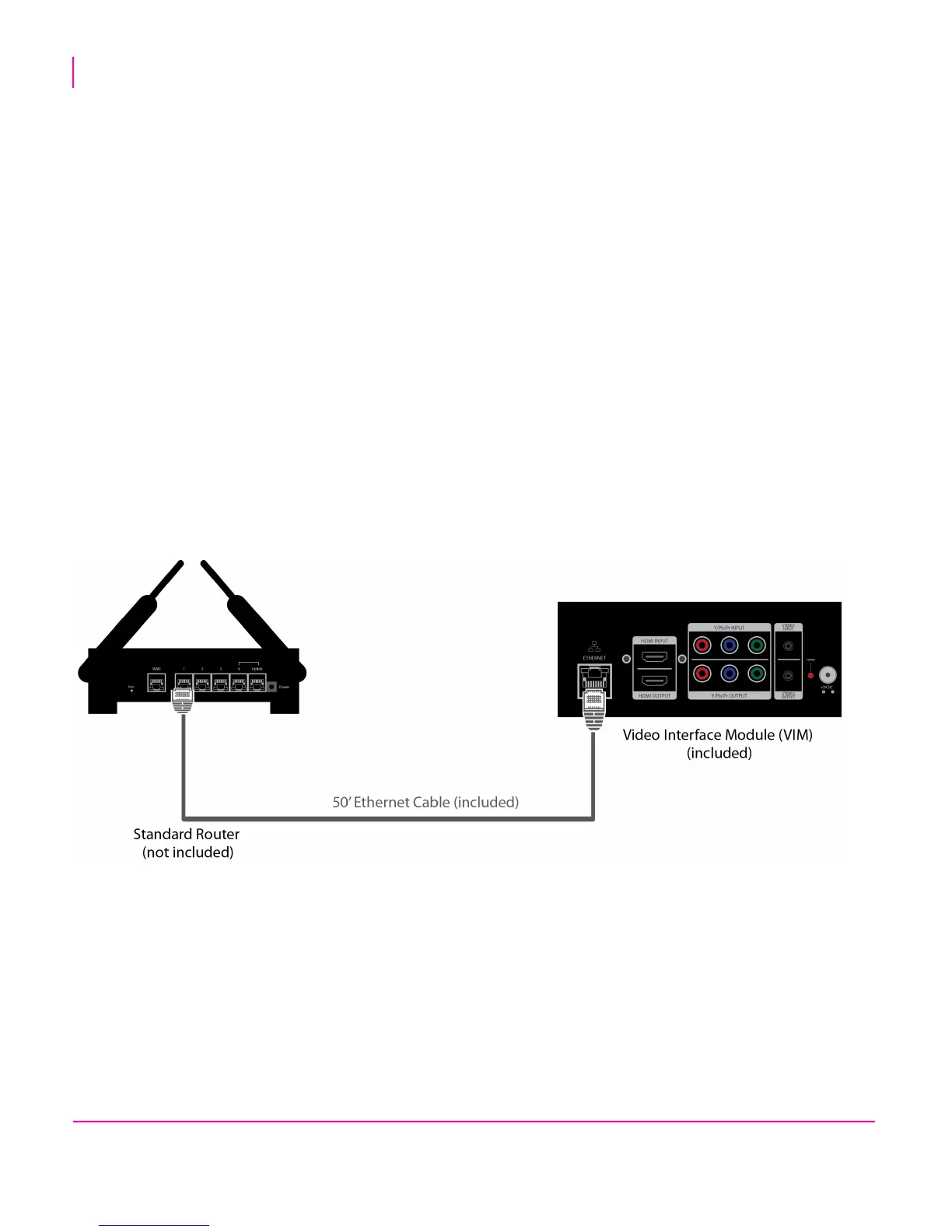
The Karaoke Kit includes a 50-foot Cat-5 Ethernet cable for connecting the VIM to the same DHCP network as the
Virtuo.
• Plug one end of the 50-foot Cat-5 Ethernet cable into the VIM’s ethernet port, and plug the other end into your
DHCP network.
For more information on connecting Virtuo to the Internet, consult the latest revision of the Virtuo Installation &
Setup Guide (900475-001) on the Operator Dashboard. This manual was also printed and packaged with your
Virtuo.


 To Next Page