30
Activating the Jukebox
To choose a dial-up connection:
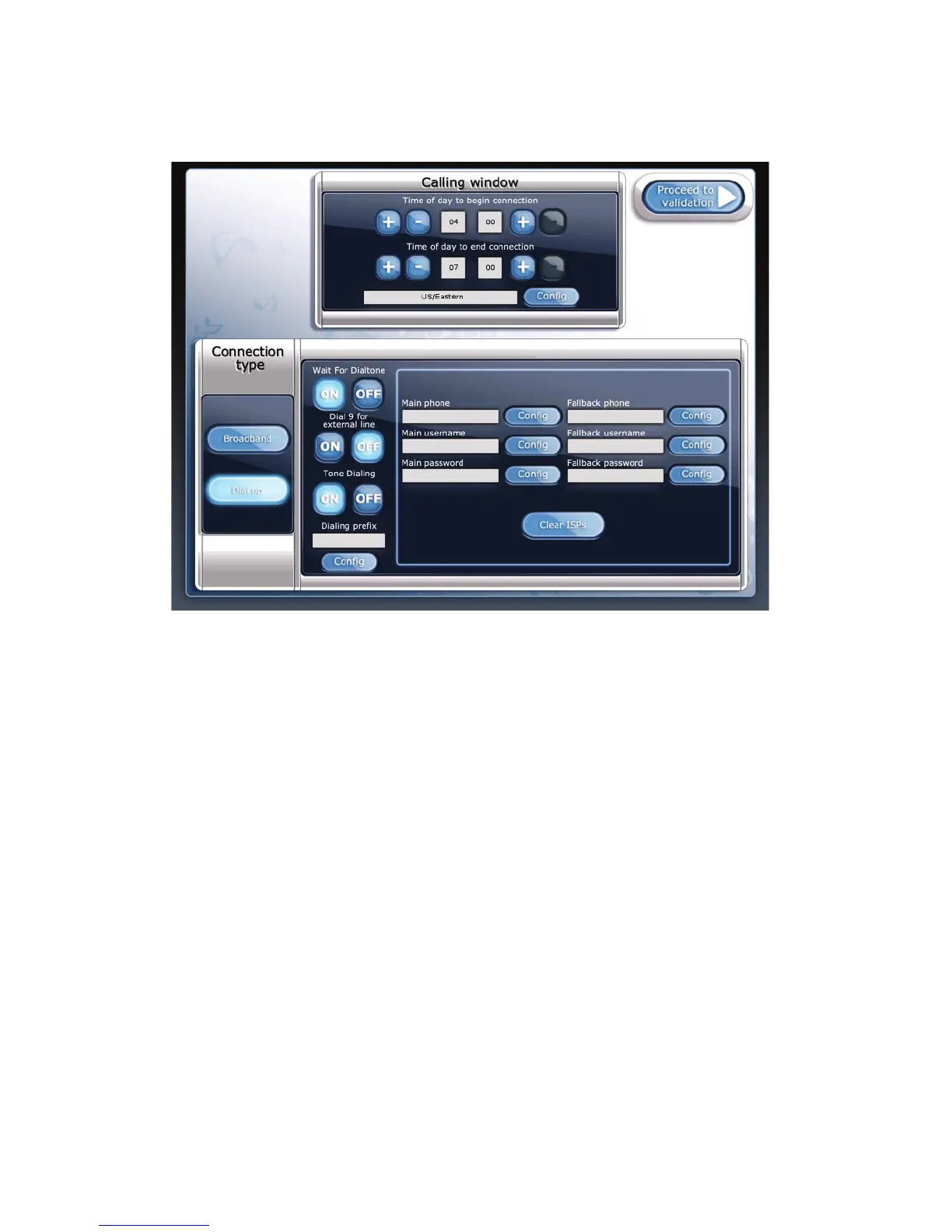
Refer to the following figure when setting up your dial-up Internet connection.
Dial-up Connection Settings
1. Disable the Wait For Dialtone option if the location has a voice mail service installed on its
line.
When this option is disabled, the jukebox will not check for a dial tone before dialing out,
instead it will pause for two seconds then begin dialing.
2. Enable the Dial 9 for external line option if you need to dial 9 to access an external line, for
example, if a PBX is installed at the location.
3. Turn the Tone Dialing option off if the location uses pulse dialing.
4. If you need to dial an outgoing prefix before the phone number, touch the Config button for
Dialing prefix, then use the numeric keypad to enter the prefix.
If the location has call waiting, you should enter the prefix to disable it. In most cases this is
*70. You may need to add a pause to the end of this sequence, as sometimes there is a delay
before the dial tone returns. Use the # key to enter a pause. For example, the sequence *70##
disables call waiting and then pauses twice before continuing to dial.
5. Touch the Config button associated with the Main phone field to specify the phone number
of your ISP. The jukebox will use number first to attempt communication with the TouchTunes
server.



 To Next Page