8
Using the Accessories:
This vacuum cleaner comes complete with a Crevice and Brush tool, for vacuuming corners and
cleaning delicate surfaces.
To use this accessory, simply attach it to the slot at the front of the main body of the unit until it
clicks into place. To remove the accessory, simply pull it out of its slot and away from the main body
of the unit.
Note: Keep the brush free of fibres, hairs, and other objects that could impede proper functioning.
Always remove these types of objects when the brush picks them up.
Troubleshooting
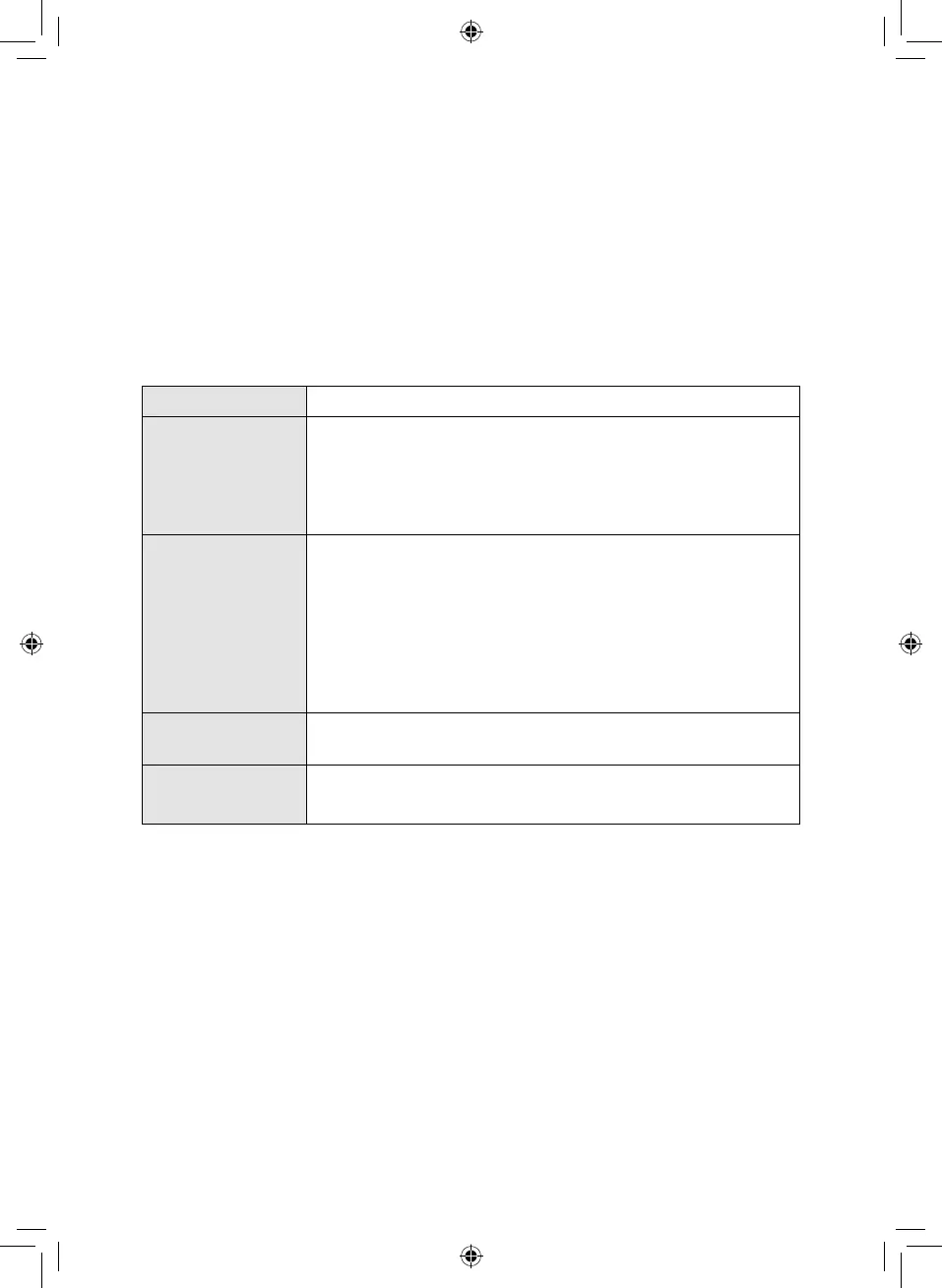
Problem Possible Solution
The vacuum will not
work
Ensure the vacuum cleaner is plugged into a mains outlet.
Check that there are no blockages to the dust tank or filter and remove
as necessary.
This appliance is equipped with a motor protective thermostat. If for
some reason it overheats, the thermostat will automatically turn the
suction motor off. Should this occur, allow it to cool for 1 hour, then
empty the dust container and clean all of the filters.
Vacuum will not
pick-up or suction
power is weak
The dust container may be full, or the filter may require cleaning. Empty
the dust container and clean the filter.
There may be blockages in the filter or dust tank. Check for blockages
and clean the filter and dust tank.
An attachment may have been installed which does not belong to
the vacuum cleaner. Make sure that all the attachments belong to
the model of vacuum cleaner that you are using. The use of accessory
attachments other than those supplied by the manufacturer is not
recommended.
Dust is escaping from
the vacuum
The filter may be installed incorrectly, or the dust container may be full.
Empty the dust container and reassemble the filter system.
There is a strange
noise coming from
the vacuum.
The airflow may be restricted or blocked. Check for blockages and clean
the filter and pole.
If the problem persists, contact the Customer Support team.



 To Next Page