Townsend Labs Sphere L22 Precision Microphone System Guide Recording Acoustic Guitar
44
One potential problem is that figure-8 mics tend to have certain sonic qualities, such as significant
proximity effect, that can be great for some applications but less than ideal for others. The OFF-AXIS
CORRECTION feature solves this problem by letting you independently select the polar pattern from
the mic type. For example, to get the sound of a 47 microphone set to cardioid but with the isolation
of a figure-8 pattern:
1. Select LD-47 as the mic type with a cardioid pattern.
2. Set the
OFF-AXIS CORRECTION pattern control to figure-8.
The goal is not to create an equivalent mic, but rather a hybrid specifically optimized for the current
application.
One Mic
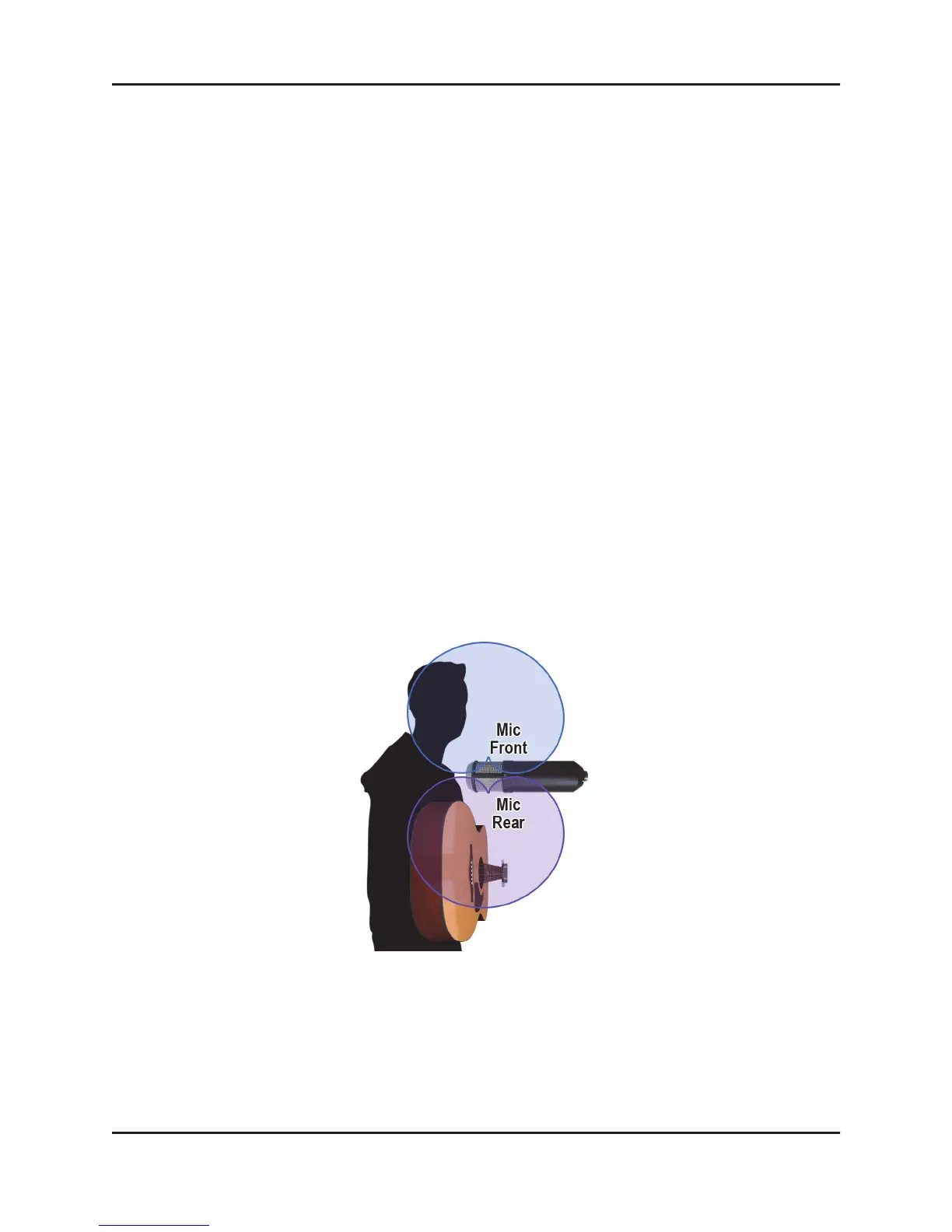
If you don’t have two Sphere mics, you can still approximate the two-mic setup by using the front
side for vocals and the rear side for guitar (see Figure 7-2).
1. In your DAW, instantiate the Sphere 180 plug-in on a stereo track.
2. Assign the left output to the vocal and right to guitar.
3. Enable
OFF-AXIS CORRECTION and set the pattern to cardioid to minimize the bleed from the off-
axis source.
With conventional cardioid mics, the rear sound pick up is typically very colored due to physical
limitations of the capsule, which can largely be avoided using OFF-AXIS CORRECTION.
Figure 7-2 Recording acoustic guitar and vocals with one mic


 To Next Page